Advanced-etl-processor
Read Excel Cell Value Dynamic Action
Metadata tab

- The Write Variables option ensures that the “Package Action” logs the variable values into the “Action vars before log file” before the action is executed and logs the updated variable values into the “Action vars after log file” after the action completes.
- This option is typically used for debugging and is not recommended in a production environment.
- It can be globally disabled through the options dialog .
Parameters tab
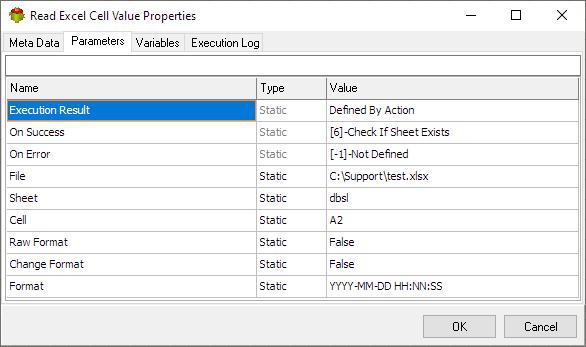
Raw format
When the raw cell format is selected, any predefined formatting for date and number cells is ignored. The data is extracted in its original, unformatted state, without applying special date or number formats such as currency symbols, date formats, or decimal places. This option is useful when you want to view or process the data exactly as it was entered, without automatic formatting adjustments.
Change format
This option is used to convert the date format into a simpler, easy to process format.
Variables tab
The Variables tab defines which variables are updated during the execution of the action.

Execution log tab
The Execution Log tab is populated after the action has been executed. Double-click a row to view the detailed execution log.

Related Actions
- Check Excel File Action
- Merge Excel Files Action
- Change Excel File Extension Action
- Set Excel Cell Color Action
- Set Excel Cell Value Action
- Read Excel Cell Value Action
- Add Sheet Action
- Delete Sheet Action
- Keep Sheet Action
- Rename Sheet Action
- Set Active Sheet Action
- Check if sheet exists Action
- List Sheets Action
Useful Links
Video Tutorial
For more technologies supported by our ETL Software see Advanced ETL Processor Versions
Confused? Ask question on our ETL Forum