Advanced-etl-processor
Folders Loop Dynamic Action
About
The Folders Loop Action iterates through the list of folders, folder name is assigned to #LoopValue# variable.
Metadata tab
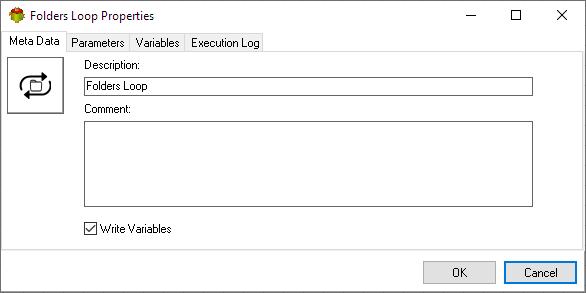
- The Write Variables option ensures that the “Package Action” logs the variable values into the “Action vars before log file” before the action is executed and logs the updated variable values into the “Action vars after log file” after the action completes.
- This option is typically used for debugging and is not recommended in a production environment.
- It can be globally disabled through the options dialog .
Parameters tab
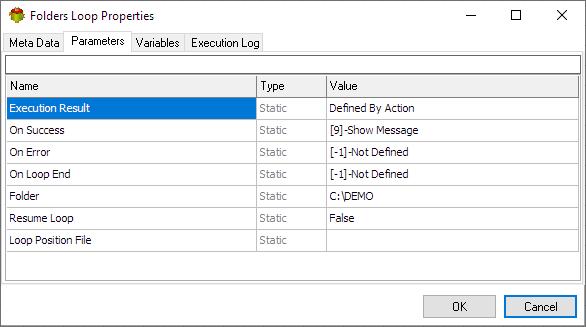
To minimize potential issues, avoid using mapped drives and opt for the UNC (Universal Naming Convention) path instead. Mapped drives can lead to problems with accessibility and permissions, especially in networked environments or automated processes. UNC paths provide a direct, reliable way to reference network resources without relying on local drive letters, ensuring better stability and consistency across different systems and users.
Resuming Loop Execution After Failure
- When Resume Loop is true current loop position value is saved into Loop Position File automatically
- The same file is used to resume file execution after failure
- Upon successful completion the Loop Position File is deleted
Variables tab
The Variables tab defines which variables are updated during the execution of the action.
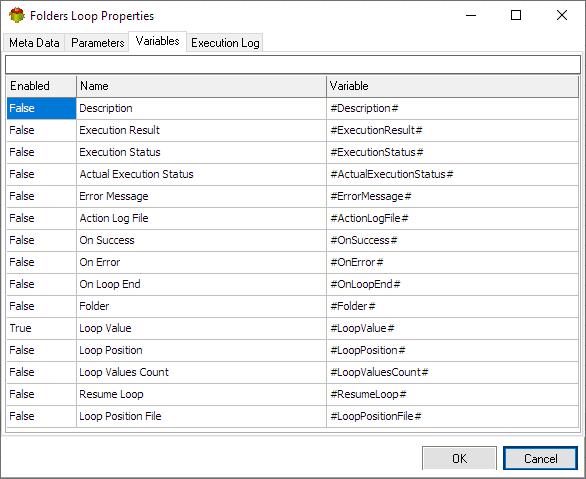
Tip: Double-click a variable name to enable or disable it.it
Execution log tab
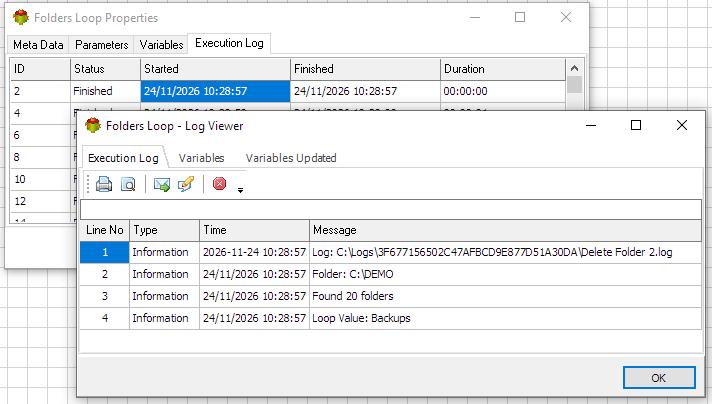
The Execution Log tab is populated after the action has been executed. Double-click a row to view the detailed execution log.
Related Actions
- Move Folder Action
- Copy Folder Action
- Clear Folder Action
- Delete Folder Action
- Create Folder Action
- Check Folder Action
- Folders List Action
- Folders Loop Action
Useful Links
Video Tutorial
We have more videos on ETL-Tools.com YouTube Channel,
Please take a look and subscribe to stay updated with the latest content.
For more technologies supported by our ETL Software see Advanced ETL Processor Versions
Confused? Ask question on our ETL Forum