Advanced-etl-processor
Decompress Dynamic Action
About
The Decompress Workflow Action is a valuable tool designed to handle the extraction and management of compressed files within a workflow. This action simplifies the process of retrieving and restoring original files from compressed formats, enabling users to access, edit, and manipulate data that has been previously archived or bundled. By automating the decompression process, the Decompress Workflow Action enhances productivity, especially when dealing with large datasets, backups, or file archives that need to be quickly restored.
Supported decompression formats
- Zip archive (.zip;.jar;.ear;.war;.cbz;.apk;.wsz;.wal;.xpi;.crx;.dfsz;.pcv;.bsz;
.mskin;.wmz;.ipa;.docx;.xlsx;.pptx;.sxw;.sxi;.sxt;.sxd;.sxc;.sxm;.sxg;.stw;
.sti;.std;.stc;.odh;.odd;.odt;.odm;.ods;.ots;.odg;.otg;.odp;.otp;.odf;.odb) - BZip2 archive (.bz2;.bzip2;.tbz2;.tbz)
- Rar archive (.rar;.r00;*.cbr)
- Arj archive (*.arj)
- Z archive (.z;.taz)
- Lzh archive (.lzh;.lha)
- 7z archive (*.7z)
- Cab archive (.cab;.fwp)
- Nsis archive (*.nsis)
- Lzma archive (*.lzma)
- Lzma86 archive (*.lzma86)
- Pe archive (.exe;.dll;.sys;.bpl)
- Elf archive (*.)
- Mach-O archive (*.)
- Udf archive (.iso;.img)
- Xar archive (.xar;.safariextz)
- Mub archive (*.)
- Hfs archive (*.hfs)
- Dmg archive (*.dmg)
- Compound archive (.msi;.msp;.doc;.xls;*.ppt)
- Wim archive (.wim;.swm)
- Iso archive (.iso;.img)
- Chm archive (.chm;.chi;.chq;.chw;.hxs;.hxi;.hxr;.hxq;.hxw;.lit)
- Split archive (*.001)
- Rpm archive (*.rpm)
- Deb archive (*.deb)
- Cpio archive (*.cpio)
- Tar archive (*.tar)
- GZip archive (.gz;.gzip;.tgz;.tpz)
- Ntfs archive (.ntfs;.img)
- Fat archive (.fat;.img)
- Mbr archive (*.mbr)
- Vhd archive (*.vhd)
- MsLZ archive (*.)
- Flv archive (*.flv)
- Swf archive (*.swf)
- APM archive (*.)
- PPMD archive (*.pmd)
- Terse Executable (*.te)
- UEFIc archive (*.scap)
- UEFIs archive (*.)
- SquashFS archive (*.squashfs)
- CramFS archive (*.cramfs)
- Ext filesystem archive (.ext;.ext2;.ext3;.ext4;*.img)
- Virtual Machine Disk archive (*.vmdk)
- Virtual Disk Image archive (*.vdi)
- QEMU Copy On Write archive (.qcow;.qcow2;*.qcow2c)
- GUID Partition Table archive (.gpt;.mbr)
- RAR v5 archive (.rar;.r00)
- IHex archive (*.ihex)
- Help 2.0 archive (.hxs;.hxi;.hxr;.hxq;.hxw;.lit)
Metadata tab

- The Write Variables option ensures that the “Package Action” logs the variable values into the “Action vars before log file” before the action is executed and logs the updated variable values into the “Action vars after log file” after the action completes.
- This option is typically used for debugging and is not recommended in a production environment.
- It can be globally disabled through the options dialog .
Parameters tab

N Value Parameter
The meaning of N Value parameter depends on Which File Parameter
- When Which File Parameter is equal to “Files Not Older Than N Days” N Value is Days
- When Which File Parameter is equal to “Files Older Than N Days” N Value is Days
- When Which File Parameter is equal to “First N Found Files” N Value file number
- When Which File Parameter is equal to “Bigger Than N Bytes” N Value is byte
Variables tab
The Variables tab defines the variables to be updated during the action’s execution.

Execution log tab
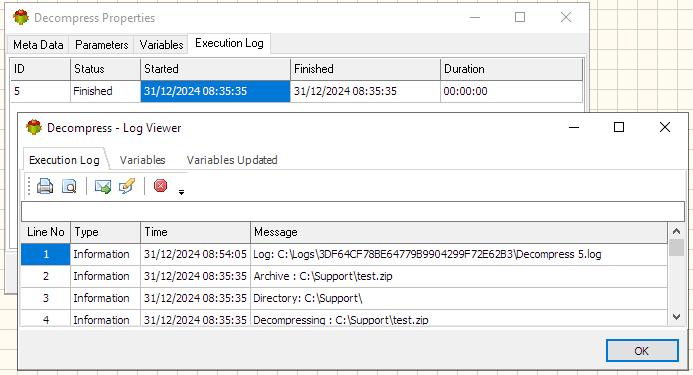
The Execution log tab is populated after the action is executed. Double click on the row to view the log.
Example dynamic zip archive
Pascal

begin
 Result:='c:\support\'+LeftString(GETSYSTEMVARIABLE('SYSTEM_DATE'),8)+'.zip';
end;
Python
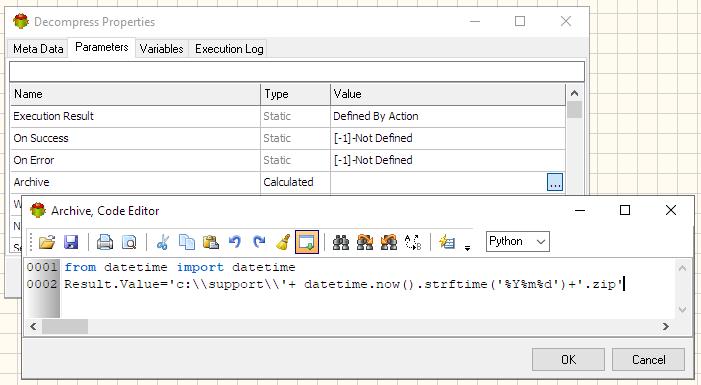
from datetime import datetime
Result.Value='c:\\support\\'+ datetime.now().strftime('%Y%m%d')+'.zip'
Related Actions
Useful Links
For more technologies supported by our ETL Software see Advanced ETL Processor Versions
Confused? Ask question on our ETL Forum