Advanced-etl-processor
Cloud Storage Legacy Action
About
The following cloud storage providers supported: DropBox, Google Drive, Microsoft OneDrive, HiDrive, Yandex Disk and Box.
Files can be uploaded, downloaded or deleted, it is also possible to work with directories or create a list of files
Workflow tab
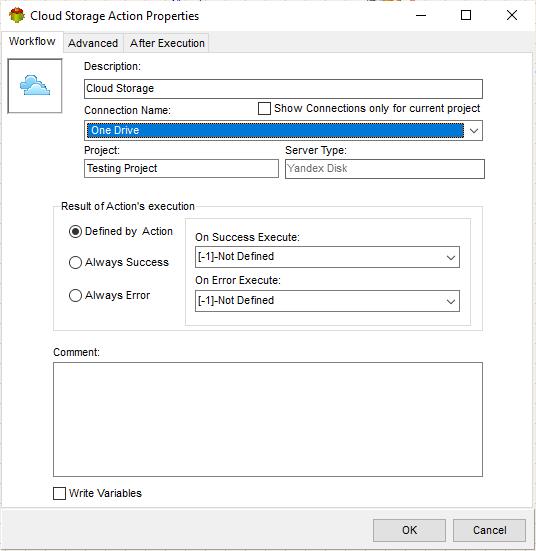
- The Write Variables option ensures that the “Package Action” logs the variable values into the “Action vars before log file” before the action is executed and logs the updated variable values into the “Action vars after log file” after the action completes.
- It is usually used for debugging and not recommended for production environment.
- It can be globally disabled using options dialogue
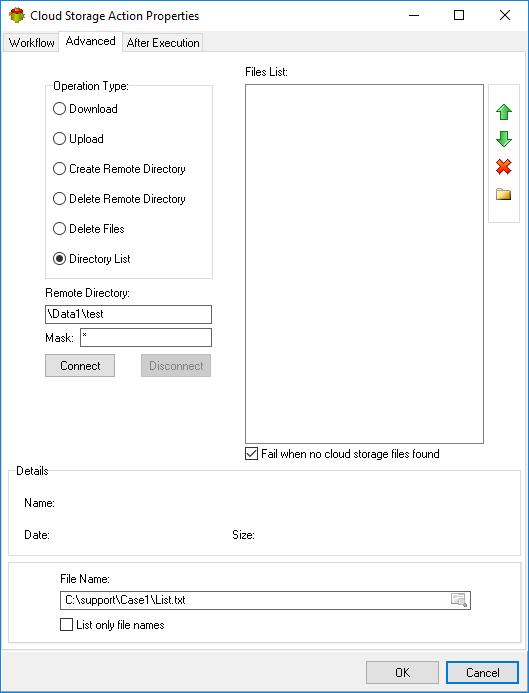
Advanced tab
Click connect to view the storage content, buttons on the right allows to perform the download, upload, directory creation and delete operation.
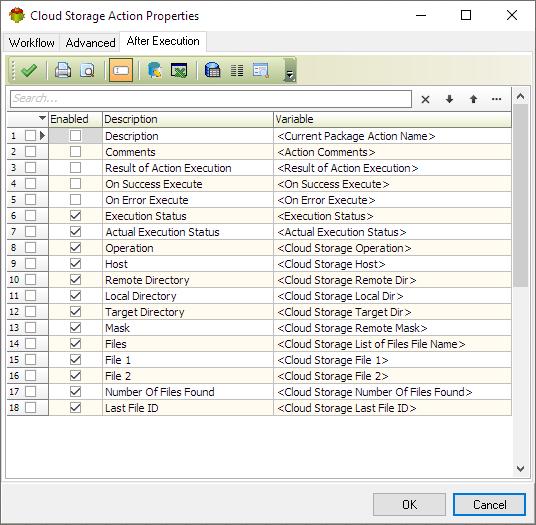
After execution tab
Specifies which variables will be set once action execution is completed
Directory List
The format is different for every cloud storage provider
Google Drive
- File Name
- Creation Date
- ID
- Description
- DownloadURL
- AlternateLink
- WebContentLink
- Link
- LastUser
- Owners
- ETag
- CommentsEnabled
- PublicShare
- Shared
Dropbox
- File Name
- Creation Date
- ID
- Link
- Path
- Share
- Revision
Boxnet
- File Name
- Creation Date
- ID
- Description
- ETag
- SHA1
- Share
- ShareView
YandexDisk
- File Name
- Creation Date
- ID
- Path
- Share;
One Drive
- File Name
- Creation Date
- ID
- Description
- Link
- Share
- CommentsEnabled
- Shared
HI Drive
- File Name
- Creation Date
- ID
- Path
- Share
- Shared
For more technologies supported by our ETL Software see Advanced ETL Processor Versions
Confused? Ask question on our ETL Forum