Data Validation Articles
Practical data validation articles for ETL workflows, source files, and automated data quality checks.
Data Validation checks source data before it reaches a database, report, or automated workflow. Start with the simple rules: required fields, data types, ranges, formats, and uniqueness. Then add relationship and business checks where bad data would make the pipeline go out of column.
Validation topics worth learning first
Start with the fundamentals, then move into specific rule types and practical file checks. In practice, most ETL validation problems are a mix of missing values, odd dates, duplicate records, and one spreadsheet cell quietly pretending to be special.
Fundamentals
Start here if you need the practical vocabulary before choosing validation rules.
Validation Types
Common checks used to catch missing, malformed, duplicated, and inconsistent data.
Practical Guides
Hands-on validation topics for files, databases, ETL workflows, and rejected rows.
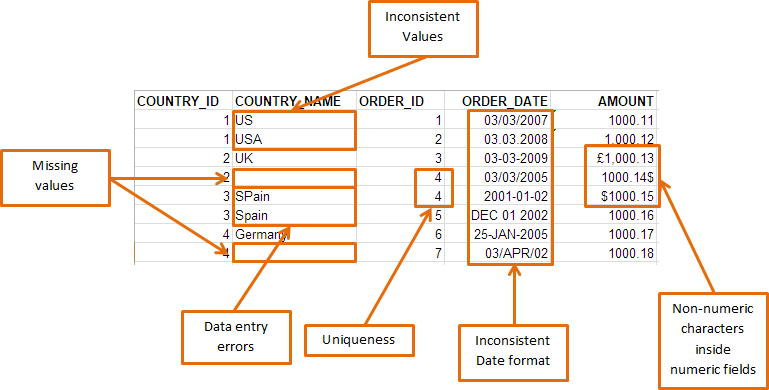
Featured data validation guides
Uniqueness Validation
Find duplicate primary keys, business keys, and repeated source records before loading.
Referential Integrity Validation
Check whether child records point to valid parent records before loading.
Business Rule Validation
Apply checks for totals, statuses, thresholds, approvals, and process-specific logic.
Data validation sits between import and transformation
A good ETL workflow reads the source, validates obvious problems, transforms the data, validates the result, then writes to the target. If validation is missing, bad source values travel downstream with confidence they have not earned.
Useful companion pages include the Data Import Hub, The Data Export Hub, the Data Transformation Hub, and Advanced ETL Processor Enterprise for self-hosted ETL automation.
Next steps
Start with the validation overview, then choose the checks that match your source data. If a one-off spreadsheet check is enough, use Excel. If the same bad file arrives every week, automate it before it becomes a team tradition.
Keep raw data unchanged. Validation belongs in the workflow, not in the only copy of the source file.