ETL Tools for Rental Platform Reporting: Automate, Analyze, and Optimize with AI
Rental platforms generate massive amounts of data every day-bookings, cancellations, payments, reviews, property updates, and marketing performance metrics. Without proper data integration, reporting becomes slow, fragmented, and unreliable. The solution is an automated ETL process that extracts data from multiple sources, transforms it into a unified format, and loads it into analytics dashboards or BI tools. That’s where Advanced ETL Processor comes in-a self-hosted, automation-ready platform designed to streamline reporting for property managers, online rental platforms, and multi-location marketplaces.
Why ETL Tools Are Essential for Rental Platform Reporting
Rental businesses work with data from multiple systems, making accurate reporting a challenge:
Without automated ETL pipelines, teams spend hours exporting spreadsheets, reconciling data, and fixing inconsistent KPIs. Automating the process improves speed, accuracy, and data quality while enabling AI-driven insights.
- Booking engines generate reservation and occupancy data.
- Payment gateways track transactions, refunds, and commissions.
- Marketing platforms collect campaign performance metrics.
- Customer review platforms provide ratings and feedback trends.
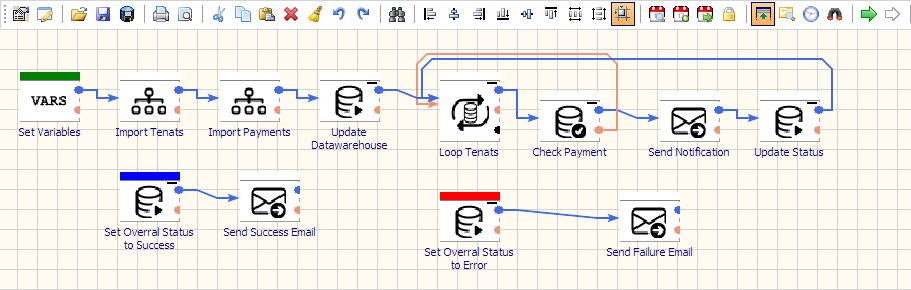
Why Self-Hosted ETL Works Best for Rental Platforms
- Data Security: Keep customer details, payment history, and revenue metrics within your infrastructure.
- Cost Control: Avoid high SaaS costs and per-row billing fees from cloud ETL providers.
- Custom Workflows: Build pipelines tailored to booking cycles, payout schedules, and marketing updates.
Advanced ETL Processor: Built for Rental Platform Reporting
Advanced ETL Processor is a self-hosted ETL platform that simplifies complex data integration tasks for rental platforms, enabling automated dashboards and AI-powered insights without relying on manual processes.
- Wide Connectivity: Connect to booking engines, payment gateways, CRMs, marketing APIs, and BI tools.
- Visual Data Transformations: Merge bookings, normalize KPIs, deduplicate customer profiles, and enrich datasets.
- Automation & Scheduling: Schedule daily, hourly, or near real-time reporting updates with alerts and retries.
- AI-Ready Pipelines: Prepare structured datasets for predictive pricing, occupancy forecasting, and personalized marketing.
- Governance & Transparency: Track data lineage, monitor quality checks, and maintain compliance with ease.
Use Cases for Rental Platform ETL Pipelines
- Occupancy Reporting: Combine bookings, cancellations, and property availability into one dashboard.
- Revenue Tracking: Merge payment gateway data with commission reports and payout schedules.
- Marketing Analytics: Unify Google Ads, Facebook Ads, and SEO metrics for campaign optimization.
- AI-Powered Insights: Use machine learning to predict seasonal demand and recommend dynamic pricing strategies.
Recommended ETL Architecture for Rental Reporting
- Extract: Pull data from booking platforms, CRMs, payment processors, marketing APIs, and review systems.
- Transform: Standardize booking statuses, normalize KPIs, and enrich data with geolocation and property attributes.
- Load: Send clean, unified datasets into BI dashboards, reporting tools, and AI analytics platforms.
- Use incremental loads to process the latest bookings and payments efficiently.
- Align KPIs across bookings, revenue, and marketing to avoid mismatched dashboards.
- Keep all timestamps in UTC for consistency, converting to local time only at the reporting layer.
- Store historical data snapshots for long-term trend analysis and AI model training.
Getting Started in 3 Steps
- Install & Connect: Deploy Advanced ETL Processor on your server and connect it to booking systems, CRMs, and BI tools.
- Model & Validate: Map properties, bookings, and payments while applying data quality checks.
- Automate & Monitor: Schedule updates, set alerts for pipeline failures, and deliver AI-ready dashboards automatically.
Watch the Demo & Learn More
- WIKI - detailed documentation for connectors, transformations, and automation workflows.
- Support Forum - share ideas and get expert assistance from the ETL-Tools community.
Business usage examples
Engineering manager
Replace one-off scripts with reusable, scheduled ETL pipelines.
Data team
Ship cleaner dashboards from standardized transformations.
Founder/owner
Get faster reporting cycles without adding orchestration overhead.
Video walkthrough
Stop struggling with fragile ETL scripts. Start shipping reliable workflows.
Download the fully functional 30-day trial. Build your first automation in 10 minutes or less.
Direct link, no registration required.