ETL Software for Luminovo
ETL software for Luminovo helps electronics manufacturers and EMS teams move Luminovo API data into reporting databases, operational files, dashboards, and downstream systems. It is the practical bit between the API and the report someone wants by 9:00 a.m. Naturally, the data will wait until 8:57 to become interesting.
Luminovo API data needs repeatable processing
Luminovo holds useful manufacturing and commercial data, including BOMs, components, quotations, RFQs, suppliers, orders, offers, and inventory. The official Luminovo API gives integration teams a structured way to access that data. The ETL problem starts after the response arrives.
- Extract JSON data from Luminovo API endpoints
- Validate required fields before loading reports or databases
- Flatten nested JSON structures into usable rows
- Combine Luminovo data with ERP, CRM, supplier, or spreadsheet data
- Schedule repeatable workflows with run logs and error handling
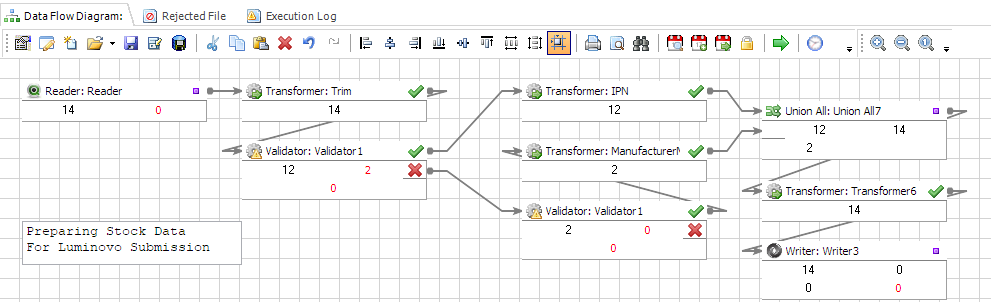
Advanced ETL Processor handles the work around the API
Advanced ETL Processor is a self-hosted ETL tool for API, file, and database automation. For Luminovo workflows, it gives you a controlled place to define extraction steps, transformations, validation checks, and scheduled output jobs without turning every integration into a custom coding project.
- HTTP and REST support: connect to API endpoints and process JSON responses.
- JSON transformation: flatten arrays, map fields, and prepare API data for relational targets.
- Validation: check missing fields, wrong data types, duplicate rows, and failed lookups.
- Scheduling: run Luminovo data workflows automatically at the right time.
- Self-hosted execution: keep data processing inside your own Windows environment.
Luminovo ETL workflows fit manufacturing reporting
The useful workflow is rarely just "call API, save file". In most cases, teams need to combine Luminovo records with other systems before the data answers anything useful. JSON is wonderful until arrays start nesting like Russian dolls. That is where ETL earns its tea.
- Export RFQ and quotation data into BI reporting tables
- Load BOM and component data into internal analytics databases
- Compare supplier, inventory, and offer data with ERP records
- Create scheduled snapshots for operations and commercial dashboards
- Archive source API responses for support and audit checks
Start with a small Luminovo API workflow
- Choose one Luminovo endpoint and confirm the authentication and headers required by the API.
- Extract a small sample response and inspect the JSON structure before mapping fields.
- Transform and validate the data, then load it into a database, Excel file, CSV file, or another target.
- Schedule the workflow only after the sample run behaves properly. Ten rows are easier to fix than ten million.
If this is a one-off export, keep it simple. If the same Luminovo report keeps coming back every week, automate it before the spreadsheet develops a personality.
Business usage examples
Manufacturing operations
Move Luminovo API data into scheduled reporting and operational workflows.
Commercial team
Prepare quotation, RFQ, customer, supplier, and order data for dashboards.
Integration owner
Keep API responses, validation failures, and reruns visible enough for support work.
Video walkthrough
FAQ
Can Advanced ETL Processor work with the Luminovo API?
Yes. Advanced ETL Processor supports HTTP and REST workflows, so you can connect to API endpoints, handle JSON responses, transform the data, and load it into databases or files.
What Luminovo data can I process?
The Luminovo API includes areas such as assemblies, BOMs, components, customers, demand, offers, inventory, orders, projects, quotations, RFQs, suppliers, and users. In practice, the exact workflow depends on the endpoints and permissions available to your Luminovo account.
Do I need to write scripts for Luminovo ETL workflows?
Not in most cases. You still need to understand the API request, authentication, and target data structure, but the extraction, transformation, validation, scheduling, and logging can be configured visually.
When should I not use an ETL tool for Luminovo data?
If you only need one small export once, a manual download or a short script may be enough. Use an ETL tool when the process repeats, has several steps, needs validation, or must run without someone babysitting it like a nervous kettle.
Can I keep Luminovo data self-hosted?
Yes. Advanced ETL Processor runs on your own Windows machine or server, so extracted Luminovo data can be processed inside your environment instead of being pushed through another vendor's cloud pipeline.
Stop struggling with fragile ETL scripts. Start shipping reliable workflows.
Download the fully functional 30-day trial. Build your first automation in 10 minutes or less.
Direct link, no registration required.