
- Posts: 114
- Thank you received: 53

How to normalize Cyrillic look alike characters in file name and XML content
8 months 1 week ago #26017
by downing
Replied by downing on topic How to normalize Cyrillic look alike characters in file name and XML content
Thx Mike

Please Log in or Create an account to join the conversation.


8 months 1 week ago #26018
by admin
Mike
ETL Architect
Replied by admin on topic How to normalize Cyrillic look alike characters in file name and XML content
I had a look and can confirm that is an encoding issue. This why file reader is not working.
In your case XSLT is a better option.
I have created a working example for you you should be able to tweak it yourself
Please see attached.
In your case XSLT is a better option.
I have created a working example for you you should be able to tweak it yourself
Please see attached.
Mike
ETL Architect
Please Log in or Create an account to join the conversation.
8 months 1 week ago #26019
by admin
Mike
ETL Architect
Replied by admin on topic How to normalize Cyrillic look alike characters in file name and XML content
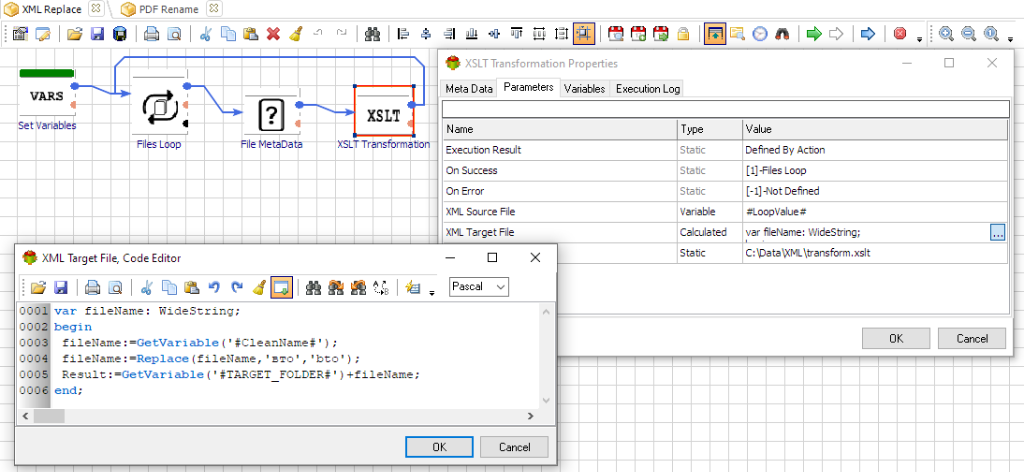
Workflow screenshot, I have also created PDF rename example
Mike
ETL Architect
Please Log in or Create an account to join the conversation.
8 months 1 week ago - 8 months 1 week ago #26029
by downing
Replied by downing on topic How to normalize Cyrillic look alike characters in file name and XML content
Hi Mike,
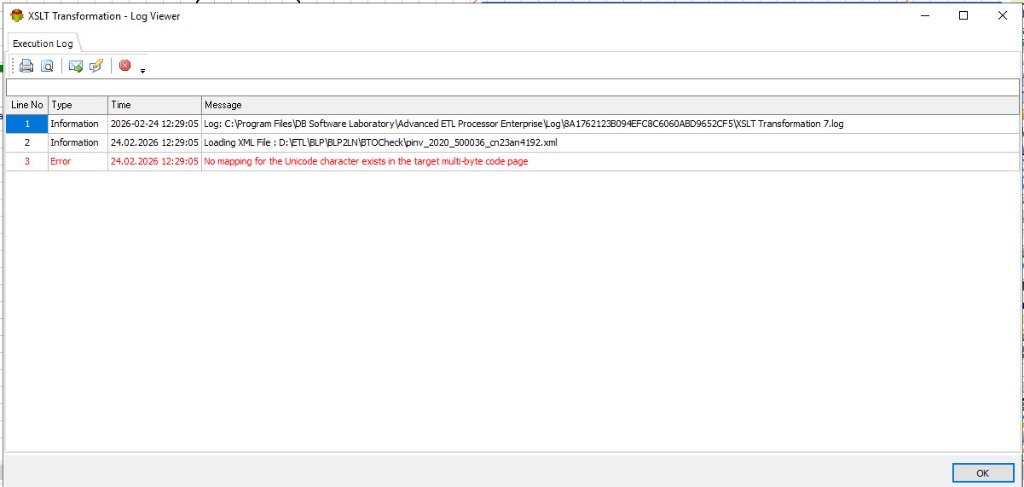
During the XML transformation I am getting the following message for some files:
 It only happens for certain files.
Do you have an idea what could cause this?
Thomas
During the XML transformation I am getting the following message for some files:
Do you have an idea what could cause this?
Thomas
Last edit: 8 months 1 week ago by downing. Reason: bad format
Please Log in or Create an account to join the conversation.
8 months 1 week ago #26030
by admin
Mike
ETL Architect
Replied by admin on topic How to normalize Cyrillic look alike characters in file name and XML content
Most likely it has other Cyrillic characters which are not being replaced.
Tweak xslt so replaces additional characters.
keep them nd force UTF-8 By inserting after first lane:
<xsl:output method="xml" encoding="UTF-8" indent="yes"/>
Tweak xslt so replaces additional characters.
keep them nd force UTF-8 By inserting after first lane:
<xsl:output method="xml" encoding="UTF-8" indent="yes"/>
Mike
ETL Architect
Please Log in or Create an account to join the conversation.
8 months 1 week ago #26031
by downing
Replied by downing on topic How to normalize Cyrillic look alike characters in file name and XML content
Could it also be caused by the slash character?
<?xml version="1.0"?><Invoice><DocumentName>pinv_2020_500036_CN 23AN/4192.pdf</DocumentName>
<?xml version="1.0"?><Invoice><DocumentName>pinv_2020_500036_CN 23AN/4192.pdf</DocumentName>
Please Log in or Create an account to join the conversation.