
Exporting to Excel - Table (keep formatting in place)


2 years 3 months ago #23920
by admin
Mike
ETL Architect
Replied by admin on topic Exporting to Excel - Table (keep formatting in place)
Since you want to add data to exiting table select "Last Row"
Mike
ETL Architect
Please Log in or Create an account to join the conversation.

2 years 3 months ago #23921
by prashant
Replied by prashant on topic Exporting to Excel - Table (keep formatting in place)
1. I also have to select Add data into existing file , otherwise it overwrites the templates, there is a chance of user losing their templates in testing
2. I selected a table and selected add to last row , table started form Column B , it still wrote the data in COLUMN A , I changed the table position to Column C , and yet data is written to column A , this seems to be a bug
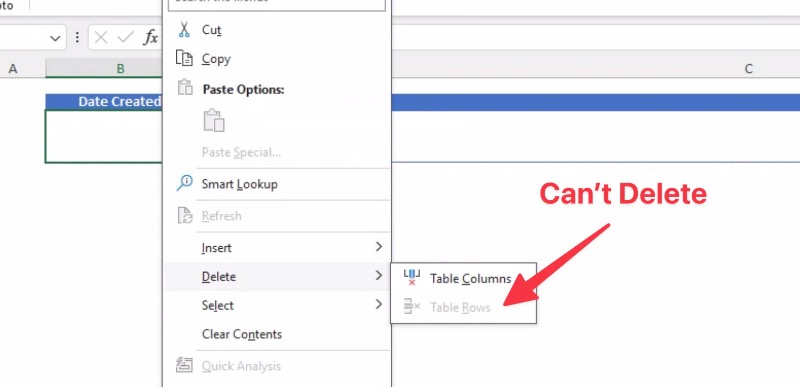
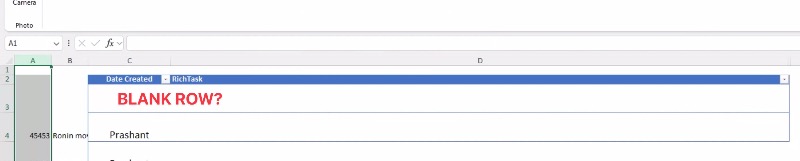
3. Each table for a template will have to have one empty row , this cannot be deleted , see my screen below , when selecting last ROW , it writes from row below it , see screenshot
4. I think with tables we need options for "table" like "add data into table" , "clear table and start from Row #1" to not confuse users

2. I selected a table and selected add to last row , table started form Column B , it still wrote the data in COLUMN A , I changed the table position to Column C , and yet data is written to column A , this seems to be a bug
3. Each table for a template will have to have one empty row , this cannot be deleted , see my screen below , when selecting last ROW , it writes from row below it , see screenshot
4. I think with tables we need options for "table" like "add data into table" , "clear table and start from Row #1" to not confuse users
Please Log in or Create an account to join the conversation.
2 years 3 months ago - 2 years 3 months ago #23922
by admin
Mike
ETL Architect
Replied by admin on topic Exporting to Excel - Table (keep formatting in place)
Can you try inserting data from the specific cell please (B3).
Mike
ETL Architect
Last edit: 2 years 3 months ago by admin.
Please Log in or Create an account to join the conversation.
2 years 3 months ago #23923
by prashant
Replied by prashant on topic Exporting to Excel - Table (keep formatting in place)
It works if I mention B3 as you suggested.
But it's worth commenting that purpose of introducing tables should be to remove this headache from user. Since excel api also provides the address and range of the table to the developer.
But it's worth commenting that purpose of introducing tables should be to remove this headache from user. Since excel api also provides the address and range of the table to the developer.
Please Log in or Create an account to join the conversation.
2 years 3 months ago #23924
by admin
Mike
ETL Architect
Replied by admin on topic Exporting to Excel - Table (keep formatting in place)
But it's worth commenting that purpose of introducing tables should be to remove this headache from user. Since excel api also provides the address and range of the table to the developer.
Not really following you can you clarify please....
Not really following you can you clarify please....
Mike
ETL Architect
Please Log in or Create an account to join the conversation.
2 years 3 months ago #23925
by prashant
Replied by prashant on topic Exporting to Excel - Table (keep formatting in place)
I, the user , select the table from the dropdown menu, the position of table and its range should be auto supplied by ETL, and the user shouldn’t have to write B3 as in earlier example.
excel api(which I assume you are using) supplies the above information regarding table range , table size etc
excel api(which I assume you are using) supplies the above information regarding table range , table size etc
Please Log in or Create an account to join the conversation.