
Exporting to Excel - Table (keep formatting in place)


2 years 1 month ago #24179
by admin
Mike
ETL Architect
Replied by admin on topic Exporting to Excel - Table (keep formatting in place)
Your suggestion was implemented in the latest release
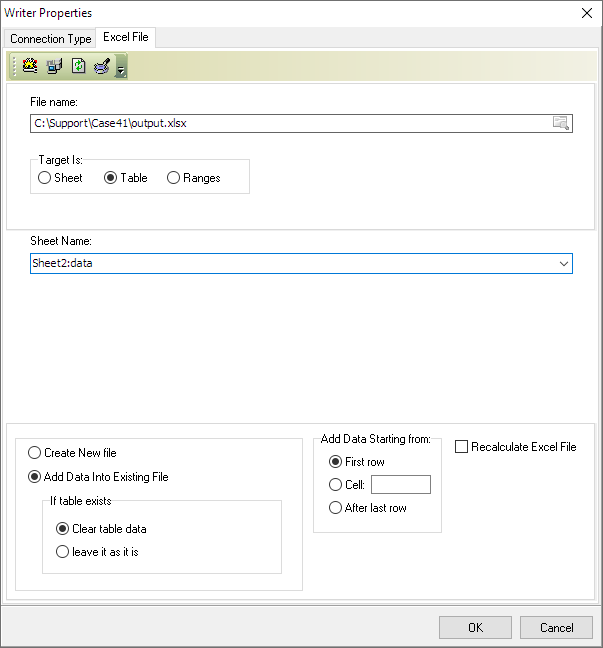
That was a complex change so if you find any problems let us know
That was a complex change so if you find any problems let us know
Mike
ETL Architect
The following user(s) said Thank You: prashant
Please Log in or Create an account to join the conversation.

2 years 1 month ago #24230
by prashant
Replied by prashant on topic Exporting to Excel - Table (keep formatting in place)
- I am consistenly seeing the behaviour of template excel file being deleted when the transfromation runs. Option of "Add data into existing file is selected". File skips recycle bin too.
- How do I outtput multiple files using {GetVariable('#file-name#')} , as in excel I must select the template file?
- When selecting Craete New file , I am getting a single file as expected but the table design is different as from original file.
Please Log in or Create an account to join the conversation.
2 years 1 month ago #24232
by admin
Mike
ETL Architect
Replied by admin on topic Exporting to Excel - Table (keep formatting in place)
I am consistenly seeing the behaviour of template excel file being deleted when the transfromation runs. Option of "Add data into existing file is selected". File skips recycle bin too.
>>> Can you provide us with basic example please ats+all files
How do I output multiple files using {GetVariable('#file-name#')} , as in excel I must select the template file?
>>> Run transformation and rename the the file once transformation is completed inside the loop
When selecting Create New file , I am getting a single file as expected but the table design is different as from original file.
This normal behaviour, nothing wrong with it.
>>> Can you provide us with basic example please ats+all files
How do I output multiple files using {GetVariable('#file-name#')} , as in excel I must select the template file?
>>> Run transformation and rename the the file once transformation is completed inside the loop
When selecting Create New file , I am getting a single file as expected but the table design is different as from original file.
This normal behaviour, nothing wrong with it.
Mike
ETL Architect
Please Log in or Create an account to join the conversation.
2 years 1 month ago #24235
by prashant
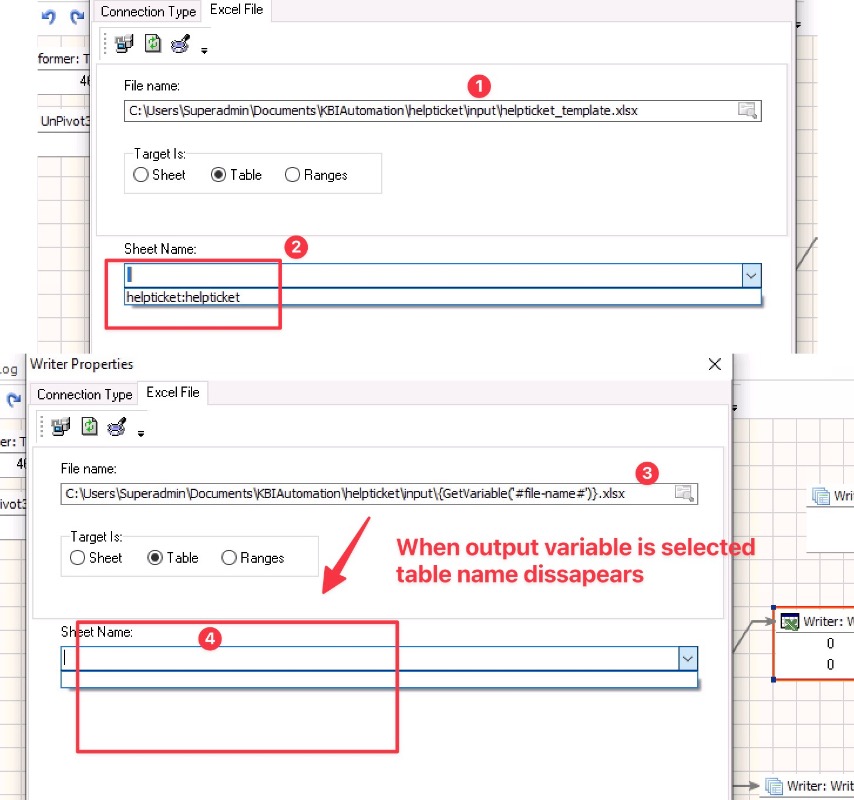
2. This is is not clear. See my screenshot
Replied by prashant on topic Exporting to Excel - Table (keep formatting in place)
1. Email Sent with ATS and all files>>> Can you provide us with basic example please ats+all files
>>> Run transformation and rename the the file once transformation is completed inside the loop
2. This is is not clear. See my screenshot
Please Log in or Create an account to join the conversation.
2 years 1 month ago #24240
by admin
Mike
ETL Architect
Replied by admin on topic Exporting to Excel - Table (keep formatting in place)
I have run your transformation and I am getting the following error message in the log
"To save this file, you must select a visible sheet"
We will have a look at it
Regarding second issue:
How do I output multiple files using {GetVariable('#file-name#')} , as in excel I must select the template file?
I assume that you want to use template
Let assume that your template is called template.xlsx and you want to create files customer1.xlsx...customer10.xlsx
The problem that here that customer1.xlsx...customer10.xlsx does not yet exist we cannot update them all we can do is to create the new files.
Our software cannot use template which does not exists.
So we have two options here
A. create 10 copies of template.xlsx => customer1.xlsx...customer10.xlsx
B. Or use loop
1 copy template.xlsx
2 run transformation which updates copy of template.xlsx
3 rename template.xlsx = > customerN.xlsx
4 repeat
"To save this file, you must select a visible sheet"
We will have a look at it
Regarding second issue:
How do I output multiple files using {GetVariable('#file-name#')} , as in excel I must select the template file?
I assume that you want to use template
Let assume that your template is called template.xlsx and you want to create files customer1.xlsx...customer10.xlsx
The problem that here that customer1.xlsx...customer10.xlsx does not yet exist we cannot update them all we can do is to create the new files.
Our software cannot use template which does not exists.
So we have two options here
A. create 10 copies of template.xlsx => customer1.xlsx...customer10.xlsx
B. Or use loop
1 copy template.xlsx
2 run transformation which updates copy of template.xlsx
3 rename template.xlsx = > customerN.xlsx
4 repeat
Mike
ETL Architect
Please Log in or Create an account to join the conversation.
2 years 1 month ago #24242
by admin
Mike
ETL Architect
Replied by admin on topic Exporting to Excel - Table (keep formatting in place)
"To save this file, you must select a visible sheet"
FYI: This issue was corrected in the latest release
19/08/2024 6.4.4.1
- Fixed: Writing to hidden excel sheet bug
FYI: This issue was corrected in the latest release
19/08/2024 6.4.4.1
- Fixed: Writing to hidden excel sheet bug
Mike
ETL Architect
Please Log in or Create an account to join the conversation.