Combine Multiple Excel Sheets into One Automatically
When you need to combine multiple Excel sheets into one, doing it manually can take hours-especially when working with large workbooks or repeating the process regularly. Advanced ETL Processor makes this effortless. It is a self-hosted automation tool that merges sheets from single or multiple workbooks into one unified dataset-without Excel, VBA, or scripting. Designed for IT professionals and business teams, it ensures accuracy, scalability, and complete automation.
Why combine multiple Excel sheets?
- Centralization: Gather fragmented data into a single, consistent view.
- Time savings: Eliminate repetitive copy-paste tasks.
- Data quality: Validate and standardize information during the merge.
- Automation: Keep reports updated by running scheduled merges.
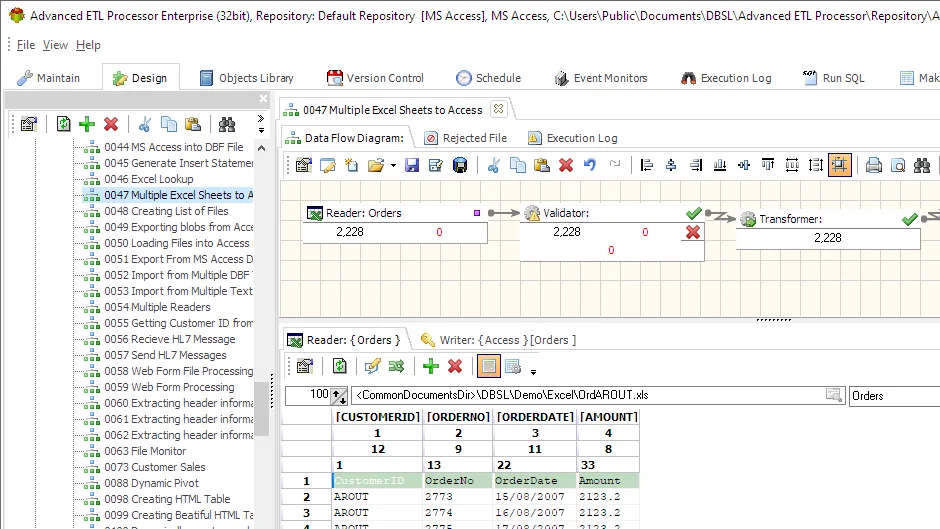
How Advanced ETL Processor makes it simple
Advanced ETL Processor can handle all aspects of combining Excel sheets, whether they are in one workbook or spread across many. It can:
- Combine multiple sheets into one consolidated sheet or table.
- Preserve headers or automatically unify column names across sheets.
- Apply data transformations while merging (cleaning, reformatting, validation).
- Process large datasets without Excel performance limits.
- Schedule merges to run automatically on a daily, weekly, or monthly basis.
Typical workflow for combining sheets
- Select input files: Point to one or multiple Excel workbooks.
- Choose sheets: Define which sheets to merge into the output.
- Map columns: Align column structures across sheets if needed.
- Combine automatically: Data is merged into one unified sheet or dataset.
- Export: Save the result to Excel, CSV, databases, or other systems.
Useful links for Excel automation
Start with the Advanced ETL Processor Enterprise overview, then download the fully functional 30-day trial. The Excel automation hub lists related workbook workflows.
Explore detailed documentation in the WIKI or follow step-by-step guides in the Video Tutorials.
If you need help, visit our Support Forum where our team is ready to assist you.
Business usage examples
Operations lead
Replace repeated workbook copying, splitting, merging, and cleanup with one scheduled Excel workflow.
Finance team
Generate formatted Excel outputs, templates, formulas, and reports without rebuilding files by hand.
Data owner
Keep raw workbooks, validation results, and run logs clear enough for audit and support work.
Video walkthrough
FAQ
Does Advanced ETL Processor automate working with Excel files?
Yes. Advanced ETL Processor reads, creates, updates, splits, merges, validates, and schedules Excel workflows without Excel macros or hand-built scripts.
Do I need Microsoft Excel installed on the server?
No. Routine Excel automation runs as a self-hosted ETL workflow without opening Excel on the desktop.
Is Excel data validated before loading?
Yes. The workflow checks required fields, data types, duplicates, lookup values, date formats, and rejected rows before writing to a database or report.
Are failed Excel files separated from good files?
Yes. A workflow moves failed workbooks to an error folder, keeps the original file, writes logs, sends notifications, and continues with valid files.
Do Excel templates preserve formatting and formulas?
Yes. Template-based workflows keep layout, formulas, sheet structure, and formatting while filling the workbook with current data.
How should missing sheets or columns be handled?
Define the rule before scheduling: stop the job, skip the file, create a clear error record, or route the workbook to a review folder.
Is there a trial for Excel automation?
Yes. Download the fully functional 30-day trial and build a small Excel workflow first.
When should I not automate an Excel process yet?
Do not automate it until the workbook layout, sheet names, column rules, output folder, and failure handling are clear. Automation repeats rules; it does not read minds.
Stop fixing broken spreadsheets by hand. Start loading clean data automatically.
If your Excel imports fail every month, automate the workflow directly and keep raw files untouched.
Direct link, no registration required.