Import Excel into SQL Server
Load spreadsheet data into SQL Server and other databases without writing custom import code.
Advanced ETL Processor Standard
Import, transform, validate and export data between databases, Excel, CSV, XML, JSON and other formats using an intuitive visual ETL designer.
Perfect for developers, analysts and database administrators who need powerful desktop ETL software without recurring subscription fees.
30-day fully functional trial. No credit card required.

Advanced ETL Processor Standard is ideal for users who need a powerful desktop ETL tool for manual data integration, data transformation, import/export and file conversion.
Load spreadsheet data into SQL Server and other databases without writing custom import code.
Move database records into Excel, CSV, XML, SQL scripts, Tableau files, Qlik files and other formats.
Read, transform and convert common business files when the source format refuses to behave.
Standardise values, fix formats and validate data quality before loading into a target system.
Map fields, calculate values, split columns, join data and reshape records visually.
Combine files, databases and spreadsheets into useful reporting or migration data sets.
Create clean output for reports, analysis, audits and one-off business requests.
Move data between systems without turning a small migration into a three-week scripting exercise.
Best for desktop data integration, import/export, file conversion, data transformation and manual ETL tasks.
Download Free TrialBest for advanced ETL development, testing, validation and reusable data integration projects.
Read About ProfessionalBest for scheduled production automation, unattended execution, monitoring and operational ETL processing.
Read About EnterpriseFree ETL consultation
Book a free 15-minute ETL consultation. We will discuss your data integration requirements and recommend the edition that best fits your project.
No sales pressure. No obligation. If another edition is better suited to your project, we will tell you.
One-Time Purchase
Standard is sold as a perpetual licence for desktop data integration, data transformation, import/export, validation and conversion work. Download the fully functional 30-day trial and test it with your own data.

Load data between files, spreadsheets, and databases for user-run ETL tasks.
Map source fields to target fields with visual tools and reusable mapping logic.
Clean, calculate, format, join, split, and reshape data before it reaches the target.
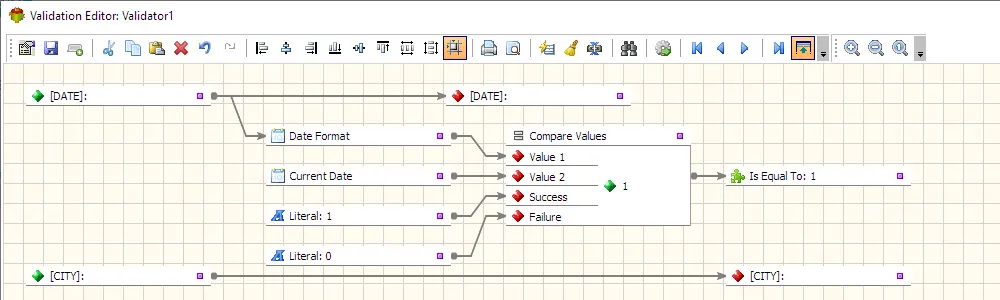
Check data quality before loading and review rejected records when source data needs correction.
Download the desktop ETL trial directly. No registration is required. Use it for import, export, conversion, validation and data preparation before buying.