Automated Report Delivery by Email Made Simple
If your team relies on regular reporting, automated report delivery by email can save hours every week and eliminate human error. Instead of manually exporting spreadsheets, formatting PDFs, and attaching files to emails, Advanced ETL Processor handles the entire process automatically. It generates reports with its integrated report designer, delivers them to the right recipients, and even logs every action-without any scripting and fully self-hosted.
Why Automate Report Delivery?
Reports are critical for decision-making, but generating and emailing them manually is time-consuming and prone to mistakes. Automating this process ensures the right data goes to the right people on time-every time.
Common Pain Points Without Automation
- Manually exporting data from multiple systems
- Formatting Excel or PDF files by hand
- Sending emails one by one or managing mailing lists
- Forgetting to send daily, weekly, or monthly summaries
- Version confusion or delivering outdated data
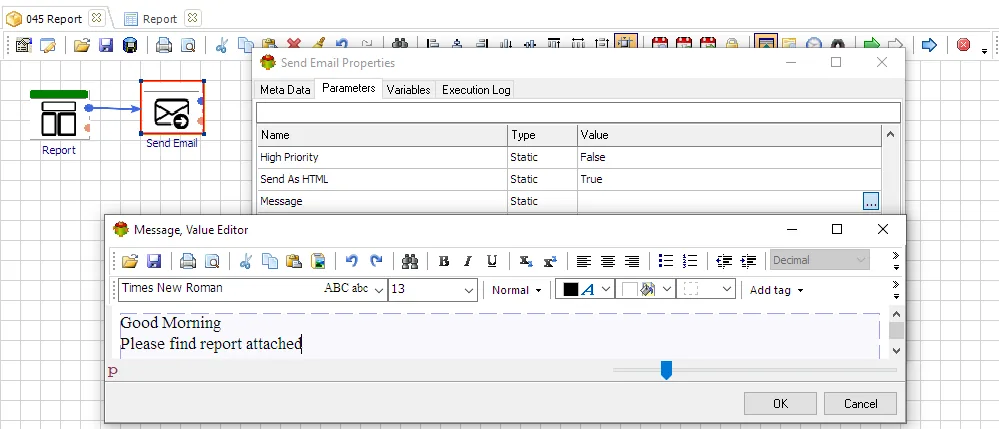
How Advanced ETL Processor Solves the Problem
Advanced ETL Processor combines data extraction, transformation, scheduling, report generation, and email delivery in one self-hosted platform, giving you control over data and security while reducing manual work.
Key Benefits
- Integrated report designer: Build reports visually without external tools.
- Self-hosted: Keep everything on-premises for security and compliance.
- No scripting needed: Drag-and-drop workflow design handles logic and delivery.
- Full scheduling: Hourly, daily, weekly, monthly, or event-based triggers.
- Dynamic recipients: Pull email lists from databases, files, or web services.
- Attachments and inline reports: Send PDFs, Excel, CSV, or embed data directly in the email body.
- Logging and alerts: Track deliveries, retries, and exceptions automatically.
Why Self-Hosted Matters
Cloud reporting tools charge per user, limit customization, and store your data offsite. With Advanced ETL Processor, everything runs on your server or workstation, keeping sensitive information internal and fully under your control.
Everything Done Without Scripting
Unlike platforms that require Python, PowerShell, or VBA, Advanced ETL Processor uses a visual interface. You can build workflows with conditions, transformations, file operations, database actions, and email delivery without writing code.
End-to-End Workflow Example
- Extract data from databases, Excel, CSV, APIs, or cloud platforms.
- Clean and transform data using visual components.
- Create reports using the integrated report designer.
- Export reports to PDF, Excel, HTML, CSV, or image formats.
- Send reports by email to individuals or groups automatically.
- Log success or failure and retry if necessary.
Useful links for email automation
Start with the Advanced ETL Processor Enterprise overview, then download the fully functional 30-day trial.
Use the WIKI, Video Tutorials, and Support Forum while testing the workflow.
Three real business use cases
Daily sales reports
Pull data from POS or ERP, generate a PDF summary, and email store managers and executives every morning automatically.
Inventory alerts
Monitor stock levels, create an Excel or CSV report of low inventory items, and send it to purchasing teams.
Financial statements
Generate weekly or monthly P&L reports, format them in the report designer, and deliver them to stakeholders automatically.
More Than Just Sending Reports
Advanced ETL Processor also supports email processing automation, including reading incoming emails and attachments, validating sender information, filtering and parsing data, moving or deleting messages based on rules, and inserting extracted data into databases.
Video walkthrough
FAQ
Can Advanced ETL Processor automate email workflows?
Yes. Advanced ETL Processor can automate email intake, attachment handling, validation, transformation, sending, archiving, and logging in self-hosted workflows.
Do I need custom scripts for email automation?
No scripting is required for routine mailbox, attachment, validation, and sending steps. Configure the process visually, test it with sample messages, then schedule it.
Can attachments be saved and processed automatically?
Yes. A workflow can save attachments, validate filenames and content, archive the original message, and process the extracted files.
Can email automation load data into a database?
Yes. After the message or attachment is read, Advanced ETL Processor can transform the data and load it into supported databases.
Can I send automated emails from a workflow?
Yes. You can send notifications, reports, error messages, and row-based emails from the same controlled workflow.
How should duplicate messages be handled?
Define a duplicate rule before production: message ID, sender, subject, attachment name, received time, or a business key inside the attached file.
Can I try it before buying?
Yes. Download the fully functional 30-day trial and build a small mailbox or attachment workflow first.
When should I not automate email processing yet?
Do not automate it until sender rules, file formats, mailbox folders, duplicate handling, and failure handling are clear. Automation repeats rules; it does not repair a vague process.
Stop struggling with fragile ETL scripts. Start shipping reliable workflows.
Download the fully functional 30-day trial. Build your first automation in 10 minutes or less.
Direct link, no registration required.