Convert XML to JSON Automatically
Need to transform XML files into clean, structured JSON? With Advanced ETL Processor, you can convert simple or deeply nested XML directly to JSON without writing XSLT, Python, or custom scripts.
What Is JSON?
JSON (JavaScript Object Notation) is a lightweight, human-readable format used for data exchange in modern applications, APIs, automation scripts, and cloud services.
Advanced ETL Processor converts XML to JSON even when your XML contains attributes, nested arrays, or irregular structures.
Why Convert XML to JSON?
- Use XML data in modern APIs, applications, or NoSQL databases
- Flatten or restructure complex XML formats
- Automate daily XML ingestion into systems expecting JSON
How to Convert XML to JSON - Step-by-Step
1. Open Advanced ETL Processor
Start the Enterprise Edition. Create two new directories:
- XML as the input
- JSON as the output
2. Create a New Transformation
Right-click a transformation group and choose New to open the design workspace.
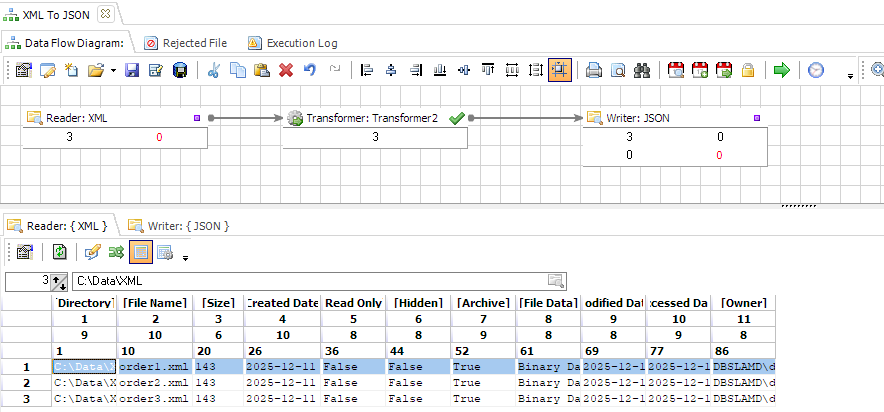
3. Configure the XML Reader
- Select Reader
- Open Properties
- Set Data Source Type to File System
- Select your XML directory from the drop-down box
- Check Read File Content
4. Configure the JSON Writer
- Select Writer
- Open Properties
- Set Data Target Type to File System
- Select your JSON directory from the drop-down box
5. Map and Transform Fields
- Reformat the file name by replacing
.xmlwith.json - Use the XML to JSON transformation function for conversion
- Apply filters, calculations, or conditional transformations if necessary
6. Run the Transformation
Click Execute to convert your XML to JSON. The resulting file can be used in web services, integrations, API calls, or cloud applications.
Automation and Scheduling
- Schedule XML-to-JSON tasks to run automatically
- Trigger processing when new files appear (local folders, FTP, HTTP)
- Generate logs and send email alerts when rules fail
Where this conversion fits
Convert XML to JSON Automatically is useful when a file has to feed a database, dashboard, partner upload, report, archive, or downstream ETL job. Use it when the same XML input needs controlled JSON output, validation, and logs instead of another manual export.
Do not automate the conversion until the output format, file naming, data types, and failure rules are agreed. Automation repeats rules; it does not rescue unclear ones.
Useful links for this conversion
Start with the Advanced ETL Processor Enterprise overview, then download the fully functional 30-day trial. The convert-data hub lists the other supported file conversion workflows.
Video Tutorial
FAQ
Can Advanced ETL Processor handle Convert XML to JSON Automatically?
Yes. Advanced ETL Processor can convert XML to JSON, validate the data, and log the workflow run.
Do I need to write a script?
No scripting is required for routine conversion, validation, scheduling, and logging. Use scripts only when the rule genuinely needs custom code.
Can I convert multiple XML files at once?
Yes. Point the reader at a folder and use a file mask so matching XML files are processed in one package. That is usually safer than opening files one by one and hoping Monday behaves like Friday.
Can the JSON output be created on a schedule?
Yes. The package can run on a schedule or as part of a larger ETL process, then write the JSON output with the same naming and validation rules each time.
What should I check before the first production run?
Check headers, data types, date formats, decimal separators, encodings, empty values, and output file naming. Most conversion problems hide in those details, usually wearing a spreadsheet hat.
Can failed rows or bad files be logged?
Yes. Add validation rules and logging so failed records, rejected files, and run status can be reviewed after execution. A silent conversion failure is just a mystery with a filename.
When should I not automate this conversion yet?
Do not automate it until source columns, data types, output naming, and error handling are clear. Conversion repeats rules; it does not repair vague ones.
Can I try it before buying?
Yes. Download the fully functional 30-day trial and build one small conversion package first.
Stop struggling with fragile ETL scripts. Start shipping reliable workflows.
Download the fully functional 30-day trial. Build your first automation in 10 minutes or less.
Direct link, no registration required.