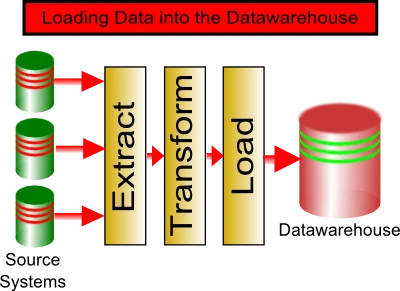
Loading data into a data warehouse means extracting data, cleaning it, transforming it into a consistent structure, and loading it into fact and dimension tables. That sounds tidy. In practice, it is usually where tidy goes to have a lie down. One bad date value, one missing customer code, and the process has lost its ETLasticity.
The good news is that the process is predictable when you break it into stages. You collect the source data, validate it, transform it, load it, and then check that the warehouse still tells the truth. Advanced ETL Processor automates those stages without scripting, so the nightly load does not depend on someone remembering to copy files before going home.
What loading data into a data warehouse means
A data warehouse stores clean, structured business data for reporting and analysis. Unlike an operational database, it is designed for questions such as monthly sales, customer activity, stock movement, finance reporting, and trend analysis.
Most warehouses use dimensional modelling. Facts contain measurable events, such as orders or payments. Dimensions describe those events, such as customers, products, dates, branches, or salespeople. Microsoft has a useful overview of dimensional modelling if you want the formal version.
If the data will be used for reporting more than once, load it properly. If it is a one-off question, Excel may be enough. Sometimes the cheapest ETL tool is a cup of tea and a quick spreadsheet.
The main stages of loading data into a warehouse
Warehouse loading is usually described as ETL: extract, transform, and load. In real projects, there are a few more steps around those three words. That is where most failures hide.
Before loading
- Identify source systems
- Collect files, database records, API data, or spreadsheets
- Validate source availability
- Keep raw data unchanged
During loading
- Clean invalid values
- Map fields into warehouse structures
- Create surrogate keys
- Load facts and dimensions in the right order
Prepare the source data before extraction
Source data can come from databases, CSV files, fixed-width files, Excel spreadsheets, APIs, FTP folders, cloud storage, or older systems that appear to have been designed during a power cut. The first job is to make sure the data is available and unchanged.
Keep the original file or source extract. Raw data is the witness statement. Transformations are the lawyers. You need both, but do not let the lawyers edit the witness statement.
With Advanced ETL Processor Enterprise, this preparation can include downloading files, reading emails, collecting FTP data, processing Excel files, and running the load on a schedule.
Extract data from source systems safely
Extraction is the point where data leaves the source system. For databases, that often means SQL queries. For files, it means parsers for CSV, fixed-width, XML, JSON, Excel, or other formats. For APIs, it means controlled requests and repeatable response handling.
Large extractions should be planned carefully. They can put pressure on operational systems. Run heavy extracts outside busy periods when possible, and test with a sample before scheduling the full process. Better to find the problem with ten rows than ten million.
Clean and transform data before loading
Data cleansing checks whether values are usable. Common checks include date formats, field length, required fields, data types, allowed values, and pattern validation. The boring checks are the useful ones. They stop the warehouse becoming a very expensive collection of rumours.
Typical warehouse transformations include:
- Combining address fields into one reporting field
- Splitting names, codes, or categories into separate fields
- Mapping values such as
Femaleto1andMaleto0 - Standardising phone numbers, dates, and currency values
- Creating surrogate keys for dimension tables
- Generating calendar tables for reporting
- Removing duplicate records before loading
IBM gives a concise explanation of the wider ETL process. The short version is this: transform the data before business users start building reports from bad assumptions.
Load dimensions before fact tables
In most warehouses, dimension tables should be loaded before fact tables. Facts usually reference dimensions through keys. If the customer dimension is missing a customer, the sales fact record has nowhere sensible to point.
The initial warehouse load usually populates all required tables and then checks whether the results are ready for reporting. Later loads may be incremental, meaning they only process new or changed records.
For related design work, see our guide on star schema optimisation. For Excel-heavy source files, see Excel ETL transformation.
Verify referential integrity after loading
After loading, check that every fact record links to the correct dimension records. For example, every sales row should have a valid date, product, customer, and branch key. If a report uses inner joins, missing dimension rows can make facts disappear from the report.
A simple check is to count the rows returned when the fact table is joined to all required dimensions. That count should match the number of rows in the fact table. On large warehouses, run this outside normal working hours. Nobody enjoys a surprise full table scan during lunchtime reporting.
Handle nulls and empty strings deliberately
Nulls and empty strings need a rule. Do not let every developer invent one. For dimensions, many teams create an unknown member with a surrogate key such as 0. Fact rows with missing dimension values can then point to that unknown record instead of breaking reports.
This is not glamorous work. It is also the difference between a reliable warehouse and a reporting system that behaves like George Costanza explaining an expense claim.
Automate warehouse loading when it happens more than once
If you load warehouse data once, a manual process may be acceptable. If you load it daily, weekly, or monthly, automate it. Scheduled ETL jobs reduce missed steps, timing problems, and manual corrections.
Advanced ETL Processor editions support warehouse loading, transformation, validation, scheduling, and file operations. The software is self-hosted, so your data stays in your environment. There are no row transfer fees and no execution fees.
FAQ: loading data into a data warehouse
What is the best way to load data into a data warehouse?
The best way is to use a repeatable ETL process: extract source data, validate it, transform it, load dimensions first, load facts second, and verify the result. Manual loading is only sensible for small one-off jobs.
What is the difference between ETL and data warehouse loading?
ETL is the process used to prepare and move data. Data warehouse loading is the final part where prepared data is inserted or updated in warehouse tables.
Should I load fact tables or dimension tables first?
Load dimension tables first in most cases. Fact tables usually depend on dimension keys, so loading facts first can create missing references.
How do I handle missing dimension values?
Create a defined unknown dimension record, often using surrogate key 0. This keeps fact rows reportable while making missing data visible.
When should I automate warehouse loading?
Automate it when the load happens more than once or when timing matters. If you do it twice, automation is usually worth considering. If you do it three times manually, you are now part of the pipeline.
If your warehouse load still needs a person to remember five steps in the correct order, download the 30-day fully functional trial before the spreadsheet develops opinions of its own.