ETL Software for WooCommerce Stores
Running a successful WooCommerce store means managing data from multiple sources-orders, customers, inventory, payments, and marketing campaigns. Using ETL software for WooCommerce stores streamlines these processes by consolidating your data into one centralized platform for better decision-making. Advanced ETL Processor is a self-hosted, AI-powered solution that automates WooCommerce data integration, analytics, and reporting while keeping your business data secure.
What is Advanced ETL Processor?
Advanced ETL Processor is a powerful ETL platform designed to extract, transform, and load WooCommerce data alongside other business systems. It automates data workflows, consolidates information from multiple sources, and uses AI to deliver actionable insights for store growth and customer engagement.
- Self-hosted security: Keep customer and order data safe within your infrastructure.
- AI-powered insights: Leverage AI to predict sales trends, identify high-value customers, and optimize stock levels.
- Automated workflows: Schedule ETL jobs to keep your dashboards up-to-date without manual effort.
- Cross-platform integration: Combine WooCommerce data with ERP, CRM, accounting software, and Google Ads.
- Scalable architecture: Manage thousands of SKUs, multiple storefronts, and growing customer bases easily.
Use Cases for WooCommerce ETL Integration
- Sales and revenue tracking: Consolidate WooCommerce sales data with payment gateways for accurate reporting.
- Inventory optimization: Sync product data with supplier feeds to predict shortages and streamline restocking.
- Customer analytics: Segment customers based on purchase behavior and engagement levels.
- Financial reporting: Automate tax calculations, refunds, and profit margins across multiple channels.
Supported Data Sources and Targets
- Sources: WooCommerce REST API, MySQL databases, CRMs, ERPs, payment gateways, Google Ads, CSV, XML, and JSON.
- Targets: MySQL, PostgreSQL, SQL Server, Oracle, Power BI, Tableau, and Google Data Studio.
WooCommerce + Google Ads Data Integration
Advanced ETL Processor supports seamless ETL software for Google Ads reporting and Google Ads data integration, helping you measure ad performance alongside WooCommerce sales. Build automated Google Ads dashboards and enable Google Ads reporting automation to track customer acquisition costs and optimize ROI.
- Ad performance tracking: Compare Google Ads conversions with WooCommerce sales revenue.
- AI in Google Ads analytics: Use AI to detect budget anomalies, CTR drops, and underperforming campaigns.
- Marketing data pipelines: Merge PPC data with customer segmentation and product-level insights.
- Self-hosted ETL: Keep your marketing and customer data secure within your infrastructure.
Recommended Architecture
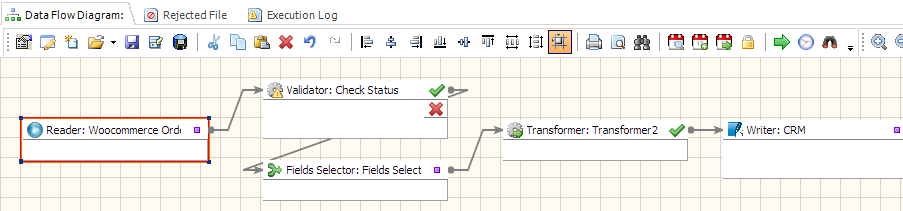
Sources → Staging → Transform & Validate → Warehouse → BI. Advanced ETL Processor automates this flow, applying AI-driven anomaly detection, data cleansing, and schema updates to keep your WooCommerce analytics accurate.
- Fast integration: Connect WooCommerce APIs, databases, and marketing platforms using visual mapping tools.
- Operational reliability: Automated retries, notifications, and detailed logging keep pipelines running smoothly.
- Cost efficiency: Self-hosted deployment avoids SaaS subscription costs and API usage fees.
- AI-driven optimization: Use predictive analytics to forecast demand, personalize marketing, and improve profitability.
Getting Started in 3 Steps
- Install: Download and install the self-hosted Advanced ETL Processor on your Windows server.
- Connect: Integrate WooCommerce APIs, ERPs, CRMs, payment gateways, and Google Ads data sources.
- Build & Automate: Design AI-enhanced ETL pipelines and publish analytics dashboards automatically.
Business usage examples
Operations lead
Replace manual consolidation with one scheduled workflow and consistent outputs.
Analytics team
Use clean, validated datasets for dashboards and recurring reports.
Compliance owner
Keep audit-friendly logs and predictable runs with retry-safe processing.
Video walkthrough
Stop struggling with fragile ETL scripts. Start shipping reliable workflows.
Download the fully functional 30-day trial. Build your first automation in 10 minutes or less.
Direct link, no registration required.