ETL Platforms for Delivery Route Analytics: Automate, Optimize, and Leverage AI
Managing delivery operations involves massive amounts of data-GPS tracking, fleet performance, customer addresses, driver schedules, fuel consumption, and delivery times. Without proper integration, analyzing routes and improving efficiency becomes challenging. The solution is a robust ETL platform that extracts data from multiple systems, transforms it into a unified structure, and loads it into dashboards or analytics tools. That’s where Advanced ETL Processor comes in-a self-hosted ETL solution designed to automate delivery route analytics and enable AI-powered optimization strategies.
Why ETL Platforms Are Essential for Delivery Route Analytics
Delivery operations generate data from multiple sources:
Without automation, teams spend hours consolidating spreadsheets and reconciling mismatched KPIs. ETL pipelines simplify this by creating a single source of truth for delivery metrics, enabling accurate, timely, and AI-ready reporting.
- GPS tracking systems monitor real-time vehicle locations.
- Transportation Management Systems (TMS) handle dispatch, scheduling, and route assignments.
- Customer platforms manage orders, addresses, and delivery windows.
- Telematics solutions provide insights on fuel usage, driver behavior, and delays.
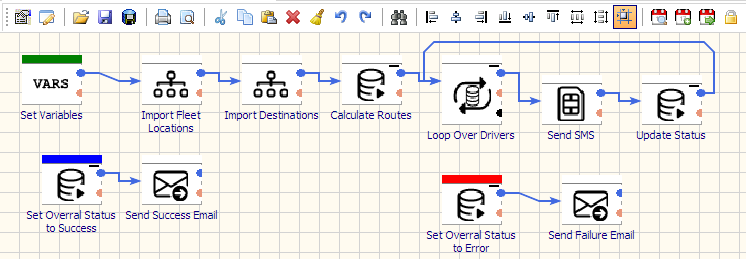
Why a Self-Hosted ETL Platform Works Best
- Data Security: Keep delivery routes, customer addresses, and pricing data inside your infrastructure.
- Cost Savings: Avoid SaaS-based pricing models and per-record billing.
- Customization: Build ETL pipelines around your specific route planning and analytics workflows.
Advanced ETL Processor: Automate Delivery Route Analytics
Advanced ETL Processor is a self-hosted ETL platform designed for high-performance logistics data integration. It automates route data processing, improves reporting accuracy, and prepares datasets for AI-powered analytics.
- Wide Integration Support: Connect to GPS APIs, TMS platforms, telematics systems, CRMs, and BI tools.
- Visual Data Transformations: Standardize delivery KPIs, merge multi-source datasets, and map route performance metrics.
- Automation & Scheduling: Refresh dashboards in near real-time or on custom schedules with failure alerts and retries.
- AI-Ready Pipelines: Feed predictive models for delivery time estimation, fuel optimization, and dynamic routing.
- Governance & Transparency: Track transformations, maintain lineage, and ensure compliance with data policies.
Use Cases for Delivery Route ETL Pipelines
- Route Optimization: Combine historical delivery times, traffic data, and real-time GPS to identify faster routes.
- Fleet Performance Reporting: Integrate driver logs, telematics, and TMS data to evaluate operational efficiency.
- Customer SLA Monitoring: Measure on-time deliveries, missed deadlines, and exception handling rates.
- AI-Driven Predictions: Use machine learning models to forecast demand and optimize driver assignments.
Recommended ETL Architecture for Route Analytics
- Extract: Collect data from GPS devices, TMS, CRMs, telematics systems, and customer portals.
- Transform: Standardize timestamps, normalize KPIs, and enrich datasets with geospatial and traffic data.
- Load: Push clean, unified data into BI dashboards, reporting systems, and AI optimization pipelines.
- Use incremental loads to process live GPS updates efficiently.
- Normalize route statuses across multiple carriers for consistent reporting.
- Leverage AI models for ETA forecasting and dynamic route adjustments.
- Maintain historical snapshots to identify long-term performance trends.
Getting Started in 3 Steps
- Install & Connect: Deploy Advanced ETL Processor and connect it to TMS, GPS APIs, telematics, and analytics tools.
- Model & Validate: Map routes, drivers, and performance KPIs while applying automated data quality checks.
- Automate & Monitor: Schedule ETL jobs, set alerts for delays or errors, and refresh AI-ready dashboards automatically.
Watch the Demo & Learn More
- WIKI - full documentation for integrations, transformations, and automation strategies.
- Support Forum - connect with experts and explore solutions for logistics reporting.
Business usage examples
Engineering manager
Replace one-off scripts with reusable, scheduled ETL pipelines.
Data team
Ship cleaner dashboards from standardized transformations.
Founder/owner
Get faster reporting cycles without adding orchestration overhead.
Video walkthrough
Stop struggling with fragile ETL scripts. Start shipping reliable workflows.
Download the fully functional 30-day trial. Build your first automation in 10 minutes or less.
Direct link, no registration required.