- Posts: 307
- Thank you received: 76

eMail Attachment with long file name
- bruce.gibbins
-
 Topic Author
- Offline
- Elite Member

Less
More
5 years 5 months ago #20999
by bruce.gibbins
eMail Attachment with long file name was created by bruce.gibbins
Hi.
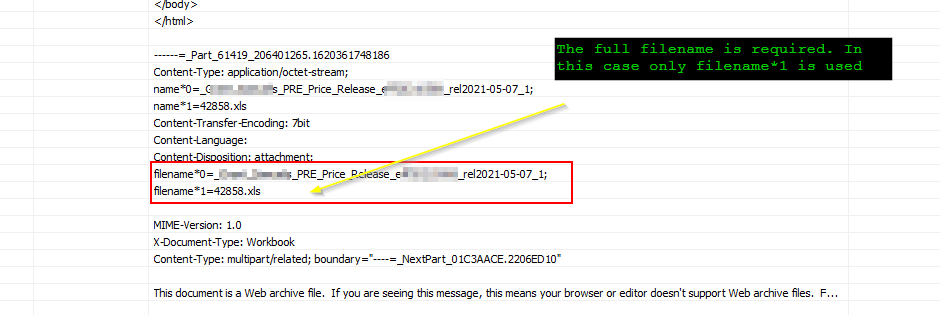
One of our data providers sends an email with an exceptionally long file name which appears in the message header broken into separate filename fields (as filename*0 and filename*1). When I use the IMAP4 Reader ACTION in a package and ask it to detach the attachment it uses filename*1 and not a concatenation of filename*0 and filename*1 fields. I have included a screen shot to explain. We have zero control over their filename conventions as they also have an automated system that generates the file and the email it is attached to.
i could probably work around this by detaching anyway and then renaming it but it would be a cleaner solution on our part if we could just use the filename it comes with.
I also suspect that the regex filtering on the attachment filename will also be using filename*1 and not the entire filename when doing a match on attachment name.
Thanks
One of our data providers sends an email with an exceptionally long file name which appears in the message header broken into separate filename fields (as filename*0 and filename*1). When I use the IMAP4 Reader ACTION in a package and ask it to detach the attachment it uses filename*1 and not a concatenation of filename*0 and filename*1 fields. I have included a screen shot to explain. We have zero control over their filename conventions as they also have an automated system that generates the file and the email it is attached to.
i could probably work around this by detaching anyway and then renaming it but it would be a cleaner solution on our part if we could just use the filename it comes with.
I also suspect that the regex filtering on the attachment filename will also be using filename*1 and not the entire filename when doing a match on attachment name.
Thanks
Please Log in or Create an account to join the conversation.


5 years 5 months ago #21000
by admin
Mike
ETL Architect
Replied by admin on topic eMail Attachment with long file name
This is a rather interesting issue. I have never seen anything like this before. We will have a look at it for you.
Mike
ETL Architect
Please Log in or Create an account to join the conversation.
- bruce.gibbins
-
Topic Author
- Offline
- Elite Member
Less
More
- Posts: 307
- Thank you received: 76
5 years 5 months ago - 5 years 5 months ago #21001
by bruce.gibbins
Replied by bruce.gibbins on topic eMail Attachment with long file name
Yes, agreed. I was surprised myself.
The other piece of info that may prove helpful is that the full filename is
_Axxxx_Bxxxxxs_PRE_Price_Release_eff20210506_rel2021-05-07_142858.xls
I have change the file name to obfuscate a little. Detaching using outlook results in the full and correct filename. In the case of AETLP (x32 v6.3.7.17) it results in 42858.xls which is about the 60th byte depending if you start from zero or one. I think there is some RFC stuff going on regarding the split of long filenames.
RFC 6266
RFC 2184
The obvious solution, then, is to use multiple parameters to contain
a single parameter value and to use some kind of distinguished name
to indicate when this is being done. And this obvious solution is
exactly what is specified here: The asterisk character ("*") followed
by a decimal count is employed to indicate that multiple parameters
are being used to encapsulate a single parameter value. The count
starts at 0 and increments by 1 for each subsequent section of the
parameter value. Decimal values are used and neither leading zeroes
nor gaps in the sequence are allowed.
The original parameter value is recovered by concatenating the
various sections of the parameter, in order. For example, the
content-type field
Content-Type: message/external-body; access-type=URL;
URL*0="ftp://";
URL*1="cs.utk.edu/pub/moore/bulk-mailer/bulk-mailer.tar"
is semantically identical to
Content-Type: message/external-body; access-type=URL;
URL=" ftp://cs.utk.edu/pub/moore/bulk-mailer/bulk-mailer.tar "
The other piece of info that may prove helpful is that the full filename is
_Axxxx_Bxxxxxs_PRE_Price_Release_eff20210506_rel2021-05-07_142858.xls
I have change the file name to obfuscate a little. Detaching using outlook results in the full and correct filename. In the case of AETLP (x32 v6.3.7.17) it results in 42858.xls which is about the 60th byte depending if you start from zero or one. I think there is some RFC stuff going on regarding the split of long filenames.
RFC 6266
RFC 2184
The obvious solution, then, is to use multiple parameters to contain
a single parameter value and to use some kind of distinguished name
to indicate when this is being done. And this obvious solution is
exactly what is specified here: The asterisk character ("*") followed
by a decimal count is employed to indicate that multiple parameters
are being used to encapsulate a single parameter value. The count
starts at 0 and increments by 1 for each subsequent section of the
parameter value. Decimal values are used and neither leading zeroes
nor gaps in the sequence are allowed.
The original parameter value is recovered by concatenating the
various sections of the parameter, in order. For example, the
content-type field
Content-Type: message/external-body; access-type=URL;
URL*0="ftp://";
URL*1="cs.utk.edu/pub/moore/bulk-mailer/bulk-mailer.tar"
is semantically identical to
Content-Type: message/external-body; access-type=URL;
URL=" ftp://cs.utk.edu/pub/moore/bulk-mailer/bulk-mailer.tar "
Last edit: 5 years 5 months ago by bruce.gibbins.
Please Log in or Create an account to join the conversation.
5 years 5 months ago - 5 years 5 months ago #21013
by admin
Mike
ETL Architect
Replied by admin on topic eMail Attachment with long file name
Hi Bruce
I wonder what your customers use as an email client
I've tried Gmail, outlook.com, AETL and thunderbird
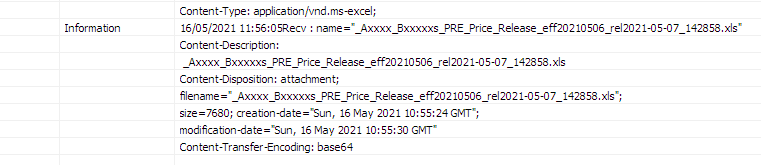
Every time our software used the correct file name to save the attachment.
Here are the screenshots of the log
Gmail, outlook.com, AETL:
Thunderbird

I wonder what your customers use as an email client
I've tried Gmail, outlook.com, AETL and thunderbird
Every time our software used the correct file name to save the attachment.
Here are the screenshots of the log
Gmail, outlook.com, AETL:
Thunderbird
Mike
ETL Architect
Last edit: 5 years 5 months ago by admin.
Please Log in or Create an account to join the conversation.
- bruce.gibbins
-
Topic Author
- Offline
- Elite Member
Less
More
- Posts: 307
- Thank you received: 76
5 years 5 months ago - 5 years 5 months ago #21014
by bruce.gibbins
Replied by bruce.gibbins on topic eMail Attachment with long file name
Thanks Mark.
Yes, first time I have seen this as well. I suspect that the client who is a large Investment Bank in the US is generating these reports and emailing through an in-house smtp service. We do the same by using the Microsoft Windows SMTP service. But given, who these guys are I would be very surprised if it was not a significant system with plenty of recipients and my guess is the reporting platform is COGNOS but what this hands it off to for email processing I can only make a guess at. The header does suggest it bounces from an SMTP service to Exchange and then over to us using O365 which is also exchange.
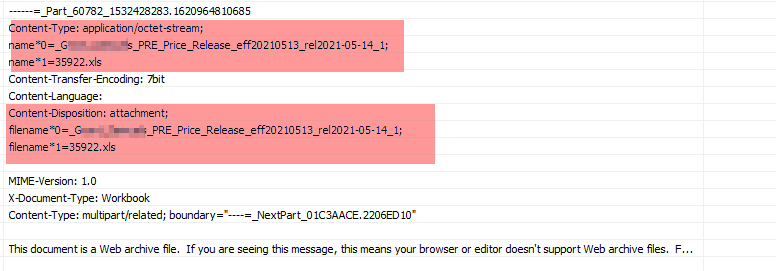
The only other comment I can make is that the message header screen shots I have been including are from the AETL execution log.
I have done a work around in the AETL package by dropping the attachment off into a local tmp folder and gambled that there is only one attachment. I then use a File Operation to put a known filename prefix in place. This then allows my downstream transformation to use a wildcard with a known filename prefix. Bit risky but works for the moment.
regards
bruce
Yes, first time I have seen this as well. I suspect that the client who is a large Investment Bank in the US is generating these reports and emailing through an in-house smtp service. We do the same by using the Microsoft Windows SMTP service. But given, who these guys are I would be very surprised if it was not a significant system with plenty of recipients and my guess is the reporting platform is COGNOS but what this hands it off to for email processing I can only make a guess at. The header does suggest it bounces from an SMTP service to Exchange and then over to us using O365 which is also exchange.
The only other comment I can make is that the message header screen shots I have been including are from the AETL execution log.
I have done a work around in the AETL package by dropping the attachment off into a local tmp folder and gambled that there is only one attachment. I then use a File Operation to put a known filename prefix in place. This then allows my downstream transformation to use a wildcard with a known filename prefix. Bit risky but works for the moment.
regards
bruce
Last edit: 5 years 5 months ago by bruce.gibbins.
Please Log in or Create an account to join the conversation.
- bruce.gibbins
-
Topic Author
- Offline
- Elite Member
Less
More
- Posts: 307
- Thank you received: 76
5 years 3 months ago - 5 years 3 months ago #21240
by bruce.gibbins
Replied by bruce.gibbins on topic eMail Attachment with long file name
AETLE/P v6.3.7.25 x32 & x64
Hi just letting you know that we still have this issue which can cause us grief in that Mail messages are 'missed' when using the IMAP4 Reader due to the filter failing see messages where the filename has been folded due to its length which appears to be at about the 60 character mark.
My research seems to indicate that there are two RFCs at play here. The older RFC2047 which outlook and a host of other 'clients' use and the newer RFC2231 which implements RFC 822 folding rules.
The end result is that in our case one of our data providers (a large bank) is using some type of mail agent to send their messages with attachments to us using RFC2231 and therefore creating folded filenames in the raw message content.
I have included some links to various forums that discuss this including some using Thunderbird. For us the "client side" is AETL and how it is interpreting the raw feed. The original screenshot shows the folding of the filename in the content-disposition section of the raw message with what would typically be "filename" being folded into filename*0 and filename*1.
The issue is that the IMAP4 Reader is not refolding the components but using filename*1 instead. I have proven this by adjusting the filter to use what I find in the raw filename*1 component and the message is found. The problem is that the filename from the source could change in length and so the filename*1 component may exist one day and not the next or it could have different values.
jira.atlassian.com/browse/JRASERVER-15133
kb.mozillazine.org/Attachments_renamed
bugzilla.mozilla.org/show_bug.cgi?id=309566
This particular URL datatracker.ietf.org/doc/html/rfc2184#section-3 discusses the issue and how it relates to URLs in a MIME message but the same convention applies to attachment filenames.
The other challenge is that if use Outlook (2016) to manage the mailbox we use for ETL and MOVE the message from one folder to another, it refolds and we end up with the filename as one would expect. This makes testing and reproducing difficult.
Regards
Bruce
Hi just letting you know that we still have this issue which can cause us grief in that Mail messages are 'missed' when using the IMAP4 Reader due to the filter failing see messages where the filename has been folded due to its length which appears to be at about the 60 character mark.
My research seems to indicate that there are two RFCs at play here. The older RFC2047 which outlook and a host of other 'clients' use and the newer RFC2231 which implements RFC 822 folding rules.
The end result is that in our case one of our data providers (a large bank) is using some type of mail agent to send their messages with attachments to us using RFC2231 and therefore creating folded filenames in the raw message content.
I have included some links to various forums that discuss this including some using Thunderbird. For us the "client side" is AETL and how it is interpreting the raw feed. The original screenshot shows the folding of the filename in the content-disposition section of the raw message with what would typically be "filename" being folded into filename*0 and filename*1.
The issue is that the IMAP4 Reader is not refolding the components but using filename*1 instead. I have proven this by adjusting the filter to use what I find in the raw filename*1 component and the message is found. The problem is that the filename from the source could change in length and so the filename*1 component may exist one day and not the next or it could have different values.
jira.atlassian.com/browse/JRASERVER-15133
kb.mozillazine.org/Attachments_renamed
bugzilla.mozilla.org/show_bug.cgi?id=309566
This particular URL datatracker.ietf.org/doc/html/rfc2184#section-3 discusses the issue and how it relates to URLs in a MIME message but the same convention applies to attachment filenames.
The other challenge is that if use Outlook (2016) to manage the mailbox we use for ETL and MOVE the message from one folder to another, it refolds and we end up with the filename as one would expect. This makes testing and reproducing difficult.
Regards
Bruce
Last edit: 5 years 3 months ago by bruce.gibbins.
Please Log in or Create an account to join the conversation.