- Posts: 306
- Thank you received: 76

AETLE Directory Monitor Virtual Memory
- bruce.gibbins
-
 Topic Author
- Offline
- Elite Member

Less
More
1 year 3 weeks ago - 1 year 3 weeks ago #25569
by bruce.gibbins
Replied by bruce.gibbins on topic AETLE Directory Monitor Virtual Memory
Hi.
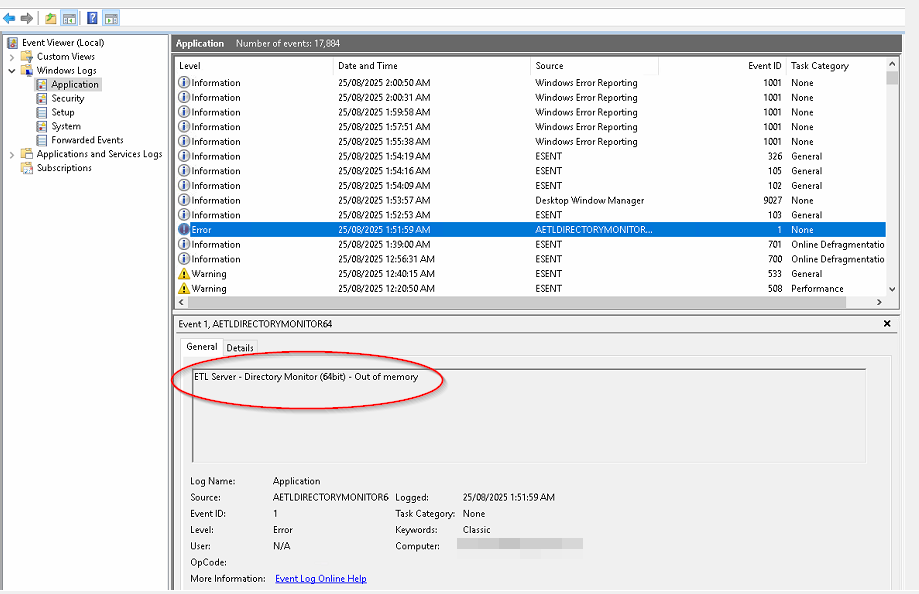
I suspect there is still an issue. I upgraded to v6.4.6.2 over the weekend and within a short time I had memory issues again. After a restart, I reinstalled the software as a precaution and restarted again as there seemed to be a lock on a .DLL. I Monitored and all seemed to be ok. however, about 20 hours later the machine started having issues again, resulting in all processes grinding to almost a halt. I have an Event Log entry indicating that Dir Monitor Ran out of memory and then very shortly after that a number of other Services started having problems and crashed.
I have attached the event log entry.
I suspect there is still an issue. I upgraded to v6.4.6.2 over the weekend and within a short time I had memory issues again. After a restart, I reinstalled the software as a precaution and restarted again as there seemed to be a lock on a .DLL. I Monitored and all seemed to be ok. however, about 20 hours later the machine started having issues again, resulting in all processes grinding to almost a halt. I have an Event Log entry indicating that Dir Monitor Ran out of memory and then very shortly after that a number of other Services started having problems and crashed.
I have attached the event log entry.
Last edit: 1 year 3 weeks ago by bruce.gibbins.
Please Log in or Create an account to join the conversation.
- Peter.Jonson
-

- Offline
- Administrator

1 year 3 weeks ago #25570
by Peter.Jonson
Peter Jonson
ETL Developer
Replied by Peter.Jonson on topic AETLE Directory Monitor Virtual Memory
Looking at it now
Peter Jonson
ETL Developer
Please Log in or Create an account to join the conversation.
- Peter.Jonson
-
- Offline
- Administrator
1 year 3 weeks ago #25571
by Peter.Jonson
Peter Jonson
ETL Developer
Replied by Peter.Jonson on topic AETLE Directory Monitor Virtual Memory
After several hours of tweaking I have managed managed to reproduce the problem.
If for some reason the network share you are monitoring becomes unavailable for example you reboot the sever after a minute or so the memory will start going up.

I am looking at what can be done about it at the moment
If for some reason the network share you are monitoring becomes unavailable for example you reboot the sever after a minute or so the memory will start going up.
I am looking at what can be done about it at the moment
Peter Jonson
ETL Developer
Please Log in or Create an account to join the conversation.
- bruce.gibbins
-
Topic Author
- Offline
- Elite Member
Less
More
- Posts: 306
- Thank you received: 76
1 year 3 weeks ago #25572
by bruce.gibbins
Replied by bruce.gibbins on topic AETLE Directory Monitor Virtual Memory
Thanks Peter.
I guess the 'unavailable' could also be any sort of moment that the service can't see the target folder for some type of duration. aka a network timeout.
These are DFS namespace shares and in this case they should actually point to the same server (ie. itself). So if the Server is called \\APP-SVR01 and this machine has an iSCSI drive of E: with a folder of E:\DATA" and this is registered as a DFS Name space of "company.local\data" then E:\DATA would be known to the rest of the domain network as \\company.local\data" this is what would be in the Dir Monitor Config
\\company.local\data\Folder1
\\company.local\data\Folder2
etc.
I guess it is possible that any type of pause or lag (ie during a backup) could result in the share not being available - even if only for a moment
I guess the 'unavailable' could also be any sort of moment that the service can't see the target folder for some type of duration. aka a network timeout.
These are DFS namespace shares and in this case they should actually point to the same server (ie. itself). So if the Server is called \\APP-SVR01 and this machine has an iSCSI drive of E: with a folder of E:\DATA" and this is registered as a DFS Name space of "company.local\data" then E:\DATA would be known to the rest of the domain network as \\company.local\data" this is what would be in the Dir Monitor Config
\\company.local\data\Folder1
\\company.local\data\Folder2
etc.
I guess it is possible that any type of pause or lag (ie during a backup) could result in the share not being available - even if only for a moment
The following user(s) said Thank You: Peter.Jonson
Please Log in or Create an account to join the conversation.
- Peter.Jonson
-
- Offline
- Administrator
1 year 3 weeks ago #25573
by Peter.Jonson
Peter Jonson
ETL Developer
Replied by Peter.Jonson on topic AETLE Directory Monitor Virtual Memory
Hi Bruce.
I have implemented some additional checks and looks like that solved the problem
I did reboot "share computer" multiple times and every time the monitory was able to recover.
Anyway can you try the latest version and let us know the outcome please
I have implemented some additional checks and looks like that solved the problem
I did reboot "share computer" multiple times and every time the monitory was able to recover.
Anyway can you try the latest version and let us know the outcome please
Peter Jonson
ETL Developer
Please Log in or Create an account to join the conversation.