What Is SFTP? A Secure Way to Transfer Files
If you work with automated data pipelines or share files between systems, you’ve likely been asked: What is SFTP? SFTP stands for SSH File Transfer Protocol (or Secure File Transfer Protocol). It provides secure file access, transfer, and management over a reliable encrypted channel-most commonly SSH. In modern IT environments, SFTP has become the standard for secure file exchange because it protects data, credentials, and integrity during transfer.
Understanding SFTP
SFTP was developed by the IETF as an extension of SSH version 2.0. Although it’s often grouped with FTP, it works very differently. Rather than using multiple ports or separate control/data channels, SFTP runs over a single encrypted SSH connection.
Key Features of SFTP
- Runs over a secure channel (SSH or TLS) - all data is encrypted.
- Single connection - easier to manage through firewalls.
- Built-in authentication - SSH keys or passwords.
- File operations - upload, download, rename, delete, list, change permissions.
- Reliable for automation - predictable behavior across platforms.
Why SFTP Is the Preferred Choice
SFTP solves many of the issues with traditional FTP and FTPS:
- No need to open multiple random ports.
- Encrypted by default.
- Stronger authentication with keys.
- Consistent behavior behind firewalls and VPNs.
- More secure and compliant with modern standards.
Where SFTP Is Commonly Used
- Financial statement transfers between banks and partners.
- Healthcare data exchange (HIPAA-compliant workflows).
- EDI and logistics file automation.
- Secure backups and archiving.
- Integration between legacy apps and cloud systems.
How Advanced ETL Processor Makes SFTP Automation Easy
As an IT professional, I know the pain of managing SFTP jobs with scripts, passwords, and manual cleanup. Advanced ETL Processor removes all that hassle.
- Self hosted - everything runs inside your infrastructure.
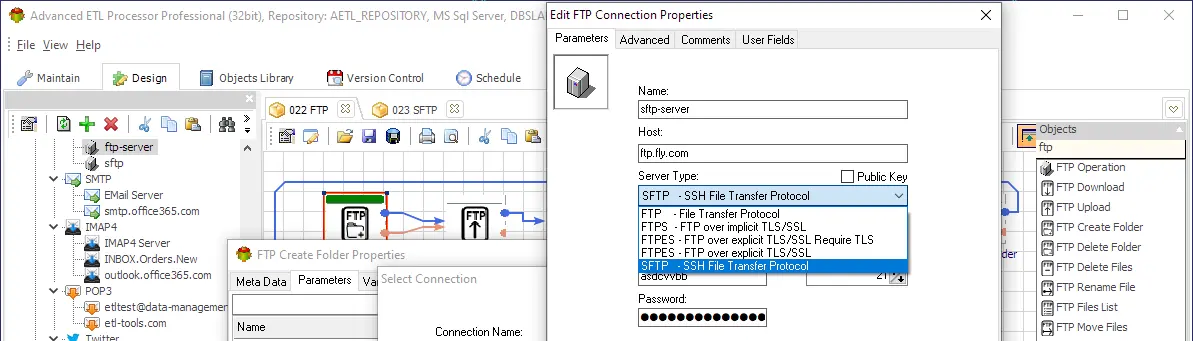
- No scripting required - visually configure SFTP tasks.
- Supports SSH key authentication for maximum security.
- Schedule and monitor jobs with logs and alerts.
- End-to-end automation: download → validate → transform → load → archive/delete.
- Integrates with databases, APIs, cloud storage, and AI workflows.
Typical Automated SFTP Workflow
- Connect securely using SSH keys or passwords.
- List and filter incoming files.
- Download and verify integrity.
- Transform or enrich data.
- Load into a database or data warehouse.
- Archive or delete source files.
Useful links for FTP automation
Business usage examples
Finance - Secure Partner Feeds
Receive daily statement files via SFTP, validate them, load to the accounting system, and archive them automatically.
Healthcare - Lab and EDI Files
Collect test results securely, transform them into standardized formats, and load into EMR systems without exposing PHI.
Retail & Logistics - Integration with Partners
Exchange inventory, shipment, and proof-of-delivery files using SFTP, enrich data, load into WMS, and remove processed files.
Video walkthrough
FAQ
Can Advanced ETL Processor automate FTP, FTPS, and SFTP?
Yes. Advanced ETL Processor can automate FTP, FTPS, and SFTP transfers as part of scheduled workflows that also validate files, transform data, load targets, archive evidence, and log results.
Do I need scripts for FTP automation?
No. Routine downloads, uploads, folder operations, file listing, archiving, and cleanup can be configured visually. Scripts should be reserved for unusual edge cases, not daily transfer work.
Can files be validated after download?
Yes. A workflow can check filenames, file sizes, row counts, required fields, dates, checksums, and duplicate rules before the data is loaded or forwarded.
Can FTP jobs avoid duplicate processing?
Yes. Use archive folders, processed-file logs, timestamps, filename patterns, and business keys inside the file to prevent the same delivery from being processed twice.
Can files be archived after transfer?
Yes. Keep raw files, processed files, and run logs long enough for audit and support. Archiving before cleanup makes failed investigations much less painful.
Can failed transfers be retried?
Yes. Scheduled jobs can retry failed transfer steps, record the exact error, and send notifications so the failure is visible instead of hidden in a desktop script.
What should an FTP automation job log?
Log the server, folder, filename, file size, start time, finish time, transfer direction, status, retry count, and the exact error message when something fails.
When should FTP work not be automated yet?
Do not automate it until file naming rules, ownership, retention, credentials, duplicate handling, and the failure path are clear. Automation repeats rules; it does not repair vague ones.
Stop chasing EDI files by hand. Start processing new messages on arrival.
Use directory monitoring and consistent validation before data lands in your target.
Direct link, no registration required.