Automate Dropbox Downloads
In modern data-driven environments, manually retrieving files is no longer practical. If you need to Automate Dropbox Downloads, relying on scripts or manual processes can introduce delays and errors. With Advanced ETL Processor, you can automate file downloads from Dropbox using a powerful, self-hosted platform that eliminates scripting and gives you full control over your workflows.
Why Automate Dropbox Downloads?
Downloading files manually from Dropbox might work occasionally, but it quickly becomes inefficient when dealing with recurring processes or large volumes of data. Automation ensures files are retrieved reliably and on time.
- Eliminate repetitive manual downloads
- Ensure timely access to critical data
- Reduce operational overhead
- Improve consistency across workflows
- Integrate downloads into automated data pipelines
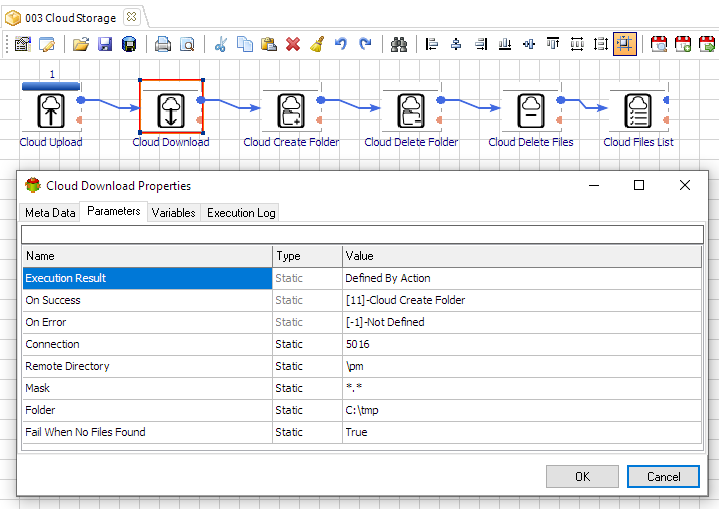
How Advanced ETL Processor Simplifies Cloud Automation
Advanced ETL Processor provides a visual environment where you can configure Dropbox download workflows without writing any code. Everything is handled through intuitive components.
Key Benefits
- No scripting required - automation is configured visually
- Self-hosted solution - full control over your infrastructure and data
- Flexible file selection - download files based on rules, patterns, or conditions
- Scheduling support - automate downloads at defined intervals
- Integrated ETL workflows - combine downloads with data processing tasks
Typical Workflow
- Connect to Dropbox securely
- Define file selection criteria (name, date, folder)
- Specify destination location
- Schedule or trigger the workflow
- Monitor execution and logs
This structured approach ensures reliable and repeatable file downloads across your environment.
Why Choose a Self-Hosted Automation Tool?
With Advanced ETL Processor, all automation runs within your own infrastructure. This self-hosted approach provides maximum control and security.
- No dependency on external automation services
- Enhanced data security and compliance
- Full ownership of workflows and processes
- Smooth integration with internal systems
Useful links for this cloud workflow
Start with the Advanced ETL Processor Enterprise overview, then download the fully functional 30-day trial. The cloud automation hub lists other Dropbox workflows.
Explore detailed documentation in the WIKI or follow step-by-step guides in the Video Tutorials.
If you need help, visit our Support Forum where our team is ready to assist you.
Business Use Cases
Data Integration Pipelines
Automatically download files from Dropbox and feed them into databases or analytics systems for processing.
Backup Retrieval
Retrieve backup files regularly from Dropbox to local or secure storage for redundancy and compliance.
Partner Data Exchange
Automatically download files shared by partners via Dropbox and integrate them into internal workflows.
Video walkthrough
FAQ
Can Advanced ETL Processor download files in Dropbox?
Yes. Advanced ETL Processor can download files in Dropbox, then log the run inside a self-hosted workflow.
Do I need custom scripts for this cloud workflow?
No scripting is required for the routine file operation, scheduling, validation, and logging steps. Use scripts only when a rule genuinely needs custom code.
When should I not automate it yet?
Do not automate it until permissions, naming rules, archive paths, and failure handling are clear. Cloud storage repeats bad rules very efficiently.
Can I test it before buying?
Yes. Download the fully functional 30-day trial and build one small workflow first. Use a test folder before touching production files.
Can this cloud step run with other ETL tasks?
Yes. The Dropbox step can run before or after validation, transformation, database loading, report generation, archiving, and notifications.
What should be logged?
Log the account, folder or bucket, filename, size, start time, finish time, status, and exact error message. Cloud jobs without logs become archaeology.
How should permissions be configured?
Use a dedicated Dropbox account or app registration with only the permissions needed for this workflow. Shared personal credentials are usually the first thing to break.
Can failed files be handled separately?
Yes. Route failed files to an error folder, keep the original input, write the run log, and retry only after the rule or source file is fixed.
Stop struggling with fragile ETL scripts. Start shipping reliable workflows.
Download the fully functional 30-day trial. Build your first automation in 10 minutes or less.
Direct link, no registration required.