0000 How to Validate and Transform data
A practical Advanced ETL Processor example for building, testing, and adapting one automation workflow.
Use this example to build one working automation package, test it safely, and then adapt it to your own files, folders, or data rules. Start small. Automation is helpful; automated mistakes are just faster mistakes.
This Example Demonstrates how to perform basic validation and transformation of a delimited file
Source Data
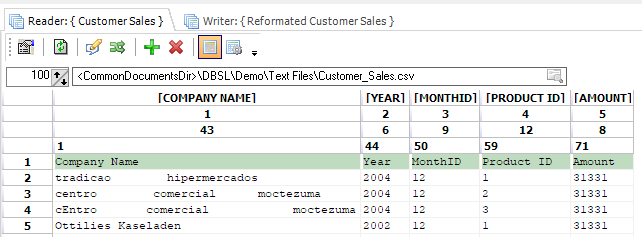
Here is a data example, it has two issues too many spaces between words and the first characters are not in upper case. we also want to process data only for 2004
Steps to follow
- Download and install Advanced ETL Processor [Link]
- Download and Unzip example [Link]
- Create a new transformation and open the .ats file

- Select the reader object and select Customer_Sales.csv file
- Double-click on the writer object and select Customer_Sales2.csv file
- Press the green arrow to run the transformation
How it works
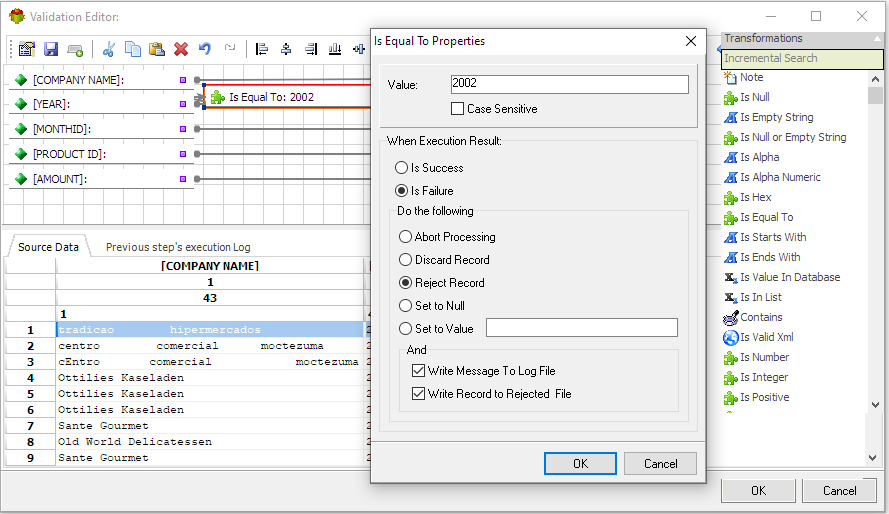
Data flows from the reader to the writer. The validator checks the year if it is not 2002 it rejects the record.
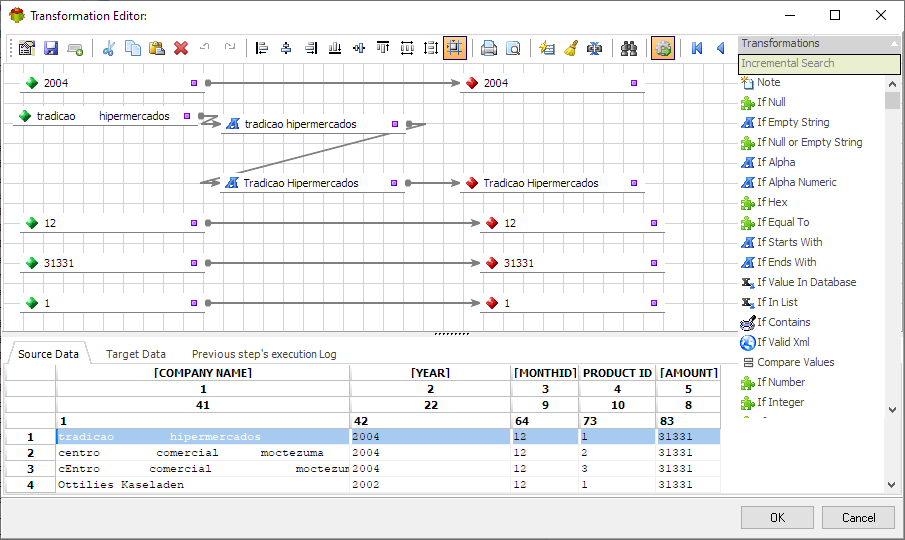
Transformer uses "Delete spaces transformation function" to get rid of additional spaces and "Proper case transformation function" to convert the first character to upper case.

Transformation result
Related Advanced ETL Processor resources
For more automation examples, review the Advanced ETL Processor tutorials, read the WIKI, or download the Advanced ETL Processor Enterprise trial.