
Data Warehousing and Data integration
Pivot in a report with dynamic columns
- Peter.Jonson
-

- Offline
- Administrator

Less
More
4 years 5 months ago #21701
by Peter.Jonson
Peter Jonson
ETL Developer
Replied by Peter.Jonson on topic Pivot in a report with dynamic columns
Hi
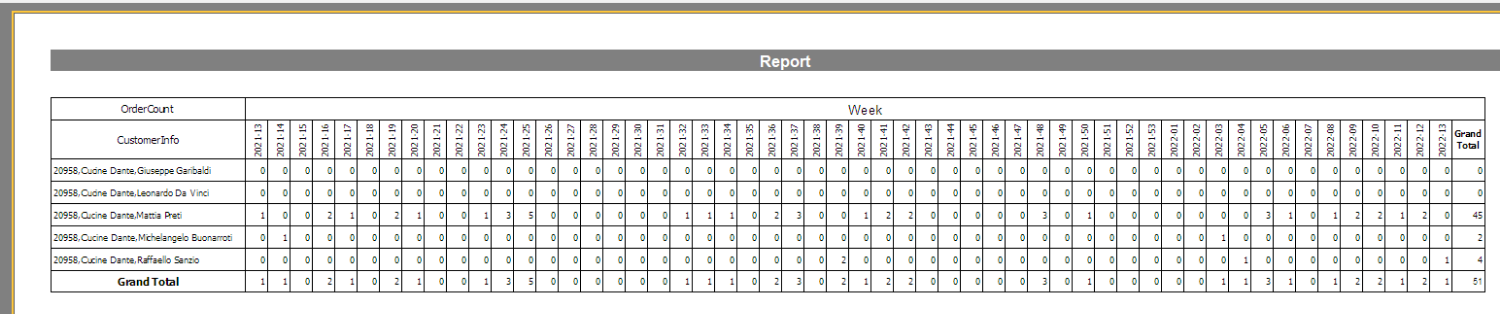
The issue you have is that not every customer has an order record for every week.
So we have to generate records for missing weeks.
Anyway here are the scripts
CREATE TABLE [dbo].[customer_orders](
[id] [int] IDENTITY(1,1) NOT NULL,
[CustomerID] [int] NULL,
[Customer] [nchar](255) NULL,
[Rapresentative] [nchar](255) NULL,
[Person] [nchar](255) NULL,
[date of order] [date] NULL,
[mail] [nchar](255) NULL,
CONSTRAINT [PK_customer_orders] PRIMARY KEY CLUSTERED
(
[id] ASC
)WITH (PAD_INDEX = OFF, STATISTICS_NORECOMPUTE = OFF, IGNORE_DUP_KEY = OFF, ALLOW_ROW_LOCKS = ON, ALLOW_PAGE_LOCKS = ON, OPTIMIZE_FOR_SEQUENTIAL_KEY = OFF) ON [PRIMARY]
) ON [PRIMARY]
GO
This view generates week numbers:
create view order_dates as
select Cast (GETDATE() -ID as date) As OrderDate,
case when datepart(WEEK,Cast (GETDATE() -ID as date)) <=9 then CONCAT('0',cast(datepart(WEEK,Cast (GETDATE() -ID as date)) as varchar))
else cast(datepart(WEEK,Cast (GETDATE() -ID as date)) as varchar)
end as [WEEK],
datepart(YEAR,Cast (GETDATE() -ID as date)) AS [YEAR],
cast(datepart(YEAR,Cast (GETDATE() -ID as date)) as varchar) + '-'+
case when datepart(WEEK,Cast (GETDATE() -ID as date)) <=9 then CONCAT('0',cast(datepart(WEEK,Cast (GETDATE() -ID as date)) as varchar))
else cast(datepart(WEEK,Cast (GETDATE() -ID as date)) as varchar)
end as [WEEK_YEAR]
FROM
(SELECT TOP (365) ROW_NUMBER() OVER (ORDER BY [object_id]) As ID
FROM sys.all_columns ORDER BY [object_id]) G
This view is used for reporting:
alter view CustomerOrdersView as
select
[CustomerID],
[Customer],
[Rapresentative],
[Person],
CONCAT([CustomerID],',',Trim([Customer]),',',Trim([Person])) As CustomerInfo,
[mail],
OrderDate as [date of order],
[WEEK_YEAR],
1 as OrderCount
from customer_orders,
order_dates
where customer_orders.[date of order] = order_dates.OrderDate
union all
select
[CustomerID],
[Customer],
[Rapresentative],
[Person],
CONCAT([CustomerID],',',Trim([Customer]),',',Trim([Person])) As CustomerInfo,
[mail],
OrderDate as [date of order],
[WEEK_YEAR],
0 as OrderCount
from customer_orders,
order_dates
I have attached cross table report for your convenience
The issue you have is that not every customer has an order record for every week.
So we have to generate records for missing weeks.
Anyway here are the scripts
CREATE TABLE [dbo].[customer_orders](
[id] [int] IDENTITY(1,1) NOT NULL,
[CustomerID] [int] NULL,
[Customer] [nchar](255) NULL,
[Rapresentative] [nchar](255) NULL,
[Person] [nchar](255) NULL,
[date of order] [date] NULL,
[mail] [nchar](255) NULL,
CONSTRAINT [PK_customer_orders] PRIMARY KEY CLUSTERED
(
[id] ASC
)WITH (PAD_INDEX = OFF, STATISTICS_NORECOMPUTE = OFF, IGNORE_DUP_KEY = OFF, ALLOW_ROW_LOCKS = ON, ALLOW_PAGE_LOCKS = ON, OPTIMIZE_FOR_SEQUENTIAL_KEY = OFF) ON [PRIMARY]
) ON [PRIMARY]
GO
This view generates week numbers:
create view order_dates as
select Cast (GETDATE() -ID as date) As OrderDate,
case when datepart(WEEK,Cast (GETDATE() -ID as date)) <=9 then CONCAT('0',cast(datepart(WEEK,Cast (GETDATE() -ID as date)) as varchar))
else cast(datepart(WEEK,Cast (GETDATE() -ID as date)) as varchar)
end as [WEEK],
datepart(YEAR,Cast (GETDATE() -ID as date)) AS [YEAR],
cast(datepart(YEAR,Cast (GETDATE() -ID as date)) as varchar) + '-'+
case when datepart(WEEK,Cast (GETDATE() -ID as date)) <=9 then CONCAT('0',cast(datepart(WEEK,Cast (GETDATE() -ID as date)) as varchar))
else cast(datepart(WEEK,Cast (GETDATE() -ID as date)) as varchar)
end as [WEEK_YEAR]
FROM
(SELECT TOP (365) ROW_NUMBER() OVER (ORDER BY [object_id]) As ID
FROM sys.all_columns ORDER BY [object_id]) G
This view is used for reporting:
alter view CustomerOrdersView as
select
[CustomerID],
[Customer],
[Rapresentative],
[Person],
CONCAT([CustomerID],',',Trim([Customer]),',',Trim([Person])) As CustomerInfo,
[mail],
OrderDate as [date of order],
[WEEK_YEAR],
1 as OrderCount
from customer_orders,
order_dates
where customer_orders.[date of order] = order_dates.OrderDate
union all
select
[CustomerID],
[Customer],
[Rapresentative],
[Person],
CONCAT([CustomerID],',',Trim([Customer]),',',Trim([Person])) As CustomerInfo,
[mail],
OrderDate as [date of order],
[WEEK_YEAR],
0 as OrderCount
from customer_orders,
order_dates
I have attached cross table report for your convenience
Peter Jonson
ETL Developer
The following user(s) said Thank You: Vassalli
Please Log in or Create an account to join the conversation.


4 years 5 months ago #21703
by Vassalli
Replied by Vassalli on topic Pivot in a report with dynamic columns
Thank you Peter!
The SQL statements to create tables are clear to me.
How can I get the report that you have drown?
Since I have to specify the column label and every week that label changes, how can I set them?
Thank you very much once again!
The SQL statements to create tables are clear to me.
How can I get the report that you have drown?
Since I have to specify the column label and every week that label changes, how can I set them?
Thank you very much once again!
Please Log in or Create an account to join the conversation.
- Peter.Jonson
-
- Offline
- Administrator
4 years 5 months ago - 4 years 5 months ago #21705
by Peter.Jonson
Peter Jonson
ETL Developer
Replied by Peter.Jonson on topic Pivot in a report with dynamic columns
I have attached the actual report to the previous post. (PivotExample.zip)
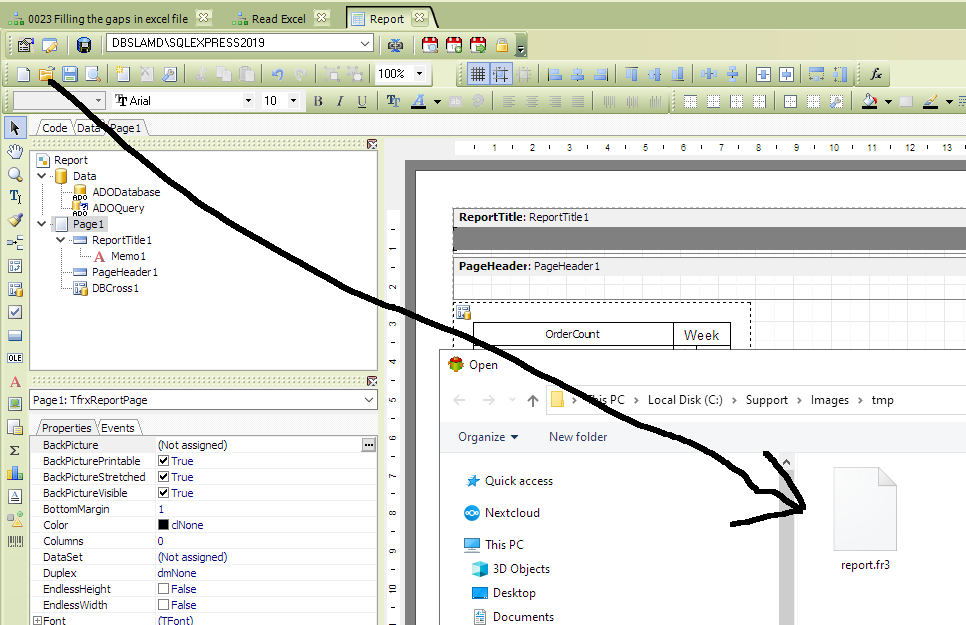
The labels are generated for you during report generation
The labels are generated for you during report generation
Peter Jonson
ETL Developer
Last edit: 4 years 5 months ago by Peter.Jonson.
The following user(s) said Thank You: Vassalli
Please Log in or Create an account to join the conversation.
4 years 5 months ago #21706
by Vassalli
Replied by Vassalli on topic Pivot in a report with dynamic columns
Thank you!
I'll try now
I'll try now
Please Log in or Create an account to join the conversation.