
- Posts: 24
- Thank you received: 8

Data Warehousing and Data integration
AETLE site license usage question
2 years 5 months ago #23623
by Kennyc
AETLE site license usage question was created by Kennyc
Hi Team,
AETLE 6.4.2.17
Want to upgrade to AETLE(site license) and apply to the following cases
Case 1
An AETLE with centralized repository database(e.g. MSSQL Express) setup in a server
5 workstations with AETLE connecting to the centralized repository database
Set some specific packages to the schedule and run them via agent in the corresponding workstation.
Any things should be concerned during the first setup and the later upgrade?
Case 2
Assist users to backup their important documents.
Build a standard backup task(e.g. a pre-defined folder for example c:\users\<user>\backup) and inform user to save their important documents into it, then AETLE schedule to backup it.
Plan to install the AETLE to each user's PC, set the AETLE to connect the centralized repository database and schedule to run this task via agent.
Can these steps be presetted in a configuration file? Then, deploy to the user PCs based on this configuration file.
Best regards,
Kenny
AETLE 6.4.2.17
Want to upgrade to AETLE(site license) and apply to the following cases
Case 1
An AETLE with centralized repository database(e.g. MSSQL Express) setup in a server
5 workstations with AETLE connecting to the centralized repository database
Set some specific packages to the schedule and run them via agent in the corresponding workstation.
Any things should be concerned during the first setup and the later upgrade?
Case 2
Assist users to backup their important documents.
Build a standard backup task(e.g. a pre-defined folder for example c:\users\<user>\backup) and inform user to save their important documents into it, then AETLE schedule to backup it.
Plan to install the AETLE to each user's PC, set the AETLE to connect the centralized repository database and schedule to run this task via agent.
Can these steps be presetted in a configuration file? Then, deploy to the user PCs based on this configuration file.
Best regards,
Kenny
Please Log in or Create an account to join the conversation.
- Peter.Jonson
-

- Offline
- Administrator

2 years 5 months ago #23635
by Peter.Jonson
Peter Jonson
ETL Developer
Replied by Peter.Jonson on topic AETLE site license usage question
Regarding Case 1
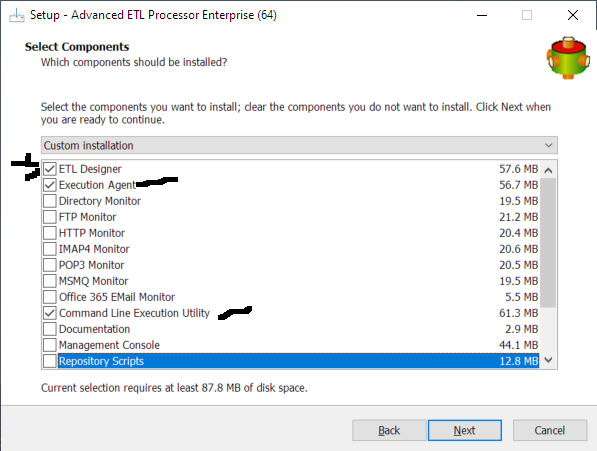
1 Install the software on the on single computer (Only necessary components)
2 Configure repository connection
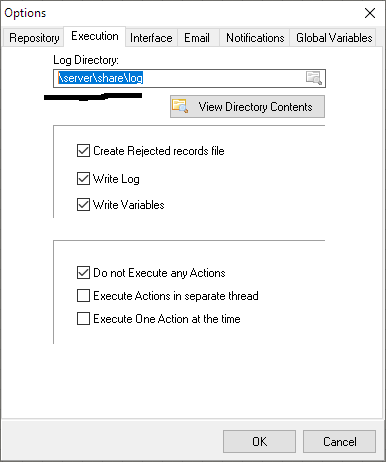
3 Configure log path so it points to the shared folder
4 Close AETL
5 Copy configuration from C:\ProgramData\ETL-Tools.com to rest of the computers
6 Install the software on the on the rest of computers (Again only necessary components)
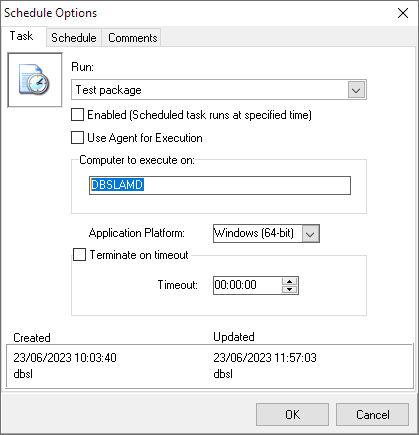
You would need to enable agent and create schedule for specific computes
See the pictures below
1 Install the software on the on single computer (Only necessary components)
2 Configure repository connection
3 Configure log path so it points to the shared folder
4 Close AETL
5 Copy configuration from C:\ProgramData\ETL-Tools.com to rest of the computers
6 Install the software on the on the rest of computers (Again only necessary components)
You would need to enable agent and create schedule for specific computes
See the pictures below
Peter Jonson
ETL Developer
Please Log in or Create an account to join the conversation.
- Peter.Jonson
-
- Offline
- Administrator
2 years 5 months ago #23636
by Peter.Jonson
Peter Jonson
ETL Developer
Replied by Peter.Jonson on topic AETLE site license usage question
Re case 2
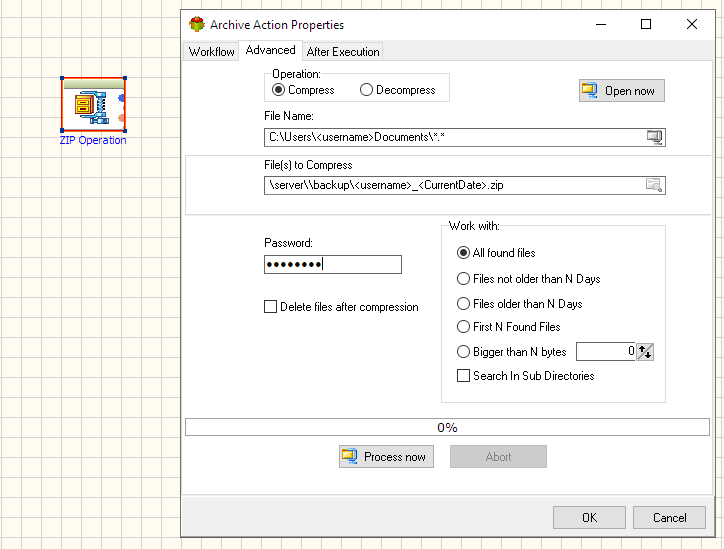
You can create a single package which will work on all computers. use <username> as part for the path
>> Can these steps be preseted in a configuration file? Then, deploy to the user PCs based on this configuration file.
The package is your configuration so there is nothing to deploy
You can create a single package which will work on all computers. use <username> as part for the path
>> Can these steps be preseted in a configuration file? Then, deploy to the user PCs based on this configuration file.
The package is your configuration so there is nothing to deploy
Peter Jonson
ETL Developer
Please Log in or Create an account to join the conversation.
2 years 5 months ago #23640
by Kennyc
Replied by Kennyc on topic AETLE site license usage question
Hi Peter,
Thanks for your suggestion.
For case 1, I knew how to deploy the new configuration issue(i.e. copy the related folder to the related workstations)
Would like to know how to cater the following continuous deployment conditions.
1) Application upgrade only
2) Repository database upgrade only
3) Application and repository database upgrade
For case 2, knew the main control is based on the centralized repository database. Would like to know whether the package added to the schedule will be also reflected to all PCs/workstations automatically or we need to setup them individually?
Best regards,
Kenny
Thanks for your suggestion.
For case 1, I knew how to deploy the new configuration issue(i.e. copy the related folder to the related workstations)
Would like to know how to cater the following continuous deployment conditions.
1) Application upgrade only
2) Repository database upgrade only
3) Application and repository database upgrade
For case 2, knew the main control is based on the centralized repository database. Would like to know whether the package added to the schedule will be also reflected to all PCs/workstations automatically or we need to setup them individually?
Best regards,
Kenny
The following user(s) said Thank You: admin
Please Log in or Create an account to join the conversation.

2 years 5 months ago #23641
by admin
Mike
ETL Architect
Replied by admin on topic AETLE site license usage question
1) Application upgrade only
>>> Install new version on top of existing
2) Repository database upgrade only
Run upgrade scripts on the server if necessary.
www.etl-tools.com/repository-database-updates/
3) Application and repository database upgrade
Combination of the above
Would like to know whether the package added to the schedule will be also reflected to all PCs/workstations automatically or we need to setup them individually?
Since all users are connected to the same repository the schedule will be also reflected to all PCs/workstations automatically.
>>> Install new version on top of existing
2) Repository database upgrade only
Run upgrade scripts on the server if necessary.
www.etl-tools.com/repository-database-updates/
3) Application and repository database upgrade
Combination of the above
Would like to know whether the package added to the schedule will be also reflected to all PCs/workstations automatically or we need to setup them individually?
Since all users are connected to the same repository the schedule will be also reflected to all PCs/workstations automatically.
Mike
ETL Architect
Please Log in or Create an account to join the conversation.
2 years 5 months ago #23661
by Kennyc
Replied by Kennyc on topic AETLE site license usage question
HI Mike,
Found the repository connection for MySQL or PostgreSQL is only allowed for ODBC connection setting.
Any reason for only this option because we may choose these databases for repository?
Knew that there are different ways to add ODBC DNS to PCs but if this connection setting is controlled in centralized repository database for the mentioned cases.
Can the non ODBC DNS setting such as the existing connection parameters setting for MySQL in ETL designer be allowed so that any updates of it can be automatically reflected to all PCs and it is not necessary to do the ODBC DNS step?
Best regards,
Kenny
Found the repository connection for MySQL or PostgreSQL is only allowed for ODBC connection setting.
Any reason for only this option because we may choose these databases for repository?
Knew that there are different ways to add ODBC DNS to PCs but if this connection setting is controlled in centralized repository database for the mentioned cases.
Can the non ODBC DNS setting such as the existing connection parameters setting for MySQL in ETL designer be allowed so that any updates of it can be automatically reflected to all PCs and it is not necessary to do the ODBC DNS step?
Best regards,
Kenny
Please Log in or Create an account to join the conversation.