
- Posts: 26
- Thank you received: 5

Complex package with multiple transformations and validations
4 years 2 weeks ago #22085
by nveger
Replied by nveger on topic Complex package with multiple transformations and validations
Hi Mike,
I didn't try your option 1 but tried to understand option 2. I think I believe I understand what you try to achieve with the case statement but please explain:
1) you mention in your post I can try to use the "Case transfromation", but I believe you mean "Case validation" right? Otherwise I can't use the e.g. Is German Postcode object (in Transformation there is no Is German Postcode only an IF German Postcode)
2) When I create the validation, I understand the inputs and case statements BUT:
- Do I need to take all fields into the validator?
- Or can I only take the LANDV and POSTKV in there?
- what is the output after "Is Equal to SUCCESS"? --> These are the correct ones which I want to bring to the correct records-table, but I also want to write the wrong records in an excel file
I am not sure if you can guide me in the right direction on how to do this, maybe a 5 minute session would be possible? I feel that i don't have the tool completely in my grip, therrefore it is hard for me to make these transformations/validations myself. How would you go about this if you were presented with a certain tool that isn't completely clear to you?
I feel the tool has a lot (most of the options) that i am looking for, but I also bump into roadblocks as I don't know how to solve certain questions and guide me to a solution within the tool for this.
Any guidance again would be awesome...
regards,
Norman
I didn't try your option 1 but tried to understand option 2. I think I believe I understand what you try to achieve with the case statement but please explain:
1) you mention in your post I can try to use the "Case transfromation", but I believe you mean "Case validation" right? Otherwise I can't use the e.g. Is German Postcode object (in Transformation there is no Is German Postcode only an IF German Postcode)
2) When I create the validation, I understand the inputs and case statements BUT:
- Do I need to take all fields into the validator?
- Or can I only take the LANDV and POSTKV in there?
- what is the output after "Is Equal to SUCCESS"? --> These are the correct ones which I want to bring to the correct records-table, but I also want to write the wrong records in an excel file
I am not sure if you can guide me in the right direction on how to do this, maybe a 5 minute session would be possible? I feel that i don't have the tool completely in my grip, therrefore it is hard for me to make these transformations/validations myself. How would you go about this if you were presented with a certain tool that isn't completely clear to you?
I feel the tool has a lot (most of the options) that i am looking for, but I also bump into roadblocks as I don't know how to solve certain questions and guide me to a solution within the tool for this.
Any guidance again would be awesome...
regards,
Norman
Please Log in or Create an account to join the conversation.
4 years 2 weeks ago - 4 years 2 weeks ago #22086
by nveger
Replied by nveger on topic Complex package with multiple transformations and validations
What I mean to say: if I don't link all the fields in the validator, I can't bring them to the step after the validation.
But how can I link the fields LANDV and POSTKV to bring them further to or success (write to SQL table) or failure (write in excel file)?
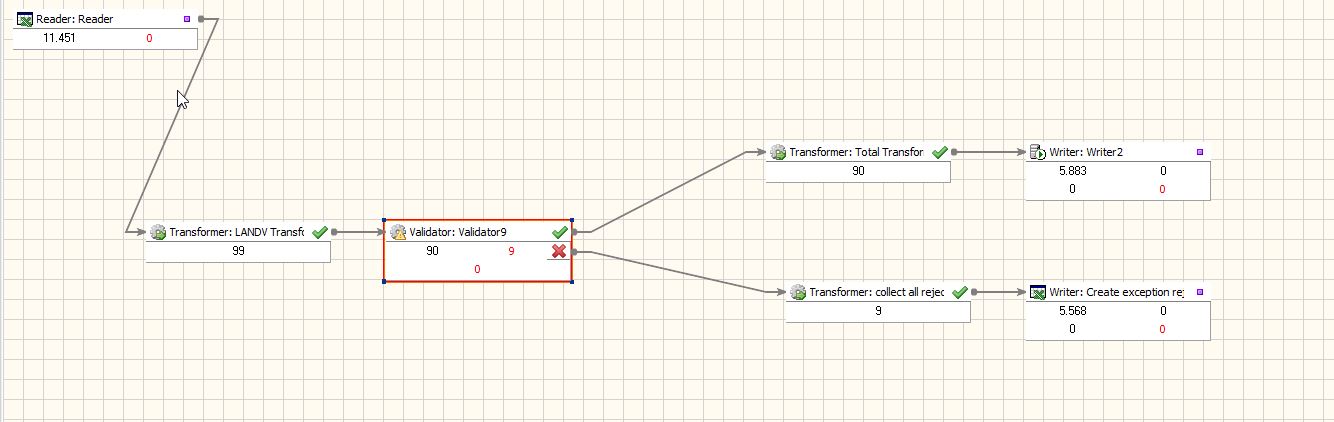
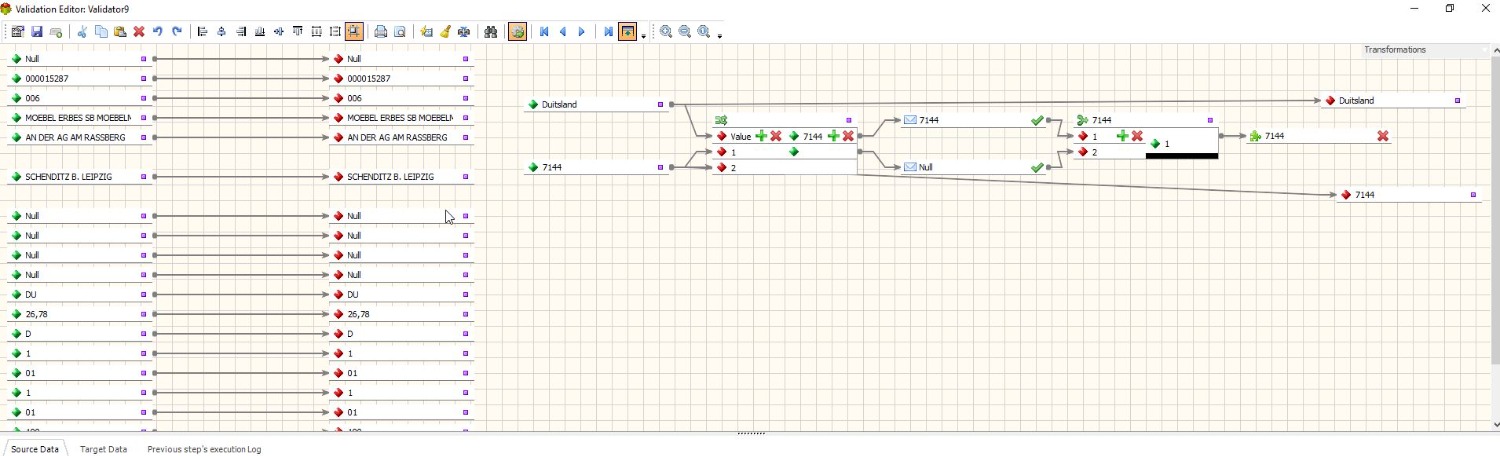
But how can I link the fields LANDV and POSTKV to bring them further to or success (write to SQL table) or failure (write in excel file)?
Last edit: 4 years 2 weeks ago by nveger.
Please Log in or Create an account to join the conversation.
- Peter.Jonson
-

- Offline
- Administrator

4 years 2 weeks ago #22087
by Peter.Jonson
Peter Jonson
ETL Developer
Replied by Peter.Jonson on topic Complex package with multiple transformations and validations
Just to clarify
Validator object can have both validation functions (rules) and transformation functions
Transformer objects can only have transformation functions
Validation functions always start from "Is" EG "Is date", "Is Null" ETC
You must map all fields within the validator if you want to pass all fields to the next step
But how can I link the fields LANDV and POSTKV to bring them further to or success (write to SQL table) or failure (write in excel file)?
You can link LANDV and POSTKV to multiple validations/transformation functions
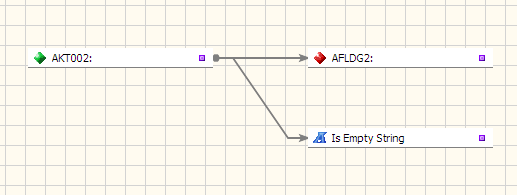
Validator object can have both validation functions (rules) and transformation functions
Transformer objects can only have transformation functions
Validation functions always start from "Is" EG "Is date", "Is Null" ETC
You must map all fields within the validator if you want to pass all fields to the next step
But how can I link the fields LANDV and POSTKV to bring them further to or success (write to SQL table) or failure (write in excel file)?
You can link LANDV and POSTKV to multiple validations/transformation functions
Peter Jonson
ETL Developer
Please Log in or Create an account to join the conversation.
4 years 2 weeks ago - 4 years 2 weeks ago #22088
by nveger
Replied by nveger on topic Complex package with multiple transformations and validations
Thanks, but that doesn't help me in this specific example.
How do I pass the SUCCESS-records into the target fields, see my screenshot in my previous post. I do a validation and the outcome is SUCCESS or failure. When Success I want to bring these records (also the two target fields) to the next transformation but I don't know how to do that, see screenshot above...
Please assist or guide me how this works..
How do I pass the SUCCESS-records into the target fields, see my screenshot in my previous post. I do a validation and the outcome is SUCCESS or failure. When Success I want to bring these records (also the two target fields) to the next transformation but I don't know how to do that, see screenshot above...
Please assist or guide me how this works..
Last edit: 4 years 2 weeks ago by nveger.
Please Log in or Create an account to join the conversation.
- Peter.Jonson
-
- Offline
- Administrator
4 years 2 weeks ago #22089
by Peter.Jonson
Peter Jonson
ETL Developer
Replied by Peter.Jonson on topic Complex package with multiple transformations and validations
I am struggling to understand the question.
On the screenshot you provided
The red cross means that the validation of the current record has failed (1)
And this record will go to the failure branch (F)
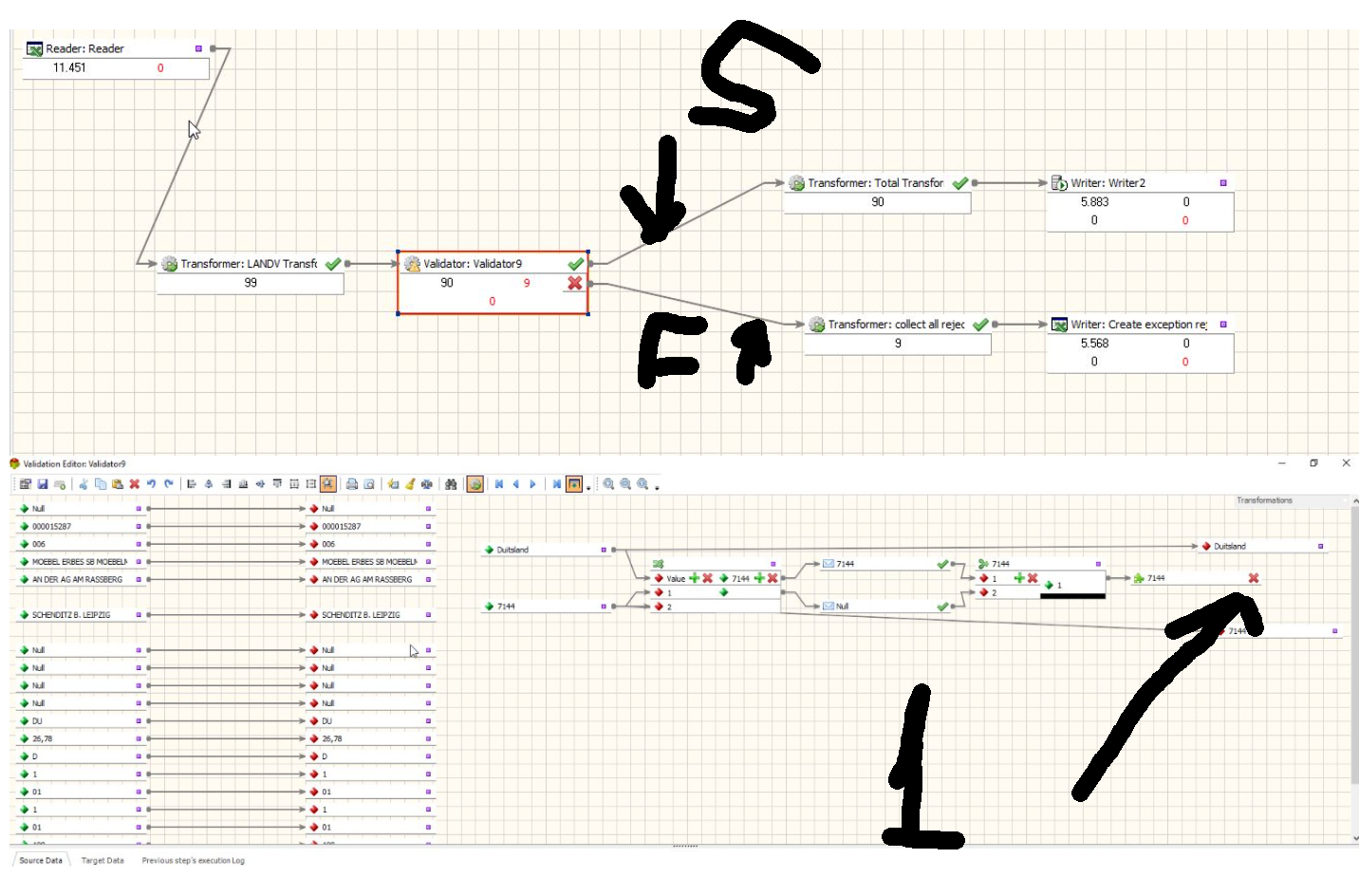
On the screenshot you provided
The red cross means that the validation of the current record has failed (1)
And this record will go to the failure branch (F)
Peter Jonson
ETL Developer
Please Log in or Create an account to join the conversation.
4 years 2 weeks ago - 4 years 2 weeks ago #22090
by nveger
Replied by nveger on topic Complex package with multiple transformations and validations
Yes I tried this and this works, my apologies...
Is the following also possible:
1) I have a column called VLAND --> in this column, we have abbreviations of the countries
2) instead of transforming the countries in the column LANDV via an SQL Server table (SQl table with column old value and column new value, and use this in the lookup-transformation in the ETL tool), I would like to do the following:
- IF LANDV = D, then VLAND=Germany
- IF LANDV = UK then VLAND= United Kindom
- etc etc..
The difference is that now, I have this old and new values stored in an SQL table, but I would like to do the transformation straight from the source excel-sheet, and replace values there...
How can I do this within the tool?
Is the following also possible:
1) I have a column called VLAND --> in this column, we have abbreviations of the countries
2) instead of transforming the countries in the column LANDV via an SQL Server table (SQl table with column old value and column new value, and use this in the lookup-transformation in the ETL tool), I would like to do the following:
- IF LANDV = D, then VLAND=Germany
- IF LANDV = UK then VLAND= United Kindom
- etc etc..
The difference is that now, I have this old and new values stored in an SQL table, but I would like to do the transformation straight from the source excel-sheet, and replace values there...
How can I do this within the tool?
Last edit: 4 years 2 weeks ago by nveger.
Please Log in or Create an account to join the conversation.