

- Posts: 31
- Thank you received: 8

Generate flat file with Header and Lines from 2 Readers
4 years 3 months ago #21925
by BPO
Replied by BPO on topic Generate flat file with Header and Lines from 2 Readers
Thank you Peter !
Would be great that you add examble en "Examples (text file)" section in the test DB for next release.
Also can I ask you an example if we want do the same transformation to get Header / Line.
But from only one reader, then source data is only one file as bellow :
HEAD01,Line1
HEAD01,Line2
HEAD02,Line4
HEAD02,Line5
HEAD03,Line3
to get :
HEAD01
Line1
Line2
HEAD02
Line4
Line5
HEAD03
Line3
Would be great that you add examble en "Examples (text file)" section in the test DB for next release.
Also can I ask you an example if we want do the same transformation to get Header / Line.
But from only one reader, then source data is only one file as bellow :
HEAD01,Line1
HEAD01,Line2
HEAD02,Line4
HEAD02,Line5
HEAD03,Line3
to get :
HEAD01
Line1
Line2
HEAD02
Line4
Line5
HEAD03
Line3
Please Log in or Create an account to join the conversation.


4 years 3 months ago #21926
by admin
Mike
ETL Architect
Replied by admin on topic Generate flat file with Header and Lines from 2 Readers
We usually post examples here so everyone can find them
index.php?option=com_content&view=category&id=108&Itemid=17/
We were planning to post the one we created for you but just have not had a chance to do it
Anyway regarding your question.
We have created another example for you I hope you will find it useful
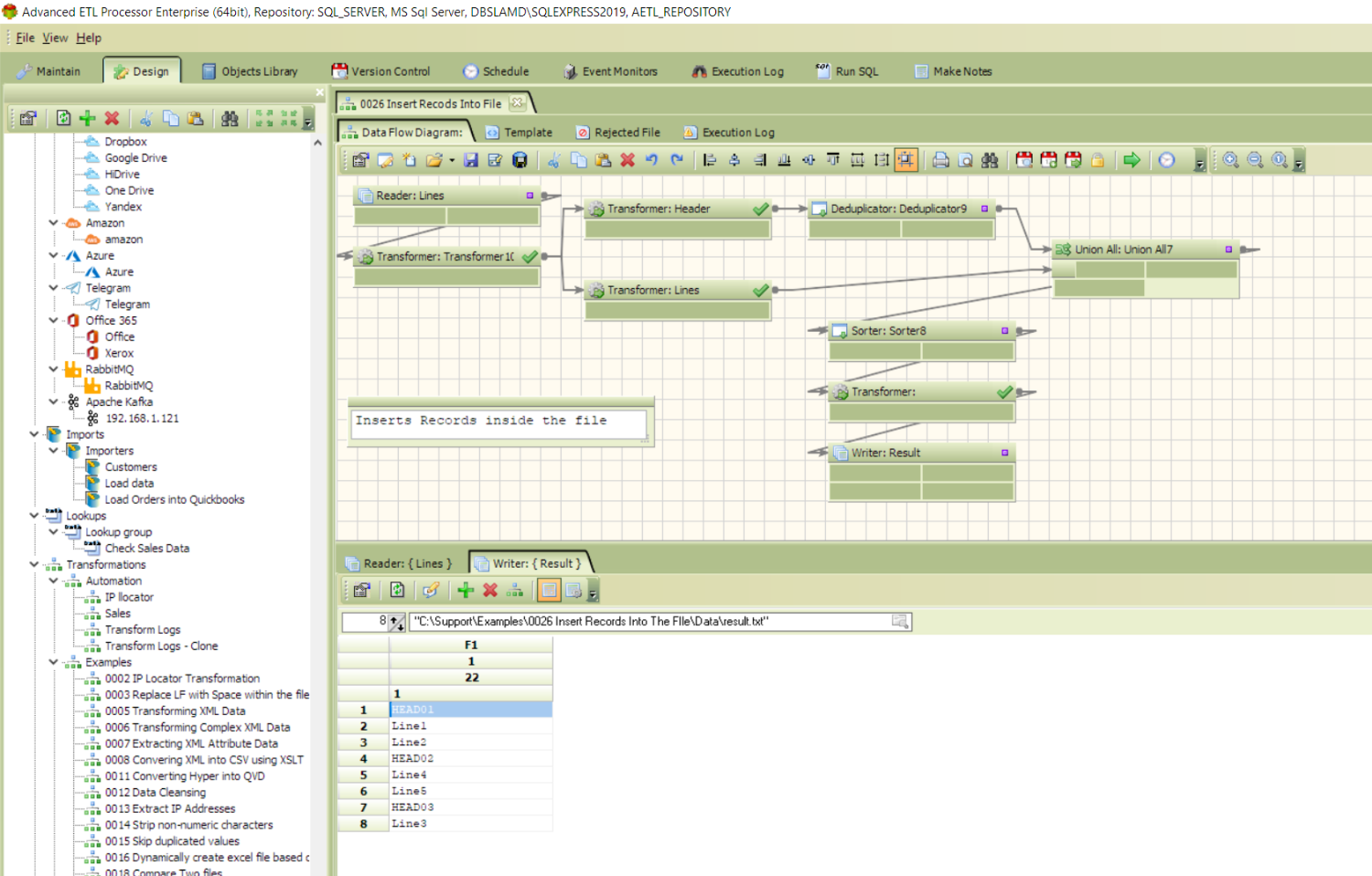
index.php?option=com_content&view=category&id=108&Itemid=17/
We were planning to post the one we created for you but just have not had a chance to do it
Anyway regarding your question.
We have created another example for you I hope you will find it useful
Mike
ETL Architect
Please Log in or Create an account to join the conversation.
4 years 3 months ago #21927
by BPO
Replied by BPO on topic Generate flat file with Header and Lines from 2 Readers
Thank you for your help and kind examples, they are really usefull.
Please Log in or Create an account to join the conversation.
4 years 3 months ago #21935
by admin
Mike
ETL Architect
Replied by admin on topic Generate flat file with Header and Lines from 2 Readers
FYI
We have published the tutorials
www.etl-tools.com/automation/0026-insert...s-into-the-file.html
www.etl-tools.com/automation/0025-merge-...-and-lines-file.html
We have published the tutorials
www.etl-tools.com/automation/0026-insert...s-into-the-file.html
www.etl-tools.com/automation/0025-merge-...-and-lines-file.html
Mike
ETL Architect
Please Log in or Create an account to join the conversation.
4 years 3 months ago #21938
by BPO
Replied by BPO on topic Generate flat file with Header and Lines from 2 Readers
There is one more thing I am trying with this transformation but without success unfortunately...
The output fil is then all right now :
HEAD1;01
LINE3;01
LINE4;01
HEAD2;02
LINE1;02
LINE2;02
What I am trying is to generate one file per Header then this way :
file1 :
HEAD1;01
LINE3;01
LINE4;01
file2 :
HEAD2;02
LINE1;02
LINE2;02
I have tried by the system file writer using Output Name but it write only last line in the file name.
Can you please help in a way of doing it.
Thx
The output fil is then all right now :
HEAD1;01
LINE3;01
LINE4;01
HEAD2;02
LINE1;02
LINE2;02
What I am trying is to generate one file per Header then this way :
file1 :
HEAD1;01
LINE3;01
LINE4;01
file2 :
HEAD2;02
LINE1;02
LINE2;02
I have tried by the system file writer using Output Name but it write only last line in the file name.
Can you please help in a way of doing it.
Thx
Please Log in or Create an account to join the conversation.
4 years 3 months ago #21939
by admin
Mike
ETL Architect
Replied by admin on topic Generate flat file with Header and Lines from 2 Readers
Default repository has an example called Dynamic File names 2
Check it out
It Creates a new separate file for every year
the year is a part of the file name
In your case the year would be the header
You would need to convert the input into
HEAD1;01;HEAD1
LINE3;01;HEAD1
LINE4;01;HEAD1
HEAD2;02;HEAD2
LINE1;02;HEAD2
LINE2;02;HEAD2
This can be quickly done using the "Keep value" transformation function
/wiki/advanced-etl-processor/transformation-functions/miscellaneous/keep-value/
Check it out
It Creates a new separate file for every year
the year is a part of the file name
In your case the year would be the header
You would need to convert the input into
HEAD1;01;HEAD1
LINE3;01;HEAD1
LINE4;01;HEAD1
HEAD2;02;HEAD2
LINE1;02;HEAD2
LINE2;02;HEAD2
This can be quickly done using the "Keep value" transformation function
/wiki/advanced-etl-processor/transformation-functions/miscellaneous/keep-value/
Mike
ETL Architect
Please Log in or Create an account to join the conversation.