- Posts: 9
- Thank you received: 1

Check File Raises an Error
- dmitriyvanyukov
- Topic Author
- Offline
- New Member

Less
More
5 years 6 months ago #20958
by dmitriyvanyukov
Replied by dmitriyvanyukov on topic Check File Raises an Error
Mike,
Does screenshot below provide you with all information you need?
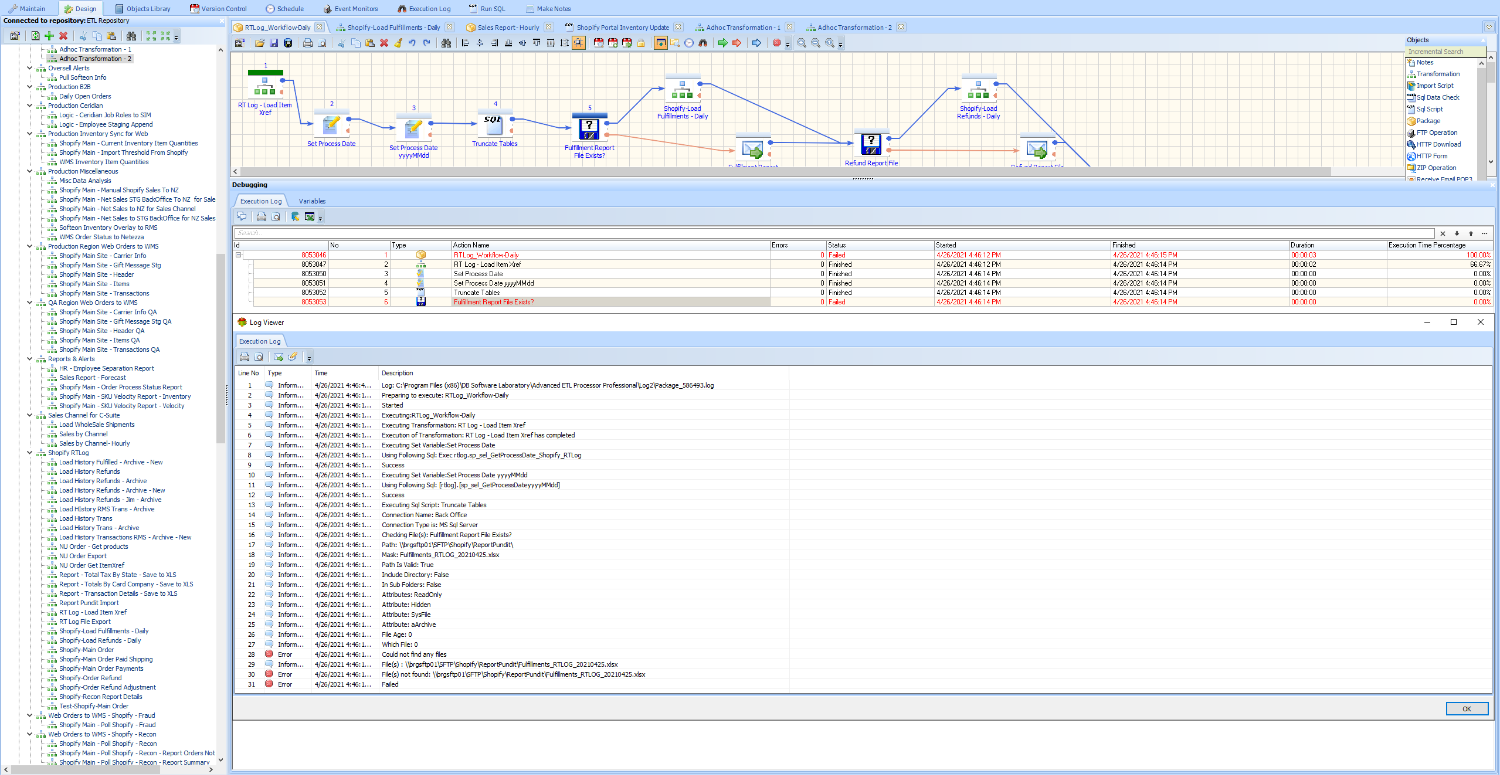
Thanks!
Dmitriy
Does screenshot below provide you with all information you need?
Thanks!
Dmitriy
Please Log in or Create an account to join the conversation.


5 years 6 months ago #20959
by admin
Mike
ETL Architect
Replied by admin on topic Check File Raises an Error
No it does not.
I have read your post multiple times and I am really struggling to understand the issue you are having.
Back to the original complaint
'This error gets bubbled up to the job scheduler and we end up reporting a job failure.'
Where is this bubbling up?
I cannot see it.
I have read your post multiple times and I am really struggling to understand the issue you are having.
Back to the original complaint
'This error gets bubbled up to the job scheduler and we end up reporting a job failure.'
Where is this bubbling up?
I cannot see it.
Mike
ETL Architect
Please Log in or Create an account to join the conversation.
- dmitriyvanyukov
- Topic Author
- Offline
- New Member
Less
More
- Posts: 9
- Thank you received: 1
5 years 6 months ago #20960
by dmitriyvanyukov
Replied by dmitriyvanyukov on topic Check File Raises an Error
Mike,
We can ignore the particulars of the scheduler. If any of the components of the package that we invoke through command line "C:\Program Files (x86)\DB Software Laboratory\Advanced ETL Processor Professional\aetlcl.exe _N_", where "_N_" is the ID of the package fail - the entire job is considered to have failed. Which makes sense to me. But then whenever we use the check file component and the file is not found the task is going into the failed state, which puts the package (in the eyes of the scheduler) into the failed state and this is what I referred to as "bubbling up". The failure is being communicated back to the scheduler.
My question then is how to avoid that. File not being present is a part of the normal operating procedure. Some days we have returns, other days we don't. Same goes for fulfillments. So I would like the job to avoid going into the failed state and scheduler raising an alert based on this failure. It does not seem like the "Check File" task would do that for me. Is there something else that can? "Case" object comes to mind. It can orchestrate alternate execution path without raising a failure. Is there a way for me to assign specific value to variable based on whether or not file exists? If there is a way to do that that would likely solve my use case.
Hope this makes more sense.
Thanks!
Dmitriy
We can ignore the particulars of the scheduler. If any of the components of the package that we invoke through command line "C:\Program Files (x86)\DB Software Laboratory\Advanced ETL Processor Professional\aetlcl.exe _N_", where "_N_" is the ID of the package fail - the entire job is considered to have failed. Which makes sense to me. But then whenever we use the check file component and the file is not found the task is going into the failed state, which puts the package (in the eyes of the scheduler) into the failed state and this is what I referred to as "bubbling up". The failure is being communicated back to the scheduler.
My question then is how to avoid that. File not being present is a part of the normal operating procedure. Some days we have returns, other days we don't. Same goes for fulfillments. So I would like the job to avoid going into the failed state and scheduler raising an alert based on this failure. It does not seem like the "Check File" task would do that for me. Is there something else that can? "Case" object comes to mind. It can orchestrate alternate execution path without raising a failure. Is there a way for me to assign specific value to variable based on whether or not file exists? If there is a way to do that that would likely solve my use case.
Hope this makes more sense.
Thanks!
Dmitriy
Please Log in or Create an account to join the conversation.
5 years 6 months ago #20961
by admin
Mike
ETL Architect
Replied by admin on topic Check File Raises an Error
If any of the components of the package that we invoke through command line "C:\Program Files (x86)\DB Software Laboratory\Advanced ETL Processor Professional\aetlcl.exe _N_", where "_N_" is the ID of the package fail - the entire job is considered to have failed.
Just to clarify
We are talking about the whole package execution status here
It is defined by the last package object executed
Consider the following scenario:
Your package has two objects check file and send email
Check file is a starting point
1 On success email is sent.
2 on failure the whole package will fail
To avoid package failure attach a pause object to check file on failure.
That way the overall package execution status will be aways success
Just to clarify
We are talking about the whole package execution status here
It is defined by the last package object executed
Consider the following scenario:
Your package has two objects check file and send email
Check file is a starting point
1 On success email is sent.
2 on failure the whole package will fail
To avoid package failure attach a pause object to check file on failure.
That way the overall package execution status will be aways success
Mike
ETL Architect
Please Log in or Create an account to join the conversation.
- dmitriyvanyukov
- Topic Author
- Offline
- New Member
Less
More
- Posts: 9
- Thank you received: 1
5 years 6 months ago #20962
by dmitriyvanyukov
Replied by dmitriyvanyukov on topic Check File Raises an Error
Mike,
Thank you! That's interesting:
>> We are talking about the whole package execution status here
It is defined by the last package object executed
This may just be the reason we are seeing the failure. Let me do some testing on our end to see if adding a pause after "On Error" would do the trick. Thank you very much, Mike!
Dmitriy
Thank you! That's interesting:
>> We are talking about the whole package execution status here
It is defined by the last package object executed
This may just be the reason we are seeing the failure. Let me do some testing on our end to see if adding a pause after "On Error" would do the trick. Thank you very much, Mike!
Dmitriy
Please Log in or Create an account to join the conversation.
- dmitriyvanyukov
- Topic Author
- Offline
- New Member
Less
More
- Posts: 9
- Thank you received: 1
5 years 6 months ago #20964
by dmitriyvanyukov
Replied by dmitriyvanyukov on topic Check File Raises an Error
Mike, thanks again! Just did some testing and adding a pause linked to the failure of File Check object does solve it. Really appreciate your help!
The following user(s) said Thank You: admin
Please Log in or Create an account to join the conversation.