
- Posts: 6
- Thank you received: 0

Directory Connection
5 years 6 months ago - 5 years 6 months ago #20880
by SoBeGuy
This is strange and non-intuitive. The directory connection allows you to select a path, not an individual file. So you're saying that after selecting the path, you have to manually append the file name to the path? Unless, you're using a mask, in which case it selects all files in the path matching the mask. No offense, but this doesn't seem like a well-thought-out design. The Directory connection should allow the user to select one or more paths and/or one or more files. The reader mask option could be used to apply additional filtering to the files for a specific reader, but the file selection behavior shouldn't change based on whether a mask is selected.
Directory Connection was created by SoBeGuy
1. Mask is selected. Then it will process all the files matching the mask
2. Mask is not selected. Then the file name will act as a mask and only one file will be processed, provided that the file does exist in the directory.
This is strange and non-intuitive. The directory connection allows you to select a path, not an individual file. So you're saying that after selecting the path, you have to manually append the file name to the path? Unless, you're using a mask, in which case it selects all files in the path matching the mask. No offense, but this doesn't seem like a well-thought-out design. The Directory connection should allow the user to select one or more paths and/or one or more files. The reader mask option could be used to apply additional filtering to the files for a specific reader, but the file selection behavior shouldn't change based on whether a mask is selected.
Last edit: 5 years 6 months ago by SoBeGuy.
Please Log in or Create an account to join the conversation.


5 years 6 months ago - 5 years 6 months ago #20883
by admin
No you do not. Have you actually tried running the transformation from the package?
The software does all the work for you
Here are some screenshots for you
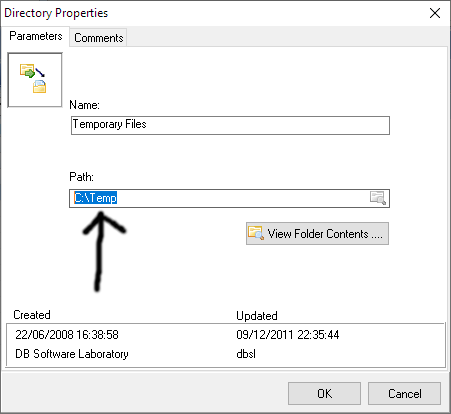
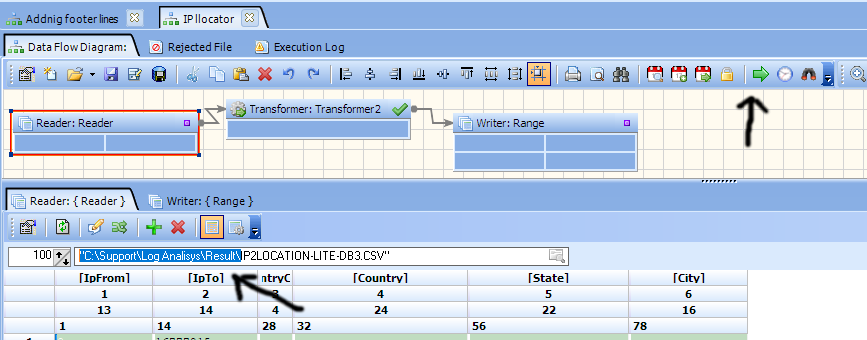
Note that the directory path is different.
When a transformation is run C:\Support\Log Analisys\Result\ path is used and not C:\temp
As a developer, I want to be able to point to any folder/file and see the content of it
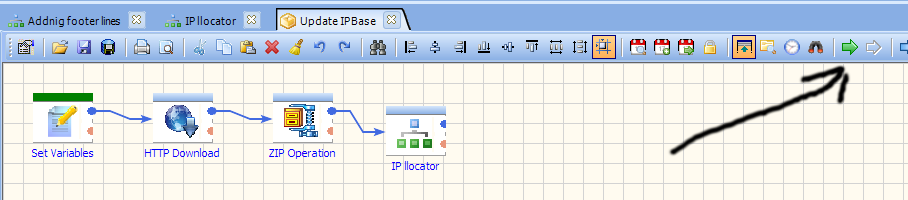
However, when the transformation is run from the package connection path is used C:\temp\
Mask
For example, we have a folder with two files
file1.txt
file2.txt
the reader is pointing at file1.txt
Now about your suggestion.
The directory usually used by multiple objects. eg it is shared object
For example, one transformation loads data from excel files another from csv files using a mask of course
So if you implement your suggestion you would need to create one directory for every reader
so your suggestion does not make sense plus it will not be welcome by existing users
The directory also can be used inside package objects
For example, if you put <Temporary Files> inside any of the text fields it will be replaced with the actual path
Thank you for your suggestions
Mike
ETL Architect
Replied by admin on topic Directory Connection
So you're saying that after selecting the path, you have to manually append the file name to the path?
No you do not. Have you actually tried running the transformation from the package?
The software does all the work for you
Here are some screenshots for you
Note that the directory path is different.
When a transformation is run C:\Support\Log Analisys\Result\ path is used and not C:\temp
As a developer, I want to be able to point to any folder/file and see the content of it
However, when the transformation is run from the package connection path is used C:\temp\
Mask
For example, we have a folder with two files
file1.txt
file2.txt
the reader is pointing at file1.txt
- when then mask is * both of the files will be loaded.
- when the mask is file2.txt, file2.tx file will be loaded (note file2.txt is different to the 'reader is pointing at file1.txt')
- when use mask is unticked file1.txt file will be loaded
Now about your suggestion.
The Directory connection should allow the user to select one or more paths and/or one or more files.
The directory usually used by multiple objects. eg it is shared object
For example, one transformation loads data from excel files another from csv files using a mask of course
So if you implement your suggestion you would need to create one directory for every reader
so your suggestion does not make sense plus it will not be welcome by existing users
The directory also can be used inside package objects
For example, if you put <Temporary Files> inside any of the text fields it will be replaced with the actual path
Thank you for your suggestions
Mike
ETL Architect
Last edit: 5 years 6 months ago by admin.
Please Log in or Create an account to join the conversation.
5 years 6 months ago - 5 years 6 months ago #20884
by SoBeGuy
Yes, of course I understand the difference between running the transformation during development, where you select a specific file, vs running it from a package, where it uses the connection settings to select the directory.
My point is, the Directory connection type should be more flexible, allowing the user to select any combination of directories and individual files. Currently, you can only select a single directory. If you want to process a specific file within that directory, you have to manually enter the filename in the reader configuration. Or if you need to process files from two different directories, you'd have to create a separate reader for each directory.
My suggestion is to improve the Directory connection type, by adding more options, not to remove any existing functionality. I'm suggesting that in the Directory connection, the user could enter:
* A single path to a single directory (same as how it works now)
* Multiple paths to multiple directories
* A single file in a single directory
* Multiple files in a single directory
* Multiple files in multiple directories
* Any combination of the above options
The screen would have a section where you can select a directory path and section where you can select a file. In each of these sections, there would be a plus icon, which you could click to add more directories or more files. Thus, in your example, where the user wants to use the same directory for CSV and Excel files, he could simply select the directory using the directory selector, the same way he does now. However, this would provide additional flexibility, such as being able to select CSV files from one directory and Excel files from a different directory.
Replied by SoBeGuy on topic Directory Connection
However, when the transformation is run from the package connection path is used C:\temp\
Yes, of course I understand the difference between running the transformation during development, where you select a specific file, vs running it from a package, where it uses the connection settings to select the directory.
My point is, the Directory connection type should be more flexible, allowing the user to select any combination of directories and individual files. Currently, you can only select a single directory. If you want to process a specific file within that directory, you have to manually enter the filename in the reader configuration. Or if you need to process files from two different directories, you'd have to create a separate reader for each directory.
The directory usually used by multiple objects. eg it is shared object
For example, one transformation loads data from excel files another from csv files using a mask of course
So if you implement your suggestion you would need to create one directory for every reader
so your suggestion does not make sense plus it will not be welcome by existing users
My suggestion is to improve the Directory connection type, by adding more options, not to remove any existing functionality. I'm suggesting that in the Directory connection, the user could enter:
* A single path to a single directory (same as how it works now)
* Multiple paths to multiple directories
* A single file in a single directory
* Multiple files in a single directory
* Multiple files in multiple directories
* Any combination of the above options
The screen would have a section where you can select a directory path and section where you can select a file. In each of these sections, there would be a plus icon, which you could click to add more directories or more files. Thus, in your example, where the user wants to use the same directory for CSV and Excel files, he could simply select the directory using the directory selector, the same way he does now. However, this would provide additional flexibility, such as being able to select CSV files from one directory and Excel files from a different directory.
Last edit: 5 years 6 months ago by SoBeGuy.
Please Log in or Create an account to join the conversation.
5 years 6 months ago #20885
by admin
Mike
ETL Architect
Replied by admin on topic Directory Connection
You can always copy the files into the directory and than load the data.
That is much easier than using all the options you suggested.
You can also use subdirectories, so your assumption that it is not possible to use multiple directories is not correct.
Our approach is to create simple actions which do one job well.
What you are suggesting to us is to create a super object which does everything.
I do not think it is really necessary
You are just starting working with our software.
Do you know that you can use variables inside directory names?
That allows switching from one directory to another.
There are a lot of options already you are not aware of.
That is much easier than using all the options you suggested.
You can also use subdirectories, so your assumption that it is not possible to use multiple directories is not correct.
Our approach is to create simple actions which do one job well.
What you are suggesting to us is to create a super object which does everything.
I do not think it is really necessary
You are just starting working with our software.
Do you know that you can use variables inside directory names?
That allows switching from one directory to another.
There are a lot of options already you are not aware of.
Mike
ETL Architect
Please Log in or Create an account to join the conversation.