
- Posts: 6
- Thank you received: 0

Hangs when reading huge CSV file
5 years 6 months ago #20866
by SoBeGuy
Hangs when reading huge CSV file was created by SoBeGuy
Using the 64-bit version of AETLPE, I tried to create a reader for a CSV file containing 6.7 million rows by 330 columns. The program hung for a long time, so I finally gave up and force closed it. Then I tried creating the reader again, but this time, in the Data Reading Restrictions tab, I specified reading only the first 100 rows, but that didn't help. It still hung indefinitely. I'm able to open smaller CSV files without a problem.
Also, as a separate note, I find it strange that such an advanced program is so slow at repainting the UI when opening a transformation. I have a 16 GB core i7 machine, so I'd think it would repaint instantly, but it takes several seconds, and you can literally watch different parts of the screen updating in slow motion during the process. I even notice the same sluggishness in your demo videos. Do you have any plans to improve the UI performance?
Also, as a separate note, I find it strange that such an advanced program is so slow at repainting the UI when opening a transformation. I have a 16 GB core i7 machine, so I'd think it would repaint instantly, but it takes several seconds, and you can literally watch different parts of the screen updating in slow motion during the process. I even notice the same sluggishness in your demo videos. Do you have any plans to improve the UI performance?
Please Log in or Create an account to join the conversation.


5 years 6 months ago #20867
by admin
Mike
ETL Architect
Replied by admin on topic Hangs when reading huge CSV file
Hello
When the user opens csv our software loads the first 100 lines(records) from it for the user convenience.
Our software users Line Terminators to determine "the end of the line"
If the software is unable to find the line terminator entire file will be treated as a single line.
Eg it will load the entire file into the memory and split it into chinks
Since you have such a huge file it will make everything very slow or it will take forever to load the file
Here is a very basic example where CSV file is very small.
Note the terminator is '{CR}+{LF}'


Here is want happens when I select an incorrect terminator
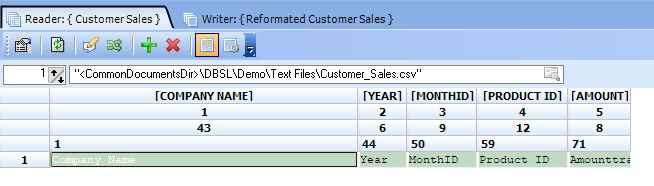
When the user opens csv our software loads the first 100 lines(records) from it for the user convenience.
Our software users Line Terminators to determine "the end of the line"
If the software is unable to find the line terminator entire file will be treated as a single line.
Eg it will load the entire file into the memory and split it into chinks
Since you have such a huge file it will make everything very slow or it will take forever to load the file
Here is a very basic example where CSV file is very small.
Note the terminator is '{CR}+{LF}'
Here is want happens when I select an incorrect terminator
Mike
ETL Architect
Please Log in or Create an account to join the conversation.
5 years 6 months ago - 5 years 6 months ago #20868
by SoBeGuy
Replied by SoBeGuy on topic Hangs when reading huge CSV file
OK, switching to LF fixed the issue, thanks.
I have a couple more questions:
1. In the Text tab, I specified "Lines to Skip" = 1, so it would exclude the header row from the data table. However, it still displays the header row.
2. Since the reader allows you to select a source file specific to that reader, why does the configuration screen still force you to select an existing Connection Name? It seems weird, to have to select one of the Text File connections, even though I'm not actually using that connection.
I have a couple more questions:
1. In the Text tab, I specified "Lines to Skip" = 1, so it would exclude the header row from the data table. However, it still displays the header row.
2. Since the reader allows you to select a source file specific to that reader, why does the configuration screen still force you to select an existing Connection Name? It seems weird, to have to select one of the Text File connections, even though I'm not actually using that connection.
Last edit: 5 years 6 months ago by SoBeGuy.
Please Log in or Create an account to join the conversation.
5 years 6 months ago #20869
by admin
Mike
ETL Architect
Replied by admin on topic Hangs when reading huge CSV file
1. In the Text tab, I specified "Lines to Skip" = 1, so it would exclude the header row from the data table. However, it still displays the header row.
This is done to make the life of the user easier.
The first row usually holds the field names if we hide it, the user will not be able to see them.
"Lines to Skip" is used during the execution.
2. Since the reader allows you to select a source file specific to that reader, why does the configuration screen still force you to select an existing Connection Name? It seems weird, to have to select one of the Text File connections, even though I'm not actually using that connection.
The connection is used when the transformation is executed from the package.
When you design the transformation you can point the reader at any file you want.
That makes the life of the developer much easier.
We do have a video explaining this feature.
www.etl-tools.com/advanced-etl-processor...s-to-read-error.html
Also
I assume you are not planning to work with all 300+ fields
If it is only a small subset say 50 fields or so try using fields selector object.
It will make transforming data much faster
Reader => Fields selector => Transfomer => Writer
And remove validator if you do not need.
Less objects = faster transformation
This is done to make the life of the user easier.
The first row usually holds the field names if we hide it, the user will not be able to see them.
"Lines to Skip" is used during the execution.
2. Since the reader allows you to select a source file specific to that reader, why does the configuration screen still force you to select an existing Connection Name? It seems weird, to have to select one of the Text File connections, even though I'm not actually using that connection.
The connection is used when the transformation is executed from the package.
When you design the transformation you can point the reader at any file you want.
That makes the life of the developer much easier.
We do have a video explaining this feature.
www.etl-tools.com/advanced-etl-processor...s-to-read-error.html
Also
I assume you are not planning to work with all 300+ fields
If it is only a small subset say 50 fields or so try using fields selector object.
It will make transforming data much faster
Reader => Fields selector => Transfomer => Writer
And remove validator if you do not need.
Less objects = faster transformation
Mike
ETL Architect
Please Log in or Create an account to join the conversation.
5 years 6 months ago #20878
by SoBeGuy
Okay, I understand, but when you select a Directory connection, it will process all files in that directory, unless you use a file mask in the reader. It would be better if the Directory connection allowed you to specify a specific file or multiple specific files, as an alternative to selecting the entire directory. In that case, the Directory connection type should be renamed to "Files", which would encompass selecting directory paths and/or specific files.
Replied by SoBeGuy on topic Hangs when reading huge CSV file
admin wrote: The connection is used when the transformation is executed from the package.
When you design the transformation you can point the reader at any file you want.
Okay, I understand, but when you select a Directory connection, it will process all files in that directory, unless you use a file mask in the reader. It would be better if the Directory connection allowed you to specify a specific file or multiple specific files, as an alternative to selecting the entire directory. In that case, the Directory connection type should be renamed to "Files", which would encompass selecting directory paths and/or specific files.
Please Log in or Create an account to join the conversation.
5 years 6 months ago #20879
by admin
Mike
ETL Architect
Replied by admin on topic Hangs when reading huge CSV file
Okay, I understand, but when you select a Directory connection, it will process all files in that directory, unless you use a file mask in the reader.
No, It will not
You have only two options
1. Mask is selected. Then it will process all the files matching the mask
2. Mask is not selected. Then the file name will act as a mask and only one file will be processed, provided that the file does exist in the directory
May I suggest to stat another topic because our discussion has nothing to do with the original question?
No, It will not
You have only two options
1. Mask is selected. Then it will process all the files matching the mask
2. Mask is not selected. Then the file name will act as a mask and only one file will be processed, provided that the file does exist in the directory
May I suggest to stat another topic because our discussion has nothing to do with the original question?
Mike
ETL Architect
Please Log in or Create an account to join the conversation.