- Posts: 10
- Thank you received: 8

Testing Python Code With a Test Harness from the Command Line
- brillsupport
- Topic Author
- Offline
- New Member

Less
More
1 year 2 months ago - 1 year 2 months ago #25344
by brillsupport
If you write complex functions in python to do transforms you may be disappointed by the lack of error messages when compiling or running your code. In these cases you'll want to test your code with an external test harness. There are testing tools for python, but perhaps you'd just like to test at the command line. Here's how to do that.
Note: I'll omit comments and just use a simple function that calls the regular expression library. (Here's the documentation for the library: re — Regular expression operations — Python 3.13.5 documentation ) You should always document your code with accurate comments and keep them up to date.
1. Write your logic in a named function
This allows you to call the logic in the Advanced ETL python code but also import your logic to another python script (eg. the test harness we will write). Save your logic to a file (eg. replace_first_instance.py)
2. Test your logic
Write a main() function in another file to run your function. Add test data. Execute the main function to run your test. Save the test harness to a file in the same directory (eg. replace_first_instance_test.py)
Run the test from the command line in the same directory as the two python files
3. Prepare your code for Advanced ETL
Add the particulars needed for Advanced ETL input and output to your original file with the logic. See ETL-WIKI - Working with Python . Use try/except with the NameError to skip errors when running the test from the test harness. Use the pass keyword to do nothing if you are calling your function from the test harness. Call your function and assign the result to Result.value
4. Paste your function into Advanced ETL's python editor and test it on ETL input
Paste your function code file in its entirety into the Calculation transform editor (or wherever you're using it). Be sure to select Python as the Language Used. Run your transform and review the output.
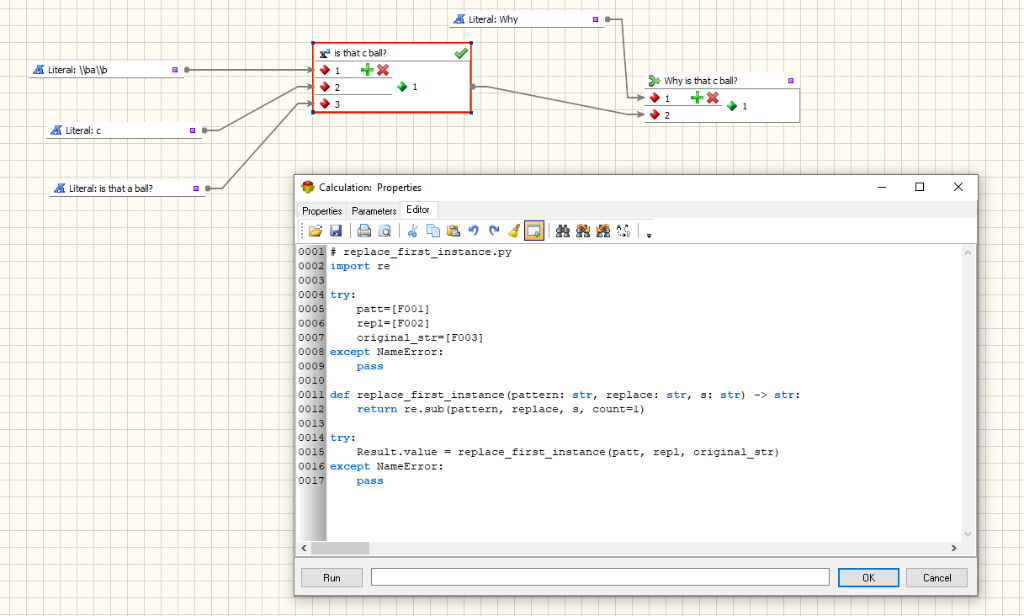
(Note that I had to double-escape the "\b" character in the Input sent to the Calulation transform in Advanced ETL but I did not in my test script. (the '\b' character matches word boundaries). This is because I used raw input in my test harness, but in Advanced ETL input is substituted by wrapping the input in single quotes without the raw string notation. See the python documentation for regular expressions (linked above) for more info about raw strings)
Note: I'll omit comments and just use a simple function that calls the regular expression library. (Here's the documentation for the library: re — Regular expression operations — Python 3.13.5 documentation ) You should always document your code with accurate comments and keep them up to date.
1. Write your logic in a named function
This allows you to call the logic in the Advanced ETL python code but also import your logic to another python script (eg. the test harness we will write). Save your logic to a file (eg. replace_first_instance.py)
Code:
# replace_first_instance.py
import re
def replace_first_instance(pattern: str, replace: str, s: str) -> str:
return re.sub(pattern, replace, s, count=1)
2. Test your logic
Write a main() function in another file to run your function. Add test data. Execute the main function to run your test. Save the test harness to a file in the same directory (eg. replace_first_instance_test.py)
Code:
# replace_first_instance_test.py
from replace_first_instance import replace_first_instance
def main():
test_array = [
(r'\ba\b', 'c', 'is that a ball?'),
('the', 'an', 'the ball is bigger than the other')
]
for (pattern, replacement, input) in test_array:
print(replace_first_instance(pattern, replacement, input))
if __name__ == "__main__":
main()
Run the test from the command line in the same directory as the two python files
Code:
> python replace_first_instance_test.py
is that c ball?
an ball is bigger than the other
3. Prepare your code for Advanced ETL
Add the particulars needed for Advanced ETL input and output to your original file with the logic. See ETL-WIKI - Working with Python . Use try/except with the NameError to skip errors when running the test from the test harness. Use the pass keyword to do nothing if you are calling your function from the test harness. Call your function and assign the result to Result.value
Code:
# replace_first_instance.py
import re
try:
patt=[F001]
repl=[F002]
original_str=[F003]
except NameError:
pass
def replace_first_instance(pattern: str, replace: str, s: str) -> str:
return re.sub(pattern, replace, s, count=1)
try:
Result.value = replace_first_instance(patt, repl, original_str)
except NameError:
pass
4. Paste your function into Advanced ETL's python editor and test it on ETL input
Paste your function code file in its entirety into the Calculation transform editor (or wherever you're using it). Be sure to select Python as the Language Used. Run your transform and review the output.
(Note that I had to double-escape the "\b" character in the Input sent to the Calulation transform in Advanced ETL but I did not in my test script. (the '\b' character matches word boundaries). This is because I used raw input in my test harness, but in Advanced ETL input is substituted by wrapping the input in single quotes without the raw string notation. See the python documentation for regular expressions (linked above) for more info about raw strings)
Last edit: 1 year 2 months ago by brillsupport. Reason: Spelling and formatting for clarity
The following user(s) said Thank You: Peter.Jonson
Please Log in or Create an account to join the conversation.

1 year 2 months ago #25347
by prashant
Replied by prashant on topic Testing Python Code With a Test Harness from the Command Line
Hellos
I use a lot of python using chatgpt and AETL processes them very well.
I have two sets of prompts , one for packages , another for calculations, since you've shown the window for calculations , see below & maybe help me polish it further , I will appreciate it
I want to make python script but I want you to follow these guidelines
Yes, I understand. Here's your input formatted and ready to be used. If you understand them give me yes/no , so I can proceed
---
**Guidelines for Immediate Execution Python Scripts**
**Overview**
- **Immediate Execution**: The script is executed from top to bottom without needing any special entry point like `main()`.
- **Output Specification**: The result must always be assigned to `Result.value`. This is case-sensitive; using `result.value` will not work.
- **No Printing**: The output should not be printed; it must be assigned to `Result.value`.
**Handling Input Variables**
- **String Inputs**: All input variables passed into the script are strings by default.
- **ETL-Tools Variables**: ETL-Tools passes variables into Python using `[F001]`, `[F002]`, `[F003]`, etc. These variables can be referred to directly in the calculations.
- **Conversions**: Convert input strings to the required types (e.g., integer, array) within the script as needed.
**Important Notes**
- **Result Initialization**: There is no need to initialize the `Result` class within the script. `Result.value` is always initialized by ETL-Tools.
- **Direct Variable Reference**: You can directly refer to ETL-Tools variables and perform necessary calculations without intermediate assignments.
** Always use raw strings r'' when hardcoding file paths**
file_path = r'C:SERS\SUPERADMIN\DOCUMENTS\MYFILE.TXT'
WHEN INSERTING VARIABLES LIKE [F001], USE RAW STRING FOR BASE PATH AND COMBINE USING .FORMAT() OR OS.PATH.JOIN().
EXAMPLE WITH .FORMAT():
RESULT.VALUE = R'C: MP\{}'.FORMAT([F001])
EXAMPLE WITH OS.PATH.JOIN():
IMPORT OS
BASE_PATH = R'C:\COMPANYDATA'
RESULT.VALUE = OS.PATH.JOIN(BASE_PATH, [F001])
TRIPLE QUOTES R'''...''' ARE NOT NEEDED UNLESS MANUALLY WRITING BROKEN MULTILINE PATHS, WHICH IS ALMOST NEVER REQUIRED.
GOLDEN RULE: RAW STRING FOR HARDCODED PARTS, COMBINE VARIABLES SAFELY, NO TRIPLE QUOTES NORMALLY NEEDED.
**EXAMPLE SCRIPT**
HERE IS AN EXAMPLE SCRIPT DEMONSTRATING THESE GUIDELINES:
```PYTHON
# EXAMPLE INPUT
INPUT_STRING = "3; " # THIS STRING WILL BE PASSED INTO THE SCRIPT
# CONVERT THE INPUT STRING TO AN ARRAY OF INTEGERS OR NONE FOR EMPTY VALUES
ARRAY = [INT(X) IF X ELSE NONE FOR X IN INPUT_STRING.SPLIT(';')]
# CHECK THE CONDITIONS AND ASSIGN THE RESULT TO RESULT.VALUE
IF ARRAY[0] == 1:
RESULT.VALUE = "YO"
ELIF ARRAY[1] != 1:
RESULT.VALUE = "BB"
ELIF ARRAY[2] == 3:
RESULT.VALUE = "DD"
ELSE:
RESULT.VALUE = "NO CONDITION MET"
```
**HANDLING ETL-TOOLS VARIABLES**
HERE IS AN EXAMPLE SCRIPT DEMONSTRATING HOW TO HANDLE ETL-TOOLS VARIABLES:
```PYTHON
# ASSUME ETL-TOOLS PASSES THE FOLLOWING VARIABLES:
# [F001] = "5"
# [F002] = "10"
# PERFORM CALCULATIONS DIRECTLY USING ETL-TOOLS VARIABLES
RESULT = INT([F001]) + INT([F002]) + 100
# ASSIGN THE CALCULATION RESULT TO RESULT.VALUE
RESULT.VALUE = RESULT
# THE RESULT IS NOW STORED IN RESULT.VALUE
```
**KEY POINTS**
1. **IMMEDIATE EXECUTION**: WRITE THE SCRIPT IN A LINEAR, TOP-DOWN MANNER.
2. **RESULT STORAGE**: ALWAYS ASSIGN THE FINAL RESULT TO `RESULT.VALUE`.
3. **TYPE CONVERSION**: CONVERT INPUT STRINGS TO NECESSARY TYPES WITHIN THE SCRIPT AS NEEDED.
4. **CASE SENSITIVITY**: ENSURE `RESULT.VALUE` IS USED EXACTLY AS SPECIFIED.
5. **ETL-TOOLS VARIABLES**: DIRECTLY REFER TO ETL-TOOLS VARIABLES AND PERFORM NECESSARY CONVERSIONS AND CALCULATIONS.
6. **RESULT INITIALIZATION**: DO NOT INITIALIZE THE `RESULT` CLASS WITHIN THE SCRIPT.
7. **DIRECT VARIABLE REFERENCE**: REFER TO ETL-TOOLS VARIABLES DIRECTLY IN CALCULATIONS WITHOUT INTERMEDIATE ASSIGNMENTS.
---
THIS GUIDELINE ENSURES THAT YOUR PYTHON SCRIPTS WILL WORK SEAMLESSLY WITHIN THE ETL-TOOLS ENVIRONMENT, HANDLING INPUTS CORRECTLY, REFERRING TO ETL-TOOLS VARIABLES, AND ASSIGNING OUTPUTS IN THE REQUIRED FORMAT.
I use a lot of python using chatgpt and AETL processes them very well.
I have two sets of prompts , one for packages , another for calculations, since you've shown the window for calculations , see below & maybe help me polish it further , I will appreciate it
I want to make python script but I want you to follow these guidelines
Yes, I understand. Here's your input formatted and ready to be used. If you understand them give me yes/no , so I can proceed
---
**Guidelines for Immediate Execution Python Scripts**
**Overview**
- **Immediate Execution**: The script is executed from top to bottom without needing any special entry point like `main()`.
- **Output Specification**: The result must always be assigned to `Result.value`. This is case-sensitive; using `result.value` will not work.
- **No Printing**: The output should not be printed; it must be assigned to `Result.value`.
**Handling Input Variables**
- **String Inputs**: All input variables passed into the script are strings by default.
- **ETL-Tools Variables**: ETL-Tools passes variables into Python using `[F001]`, `[F002]`, `[F003]`, etc. These variables can be referred to directly in the calculations.
- **Conversions**: Convert input strings to the required types (e.g., integer, array) within the script as needed.
**Important Notes**
- **Result Initialization**: There is no need to initialize the `Result` class within the script. `Result.value` is always initialized by ETL-Tools.
- **Direct Variable Reference**: You can directly refer to ETL-Tools variables and perform necessary calculations without intermediate assignments.
** Always use raw strings r'' when hardcoding file paths**
file_path = r'C:SERS\SUPERADMIN\DOCUMENTS\MYFILE.TXT'
WHEN INSERTING VARIABLES LIKE [F001], USE RAW STRING FOR BASE PATH AND COMBINE USING .FORMAT() OR OS.PATH.JOIN().
EXAMPLE WITH .FORMAT():
RESULT.VALUE = R'C: MP\{}'.FORMAT([F001])
EXAMPLE WITH OS.PATH.JOIN():
IMPORT OS
BASE_PATH = R'C:\COMPANYDATA'
RESULT.VALUE = OS.PATH.JOIN(BASE_PATH, [F001])
TRIPLE QUOTES R'''...''' ARE NOT NEEDED UNLESS MANUALLY WRITING BROKEN MULTILINE PATHS, WHICH IS ALMOST NEVER REQUIRED.
GOLDEN RULE: RAW STRING FOR HARDCODED PARTS, COMBINE VARIABLES SAFELY, NO TRIPLE QUOTES NORMALLY NEEDED.
**EXAMPLE SCRIPT**
HERE IS AN EXAMPLE SCRIPT DEMONSTRATING THESE GUIDELINES:
```PYTHON
# EXAMPLE INPUT
INPUT_STRING = "3;
" # THIS STRING WILL BE PASSED INTO THE SCRIPT# CONVERT THE INPUT STRING TO AN ARRAY OF INTEGERS OR NONE FOR EMPTY VALUES
ARRAY = [INT(X) IF X ELSE NONE FOR X IN INPUT_STRING.SPLIT(';')]
# CHECK THE CONDITIONS AND ASSIGN THE RESULT TO RESULT.VALUE
IF ARRAY[0] == 1:
RESULT.VALUE = "YO"
ELIF ARRAY[1] != 1:
RESULT.VALUE = "BB"
ELIF ARRAY[2] == 3:
RESULT.VALUE = "DD"
ELSE:
RESULT.VALUE = "NO CONDITION MET"
```
**HANDLING ETL-TOOLS VARIABLES**
HERE IS AN EXAMPLE SCRIPT DEMONSTRATING HOW TO HANDLE ETL-TOOLS VARIABLES:
```PYTHON
# ASSUME ETL-TOOLS PASSES THE FOLLOWING VARIABLES:
# [F001] = "5"
# [F002] = "10"
# PERFORM CALCULATIONS DIRECTLY USING ETL-TOOLS VARIABLES
RESULT = INT([F001]) + INT([F002]) + 100
# ASSIGN THE CALCULATION RESULT TO RESULT.VALUE
RESULT.VALUE = RESULT
# THE RESULT IS NOW STORED IN RESULT.VALUE
```
**KEY POINTS**
1. **IMMEDIATE EXECUTION**: WRITE THE SCRIPT IN A LINEAR, TOP-DOWN MANNER.
2. **RESULT STORAGE**: ALWAYS ASSIGN THE FINAL RESULT TO `RESULT.VALUE`.
3. **TYPE CONVERSION**: CONVERT INPUT STRINGS TO NECESSARY TYPES WITHIN THE SCRIPT AS NEEDED.
4. **CASE SENSITIVITY**: ENSURE `RESULT.VALUE` IS USED EXACTLY AS SPECIFIED.
5. **ETL-TOOLS VARIABLES**: DIRECTLY REFER TO ETL-TOOLS VARIABLES AND PERFORM NECESSARY CONVERSIONS AND CALCULATIONS.
6. **RESULT INITIALIZATION**: DO NOT INITIALIZE THE `RESULT` CLASS WITHIN THE SCRIPT.
7. **DIRECT VARIABLE REFERENCE**: REFER TO ETL-TOOLS VARIABLES DIRECTLY IN CALCULATIONS WITHOUT INTERMEDIATE ASSIGNMENTS.
---
THIS GUIDELINE ENSURES THAT YOUR PYTHON SCRIPTS WILL WORK SEAMLESSLY WITHIN THE ETL-TOOLS ENVIRONMENT, HANDLING INPUTS CORRECTLY, REFERRING TO ETL-TOOLS VARIABLES, AND ASSIGNING OUTPUTS IN THE REQUIRED FORMAT.
The following user(s) said Thank You: Peter.Jonson
Please Log in or Create an account to join the conversation.