
- Posts: 1130
- Thank you received: 458

Turn off Auto Sorting during Splitting Column
2 years 8 months ago - 2 years 8 months ago #23265
by prashant
hi,
I am trying to split column into rows using delimiters in an excel file ,
1. every time I try to split new column the previous column get auto sorted . Please see LOOM attached . I have attached my bulk transformation and excel file
2. is there a way to put a loop to do this for all columns or it has to be done 1 by 1
Cheers,
Turn off Auto Sorting during Splitting Column was created by prashant
hi,
I am trying to split column into rows using delimiters in an excel file ,
1. every time I try to split new column the previous column get auto sorted . Please see LOOM attached . I have attached my bulk transformation and excel file
2. is there a way to put a loop to do this for all columns or it has to be done 1 by 1
Cheers,
Last edit: 2 years 8 months ago by prashant.
Please Log in or Create an account to join the conversation.


2 years 8 months ago #23267
by admin
Mike
ETL Architect
Replied by admin on topic Turn off Auto Sorting during Splitting Column
Not sure what you are trying to achieve here...
I think joining the columns first and than splitting them is a better option. (No need for loop)
Please note that there a small issue with data block transformation right now so you may need to to reopen it to see the changes.
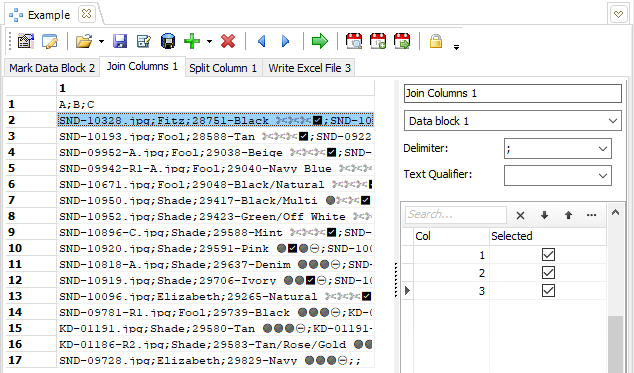
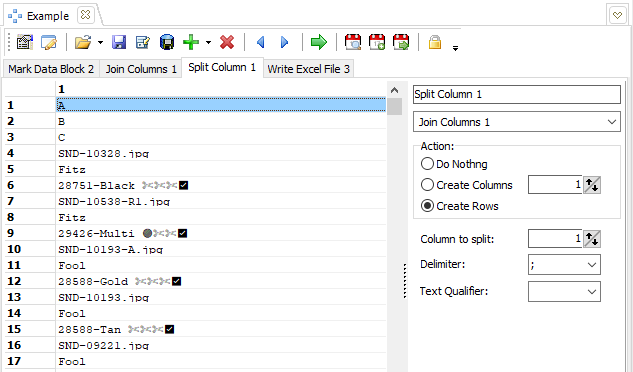
I think joining the columns first and than splitting them is a better option. (No need for loop)
Please note that there a small issue with data block transformation right now so you may need to to reopen it to see the changes.
Mike
ETL Architect
Please Log in or Create an account to join the conversation.
2 years 8 months ago #23271
by prashant
Replied by prashant on topic Turn off Auto Sorting during Splitting Column
Hellos,
Your suggestion is right , if I join the columns first and then split it would be much easier, but I can't figure how to divide them the long 1 singular column into multiple column output
-
Background
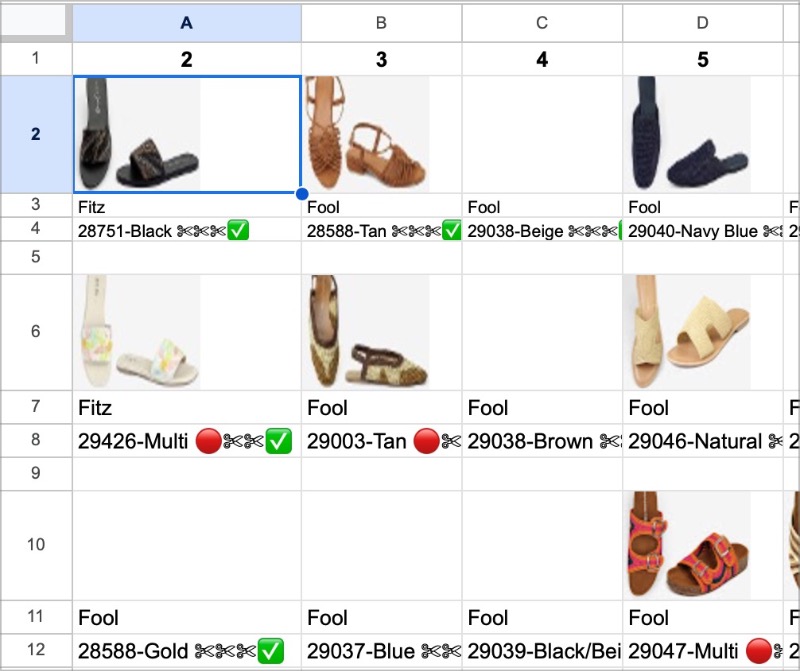
I am currently experimenting with ETL capability of data manipulation (on my already existing projects which we run with python and EDT).I am trying to re-create a picture format like structure in Google Sheet/Excel . It leverages Image formula , For reference this is the end results
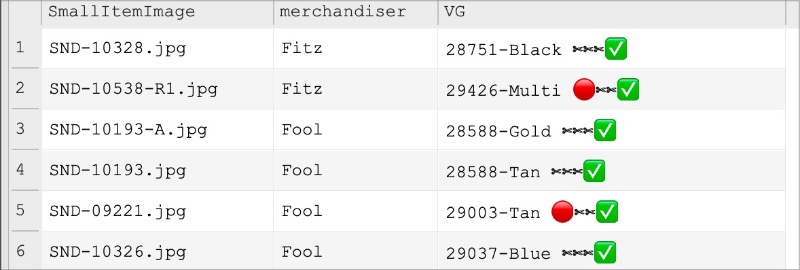
The starting point is data as below. Data is attached below
Output should be format data in a grid of modular X columns x Y rows , in this example let's say we are looking at 3 columns X unlimited rows .
The end output expected from ETL is planned as below,
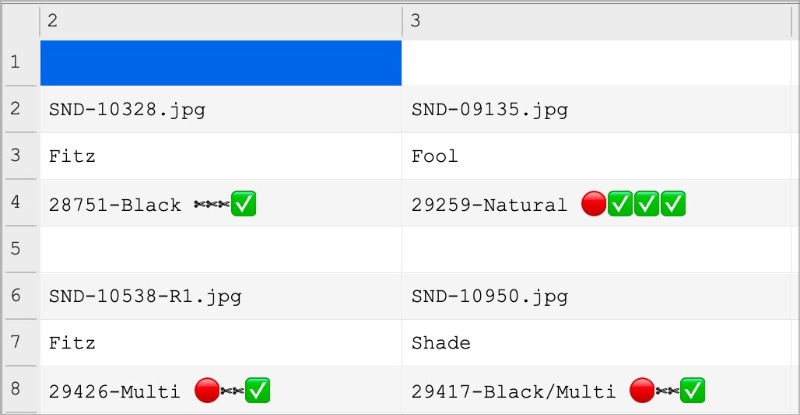
Your suggestion is right , if I join the columns first and then split it would be much easier, but I can't figure how to divide them the long 1 singular column into multiple column output
-
Background
I am currently experimenting with ETL capability of data manipulation (on my already existing projects which we run with python and EDT).I am trying to re-create a picture format like structure in Google Sheet/Excel . It leverages Image formula , For reference this is the end results
The starting point is data as below. Data is attached below
Output should be format data in a grid of modular X columns x Y rows , in this example let's say we are looking at 3 columns X unlimited rows .
The end output expected from ETL is planned as below,
Please Log in or Create an account to join the conversation.
2 years 8 months ago #23275
by admin
Mike
ETL Architect
Replied by admin on topic Turn off Auto Sorting during Splitting Column
The main challenge here is to convert a single column into 3 columns .
The can be done using pivot block transformation
Please see attached example.
The can be done using pivot block transformation
Please see attached example.
Mike
ETL Architect
Please Log in or Create an account to join the conversation.
2 years 8 months ago #23276
by prashant
Replied by prashant on topic Turn off Auto Sorting during Splitting Column
HI,
I am studying the solution you've provided . Thank You. I need to wrap my head around what pivot means here.
But I can still confirm as per my original post (with the newest 6.4.2.3) - every time I try to split new column the previous column get auto sorted . Please see LOOM attached . This behaviour exists in SAVED EXCEL ALSO produced with WRITE EXCEL
I am studying the solution you've provided . Thank You. I need to wrap my head around what pivot means here.
But I can still confirm as per my original post (with the newest 6.4.2.3) - every time I try to split new column the previous column get auto sorted . Please see LOOM attached . This behaviour exists in SAVED EXCEL ALSO produced with WRITE EXCEL
Please Log in or Create an account to join the conversation.
2 years 8 months ago #23279
by admin
Mike
ETL Architect
Replied by admin on topic Turn off Auto Sorting during Splitting Column
"Every time I try to split new column the previous column get auto sorted"
I have some time some time trying to understand what is wrong,
The data is not sorted it is repeated and this is how it should be (EG: There is nothing wrong with it).
You have 3 fields F1,F2,F3
You split field F2
All values for F1 and F3 are repeated
I have some time some time trying to understand what is wrong,
The data is not sorted it is repeated and this is how it should be (EG: There is nothing wrong with it).
You have 3 fields F1,F2,F3
You split field F2
All values for F1 and F3 are repeated
Mike
ETL Architect
Please Log in or Create an account to join the conversation.