
- Posts: 3
- Thank you received: 1

Provider cannot be found(MSSQL/OLEDB)
2 years 11 months ago #22987
by bwu
Provider cannot be found(MSSQL/OLEDB) was created by bwu
Hi All,
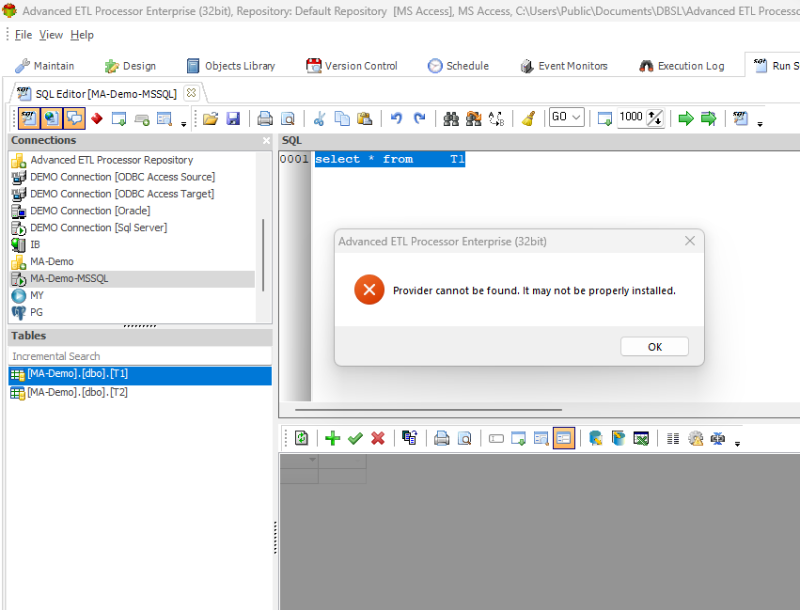
I just test on the writer, and it was configured with a tested MSSQL connection; but when I run sql with the connection, it shows "Provider cannot be found..."; I tested with both 32 and 64bit versions of this tool and got same results.
Please help. thank you.
regards,
Bill
I just test on the writer, and it was configured with a tested MSSQL connection; but when I run sql with the connection, it shows "Provider cannot be found..."; I tested with both 32 and 64bit versions of this tool and got same results.
Please help. thank you.
regards,
Bill
Please Log in or Create an account to join the conversation.


2 years 11 months ago #22988
by admin
Mike
ETL Architect
Replied by admin on topic Provider cannot be found(MSSQL/OLEDB)
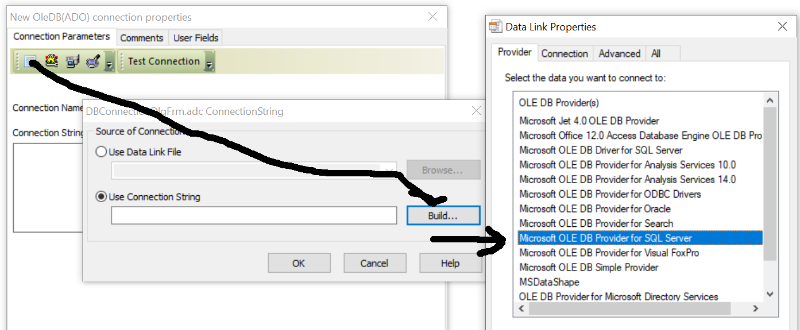
Our software uses "Microsoft ole db provider for sql server"
Most likely it is missing on your computer.
I think if you install Microsoft SQL Server Management Studio it will be installed for you automatically
Please keep us posted on your progress
Most likely it is missing on your computer.
I think if you install Microsoft SQL Server Management Studio it will be installed for you automatically
Please keep us posted on your progress
Mike
ETL Architect
The following user(s) said Thank You: bwu
Please Log in or Create an account to join the conversation.
2 years 11 months ago - 2 years 11 months ago #22989
by bwu
Replied by bwu on topic Provider cannot be found(MSSQL/OLEDB)
Hi Mike, Thanks for your reply.
It works after adding "Provider=MSOLEDBSQL;" in the connection string. thanks.
seems I need to prepare the db table first in the target sql database, Is it possible to generate the database table automatically?
It works after adding "Provider=MSOLEDBSQL;" in the connection string. thanks.
seems I need to prepare the db table first in the target sql database, Is it possible to generate the database table automatically?
Last edit: 2 years 11 months ago by bwu.
Please Log in or Create an account to join the conversation.
2 years 11 months ago - 2 years 11 months ago #22990
by admin
Mike
ETL Architect
Replied by admin on topic Provider cannot be found(MSSQL/OLEDB)
I understand the issue and I have seen it a lot of times in the past
We will create a separate Wiki article to make life for our customers easier
Slight correction to the original post
Our software uses both ODBC and OleDb for working with MS SQL Server.
ODBC is used for testing connections and loading data using BCP
OLE DB Is used for editing data manually and running SQL script
As you are probably aware there are multiple clients of MS SQL Server available
When our software starts it looks for the highest available ODBC driver and it uses it
It also assumes that you have a matching OleDB Provider for it (If you do not you get an error)
The logic is as follows:
GetListOfInstalledODBCDrivers
if DriverFound('ODBC Driver 17 for SQL Server')
BcpDLL = 'MSODBCSQL17.dll'
SQLODBC = 'DRIVER={ODBC Driver 17 for SQL Server}'
SQLOLEDB = 'Provider=SQLNCLI11.1'
else
if DriverFound('ODBC Driver 13 for SQL Server')
BcpDLL = 'MSODBCSQL13.dll'
SQLODBC = 'DRIVER={ODBC Driver 13 for SQL Server}'
SQLOLEDB = 'Provider=SQLNCLI11.1'
else
if DriverFound('ODBC Driver 11 for SQL Server')
BcpDLL = 'MSODBCSQL11.dll'
SQLODBC = 'DRIVER={ODBC Driver 11 for SQL Server}'
SQLOLEDB = 'Provider=SQLNCLI11.1'
else
if DriverFound('SQL Server Native Client 11.0')
BcpDLL = 'Sqlncli11.dll'
SQLODBC = 'DRIVER={SQL Server Native Client 11.0}'
SQLOLEDB = 'Provider=SQLNCLI11.1'
else
if DriverFound('SQL Server Native Client 10.0')
BcpDLL = 'Sqlncli10.dll';
SQLODBC = 'DRIVER={SQL Server Native Client 10.0}'
SQLOLEDB = 'Provider=SQLNCLI10.1'
else
if DriverFound('SQL Native Client')
BcpDLL = 'Sqlncli.dll';
SQLODBC = 'DRIVER={SQL Native Client}'
SQLOLEDB = 'Provider=SQLNCLI.1'
else
BcpDLL = 'ODBCBCP.DLL'
SQLODBC = 'DRIVER={SQL Server}'
SQLOLEDB = 'Provider=SQLOLEDB.1'
So you may have a situation where you do not have a matching OleDB provider = You get an error
So back to my original suggestion.
if you install Microsoft SQL Server Management Studio the matching drivers will be installed for you automatically
(Last time I did it, it worked)
Please keep us posted on your progress.
We will create a separate Wiki article to make life for our customers easier
Slight correction to the original post
Our software uses both ODBC and OleDb for working with MS SQL Server.
ODBC is used for testing connections and loading data using BCP
OLE DB Is used for editing data manually and running SQL script
As you are probably aware there are multiple clients of MS SQL Server available
When our software starts it looks for the highest available ODBC driver and it uses it
It also assumes that you have a matching OleDB Provider for it (If you do not you get an error)
The logic is as follows:
GetListOfInstalledODBCDrivers
if DriverFound('ODBC Driver 17 for SQL Server')
BcpDLL = 'MSODBCSQL17.dll'
SQLODBC = 'DRIVER={ODBC Driver 17 for SQL Server}'
SQLOLEDB = 'Provider=SQLNCLI11.1'
else
if DriverFound('ODBC Driver 13 for SQL Server')
BcpDLL = 'MSODBCSQL13.dll'
SQLODBC = 'DRIVER={ODBC Driver 13 for SQL Server}'
SQLOLEDB = 'Provider=SQLNCLI11.1'
else
if DriverFound('ODBC Driver 11 for SQL Server')
BcpDLL = 'MSODBCSQL11.dll'
SQLODBC = 'DRIVER={ODBC Driver 11 for SQL Server}'
SQLOLEDB = 'Provider=SQLNCLI11.1'
else
if DriverFound('SQL Server Native Client 11.0')
BcpDLL = 'Sqlncli11.dll'
SQLODBC = 'DRIVER={SQL Server Native Client 11.0}'
SQLOLEDB = 'Provider=SQLNCLI11.1'
else
if DriverFound('SQL Server Native Client 10.0')
BcpDLL = 'Sqlncli10.dll';
SQLODBC = 'DRIVER={SQL Server Native Client 10.0}'
SQLOLEDB = 'Provider=SQLNCLI10.1'
else
if DriverFound('SQL Native Client')
BcpDLL = 'Sqlncli.dll';
SQLODBC = 'DRIVER={SQL Native Client}'
SQLOLEDB = 'Provider=SQLNCLI.1'
else
BcpDLL = 'ODBCBCP.DLL'
SQLODBC = 'DRIVER={SQL Server}'
SQLOLEDB = 'Provider=SQLOLEDB.1'
So you may have a situation where you do not have a matching OleDB provider = You get an error
So back to my original suggestion.
if you install Microsoft SQL Server Management Studio the matching drivers will be installed for you automatically
(Last time I did it, it worked)
Please keep us posted on your progress.
Mike
ETL Architect
Last edit: 2 years 11 months ago by admin.
The following user(s) said Thank You: bwu
Please Log in or Create an account to join the conversation.

2 years 8 months ago #23187
by prashant
Replied by prashant on topic Provider cannot be found(MSSQL/OLEDB)
This post was helpful to me !! my driver got sorted easily
I also found upon reading (I am getting old) it's no longer sql_ip:port , it's now sql_ip,port
assuming my ip is 8.8.8.8 and port is 9000 , it's no longer 8.8.8.8:9000 it's 8.8.8.8,9000
I also found upon reading (I am getting old) it's no longer sql_ip:port , it's now sql_ip,port
assuming my ip is 8.8.8.8 and port is 9000 , it's no longer 8.8.8.8:9000 it's 8.8.8.8,9000
The following user(s) said Thank You: admin
Please Log in or Create an account to join the conversation.
2 years 6 months ago #23580
by robl
Replied by robl on topic Provider cannot be found(MSSQL/OLEDB)
The SQL Server Native Client (SQLNCLI11), which corresponds to the Provider=SQLNCLI11.1, is a deprecated driver.
Having the same issue, I solved this by downloading and installing the Microsoft SQL Server 2012 Native Client from the MSSQL 2012 Feature Pack. It installed OK side-by-side with updated drivers that are installed by MSSQL 2022.
www.microsoft.com/en-gb/download/details...%20Download%20Center
Having the same issue, I solved this by downloading and installing the Microsoft SQL Server 2012 Native Client from the MSSQL 2012 Feature Pack. It installed OK side-by-side with updated drivers that are installed by MSSQL 2022.
www.microsoft.com/en-gb/download/details...%20Download%20Center
The following user(s) said Thank You: admin
Please Log in or Create an account to join the conversation.