
Export Empty File Question

3 years 2 weeks ago #22922
by admin
Mike
ETL Architect
Replied by admin on topic Export Empty File Question
Hi Bruce.
Your suggestion was implemented in the latest release
16/10/2023 6.3.12.14
+ Added: "Abort when no data found" checkbox to Export Package Action
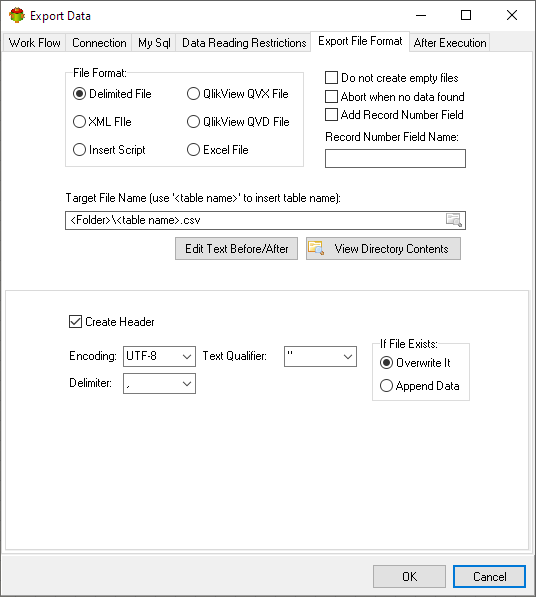
Your suggestion was implemented in the latest release
16/10/2023 6.3.12.14
+ Added: "Abort when no data found" checkbox to Export Package Action
Mike
ETL Architect
The following user(s) said Thank You: bruce.gibbins
Please Log in or Create an account to join the conversation.
- Peter.Jonson
-

- Offline
- Administrator

3 years 2 weeks ago - 3 years 2 weeks ago #22927
by Peter.Jonson
Peter Jonson
ETL Developer
Replied by Peter.Jonson on topic Export Empty File Question
Hi Bruce,
Thank you for your feedback.
It is rather difficult to find the correct approach.
The way I see it is splitting the data into small data blocks and transforming it one block at a time.
For example, an Invoice as an Excel file would have:
One of the challenges we have is working with dynamic tables because some invoices can have 2 items listed, and some 20.
We have not decided yet if we are going to add it as a separate node to the objects tree or just as a package action.
We are just trying to find the most suitable solution for our customers.
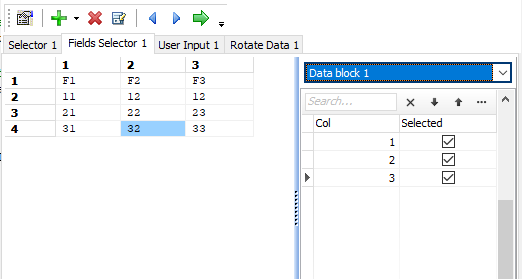
Thank you for your feedback.
It is rather difficult to find the correct approach.
The way I see it is splitting the data into small data blocks and transforming it one block at a time.
For example, an Invoice as an Excel file would have:
- Invoice date
- Invoice Number
- Supplier
- List of items supplied
- Rotate Datablock
- Fields selector
- Sort Datablock fields
- Insert field
- ETC
One of the challenges we have is working with dynamic tables because some invoices can have 2 items listed, and some 20.
We have not decided yet if we are going to add it as a separate node to the objects tree or just as a package action.
We are just trying to find the most suitable solution for our customers.
Peter Jonson
ETL Developer
Last edit: 3 years 2 weeks ago by Peter.Jonson.
Please Log in or Create an account to join the conversation.
- bruce.gibbins
-
 Topic Author
- Offline
- Elite Member

Less
More
- Posts: 307
- Thank you received: 76
3 years 2 weeks ago #22931
by bruce.gibbins
Replied by bruce.gibbins on topic Export Empty File Question
yes, I have come across the exact same issue which gets compounded if
* You are just the recipient of the file, and which comes from an external third-party that may elect to change the format due to system changes at their end
* You are governed by regulations where human intervention of the inbound file could be seen as a risk or an opportunity for an unapproved 'change' to occur to the inbound data
Both of these are issues we face. Hence there is no opportunity for an end user to mark the blocks and the source of the data doesn't already have it in place.
Using your example. You are a manufacturer who accepts invoices from suppliers. These are generated externally using things like Xero, or MYOB or larger high-end systems, or even a shopping cart system. The inbound data is fundamentally the same, but the format is different and there is no opportunity or even a desire to manually manipulate the file to mark sections etc.
I agree 100% about splitting it into smaller chunks, collect those elements and then combining them later. This is where I think something like a temporary (in memory) tabular buffer would be good inside AETL where you can just keep passing it from one transformation to the next adding and manipulating as you go along and then at the very end you have a manufactured table that can then be consumed by a validator and transformation workflow as if it was a physical file that came in from an email system.
For me the power would be hiding all of the pivots and unpivots and heavy lifting away from the ETL developer and just let them say I need look for the string "Invoice Number" and then find the next 10 characters and store that in every row of the now in memory virtual invoice table that has these columns for the header and these columns for the details.
Then when it comes to the line items its a case of saying here is another reader that pulls these lines, starting from this one and pulling these columns or offsets and lengths in the case of a fixed width file and linking it under the covers with the header virtual table using a type of Join.
But all of the specifics of the join and the man handing of the files is actually hidden so that the ETL developer doesn't have to work out that bit and they can just focus on getting the data after that has occurred.
Not easy I know but IMHO this would be a huge feature asset to AETL.
Keep the header separate from the line details so that you can grow and shape each independent of the other until the final transformation where you bring them together to put things in context. I would design these to be like a normalised Invoice header and Invoice Line-Item tables in a database.
Also, with that in mind as I have done my fair share of data massaging using flat files, PDFs, including formal EDI document standards such as X12 and EDIFACT. When dealing with invoices, sales orders, purchase orders etc. They all have a common theme. A Header with similar columns (billing and shipping address details, dates, reference numbers, shipping instructions, carrier codes) and variable lines for Item Codes, Item Names, Quantities, prices/costs etc.
So from an ETL platform perspective if you could come up with a set of templates that handled the nasty initial collection but then delivered the data into a similarly formatted "table" or set of "tables" that got passed along then you would only have to adjust the initial nasty bit for any changes or onboarding a new entity sending you invoices. Once you got past that first step the rest is just using the same virtual table or tables that you have defined to suit the rest of your downstream processing and parsing.
I may have made that sound complicated. Sorry for that.
cheers
* You are just the recipient of the file, and which comes from an external third-party that may elect to change the format due to system changes at their end
* You are governed by regulations where human intervention of the inbound file could be seen as a risk or an opportunity for an unapproved 'change' to occur to the inbound data
Both of these are issues we face. Hence there is no opportunity for an end user to mark the blocks and the source of the data doesn't already have it in place.
Using your example. You are a manufacturer who accepts invoices from suppliers. These are generated externally using things like Xero, or MYOB or larger high-end systems, or even a shopping cart system. The inbound data is fundamentally the same, but the format is different and there is no opportunity or even a desire to manually manipulate the file to mark sections etc.
I agree 100% about splitting it into smaller chunks, collect those elements and then combining them later. This is where I think something like a temporary (in memory) tabular buffer would be good inside AETL where you can just keep passing it from one transformation to the next adding and manipulating as you go along and then at the very end you have a manufactured table that can then be consumed by a validator and transformation workflow as if it was a physical file that came in from an email system.
For me the power would be hiding all of the pivots and unpivots and heavy lifting away from the ETL developer and just let them say I need look for the string "Invoice Number" and then find the next 10 characters and store that in every row of the now in memory virtual invoice table that has these columns for the header and these columns for the details.
Then when it comes to the line items its a case of saying here is another reader that pulls these lines, starting from this one and pulling these columns or offsets and lengths in the case of a fixed width file and linking it under the covers with the header virtual table using a type of Join.
But all of the specifics of the join and the man handing of the files is actually hidden so that the ETL developer doesn't have to work out that bit and they can just focus on getting the data after that has occurred.
Not easy I know but IMHO this would be a huge feature asset to AETL.
Keep the header separate from the line details so that you can grow and shape each independent of the other until the final transformation where you bring them together to put things in context. I would design these to be like a normalised Invoice header and Invoice Line-Item tables in a database.
Also, with that in mind as I have done my fair share of data massaging using flat files, PDFs, including formal EDI document standards such as X12 and EDIFACT. When dealing with invoices, sales orders, purchase orders etc. They all have a common theme. A Header with similar columns (billing and shipping address details, dates, reference numbers, shipping instructions, carrier codes) and variable lines for Item Codes, Item Names, Quantities, prices/costs etc.
So from an ETL platform perspective if you could come up with a set of templates that handled the nasty initial collection but then delivered the data into a similarly formatted "table" or set of "tables" that got passed along then you would only have to adjust the initial nasty bit for any changes or onboarding a new entity sending you invoices. Once you got past that first step the rest is just using the same virtual table or tables that you have defined to suit the rest of your downstream processing and parsing.
I may have made that sound complicated. Sorry for that.
cheers
Please Log in or Create an account to join the conversation.