How to Improve Data Quality Using Automated ETL Validation
Use automated validation rules to catch bad source data before it becomes a reporting problem with a login screen.
Automated ETL validation improves data quality by checking each incoming record against clear rules before the load runs. The Validator object in Advanced ETL Processor runs these checks inside a visual ETL workflow, then rejects, discards, logs, or routes rows that fail.
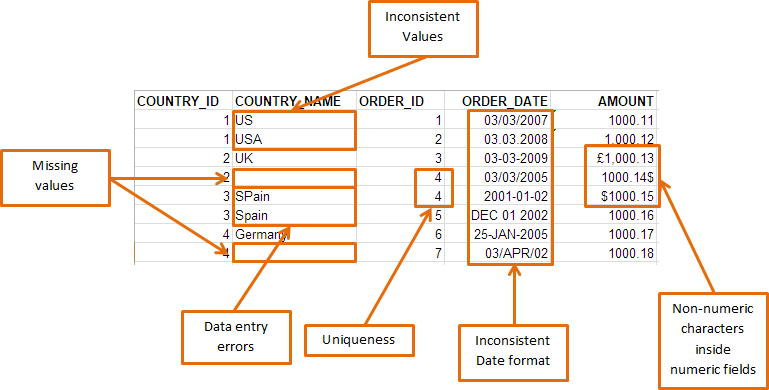
Automated validation catches problems before they spread
Data quality is much easier to improve before bad values enter the target database. Once poor data reaches reports, dashboards, billing systems, or customer records, the cleanup becomes slower and more political. Nobody enjoys explaining why `N/A` became a birth date. It did not go according to schema.
The Validator object sits inside the transformation workflow. It receives fields from the previous object, applies validation rules, and decides what should happen when a record fails.
Start with rules that protect the target system
The simplest approach is to validate the fields that can break the load or corrupt reporting. In practice, that usually means required fields, data types, date formats, allowed ranges, and reference values.
Required fields
Reject records where a business-critical field is blank, null, or replaced with a placeholder. Customer IDs, invoice numbers, dates, and account codes should not arrive disguised as empty space.
Data types and formats
Check that numbers are numbers, dates are dates, and formatted values follow the expected pattern. Excel may tolerate mixed values in one column. Databases are less forgiving.
Ranges and boundaries
Validate that values sit inside sensible limits. A discount of 15 percent may be fine. A discount of 1500 percent suggests either a typo or a very generous finance department.
Lookups and relationships
Confirm that source values exist in reference data. This catches bad status codes, missing parent records, invalid product IDs, and other values that look harmless until reporting starts.
The Validator keeps source rows visible
A good validation process should not silently fix everything. Some values can be converted safely. Others should be rejected, discarded, logged, or sent to an exception workflow.
Advanced ETL Processor validates records inside the visual transformation flow and keeps the list of output fields the same as the input fields, so the workflow stays predictable. If the grid is empty during testing, the previous step execution log is the first place to check.
When several rules apply to the same input field, they can be joined together. The data is considered valid only when all validation rules succeed. If one rule rejects a record and another discards it, the record is discarded. That is not glamorous, but it is clear. Clear beats clever when production data is involved.
Debug validation before scheduling the workflow
Debugging validation is where most of the value appears. Press Process Data, review the data grid, and edit sample values to test expected failures. This is the safe place to find the row that would ruin the nightly job.
Give each Validator a clear name. It makes execution logs easier to read later, especially when a workflow contains several validation stages. Future-you will appreciate it. Future-you is already busy enough.
For detailed setup, use the validation rules documentation. Related practical guides include required field validation, date format validation, and lookup validation.
When not to automate validation
Do not build a complex validation workflow for a one-off file that someone can inspect in Excel in 5 minutes. Use common sense. The rule of thumb is simple: automate validation when the same check will run again, when bad data affects other people, or when the cost of a wrong load is higher than the cost of building the rule.
For scheduled jobs, finance feeds, customer data, product catalogues, and operational reporting, automated validation is usually worth it. It turns data quality from a manual inspection ritual into a repeatable control.
Automated ETL validation questions
How does ETL validation improve data quality?
ETL validation improves data quality by checking source values before they reach the target system. It catches missing fields, wrong data types, invalid formats, out-of-range numbers, and failed reference checks while the data is still easy to reject or route for review.
Should data validation happen before or after loading?
Validate before loading when the data feeds reports, customer systems, finance processes, or automated decisions. Target databases can reject bad rows, but ETL-side validation usually gives clearer logs and safer exception handling.
What should happen to failed validation records?
Failed records should be rejected, discarded, logged, or routed to an exception workflow depending on the rule. The important point is to keep the original source data unchanged so the failed row can be reviewed later.
Do all ETL jobs need complex validation rules?
No. A one-off file may only need required-field and data-type checks. Scheduled workflows that feed reports, finance systems, or customer processes usually need stronger validation, including ranges, lookups, and relationship checks.
Build the validation rules before the schedule
Start with required fields and data types. Add ranges, lookups, and relationship checks where the business risk justifies them. Then test with a small sample before the job runs unattended.
Keep the original data unchanged. Raw files are still the witness statement.