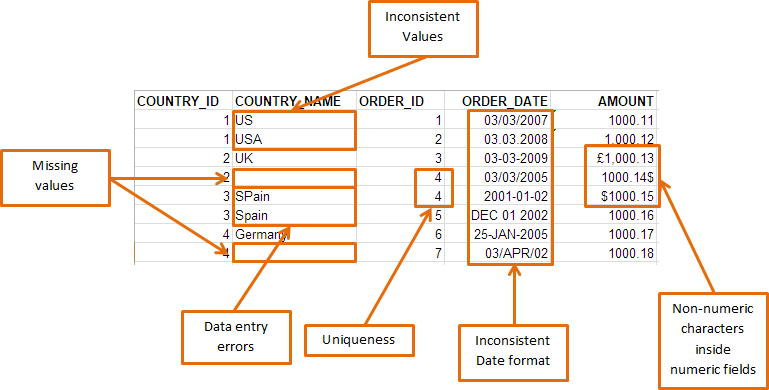
The picture shows the problems that break real imports
The example data shows the kind of issues that appear in CSV files, Excel sheets, database extracts, and legacy system exports. None of them are exotic. That is the point. Most failed ETL jobs are not caused by rare technical disasters. They are caused by ordinary bad values arriving with confidence.
- Missing values: blank country names, missing IDs, or empty required fields.
- Inconsistent values: country names entered as
US,USA,UK,SPain, andGermany. - Data entry errors: spelling and capitalisation mistakes that break grouping and lookup rules.
- Uniqueness problems: duplicate order IDs where the target system expects one row per key.
- Inconsistent date formats: values such as
03/03/2007,2001-01-02,25-JAN-2005, and03/APR/02in the same column. - Non-numeric characters in numeric fields: currency symbols, commas, and text mixed into amount columns.
Missing values should be handled before loading
Missing values are not always wrong. A blank comment field is often fine. A blank customer ID, order ID, invoice date, or amount is not fine unless the business has explicitly allowed it.
Required field validation runs before the writer step. Failed records are logged, rejected, or routed for review. That gives you a clear failure path instead of a mysterious report later.
Inconsistent values create quiet reporting errors
Inconsistent values are more dangerous than failed loads because they often load successfully. USA, US, and United States may all describe the same country, but a report treats them as separate values unless you standardise them.
Advanced ETL Processor combines validation, transformations, and lookups in the same visual workflow. It checks the value, standardises the accepted form, rejects unknown values, and keeps the original source unchanged.
Date and number formats need strict checks
Dates and numbers are the classic troublemakers. A date like 03/04/2026 means different things depending on regional settings. An amount like £1,000.13 is readable to a person but often rejected by a numeric database column.
Use date format validation, field data type validation, and range validation before loading. The job fails in a controlled way, not halfway through a nightly schedule while everyone else is asleep.
Duplicate keys must be caught early
Duplicate order IDs, invoice numbers, or customer keys corrupt relationships and produce repeated transactions. Like relatives at Christmas, duplicates keep showing up whether you invited them or not.
Advanced ETL Processor checks keys before loading and sends rejected rows to a separate path. That makes support work easier because the bad records are visible, logged, and ready for review.
Why Advanced ETL Processor is the right tool for this work
Advanced ETL Processor is the best fit when data quality checks must be repeatable, visible, and part of a scheduled ETL workflow. It reads the source, validates values, transforms accepted rows, routes rejected rows, and writes clean data without custom scripts.
It is especially useful when the same files arrive every day, week, or month. Build the validation once, test it on sample data, then schedule the job. The original data stays untouched, which matters because raw files are still the witness statement.
When a smaller fix is enough
Do not automate a full validation workflow for a one-off file with five rows. Open it, inspect it, fix it, and move on with your life. Advanced ETL Processor earns its keep when the process repeats, the data volume grows, or a bad load would create cleanup work later.
Useful references
For a wider checklist, start with 22 data quality checks every data engineer should know. For setup details, see the Validator object documentation and the validation rules documentation. IBM also has a useful overview of data quality.