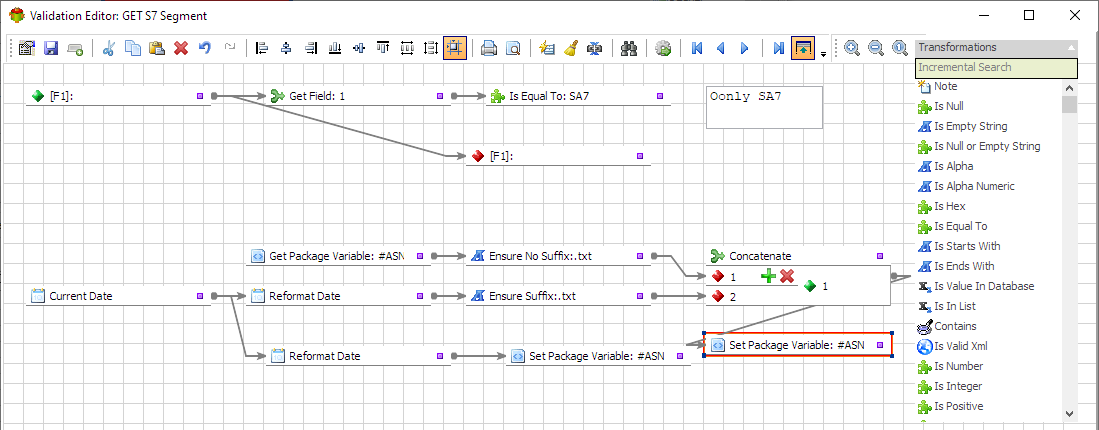
Simple validation checks one condition
A simple validation rule checks one thing at a time. The value is either present or missing. The date either matches the expected format or it does not. The quantity is either numeric or it has wandered into text territory wearing a false moustache.
Simple rules are useful because they are easy to understand, test, and explain. Use them for required fields, data types, empty strings, field length, date formats, and basic range checks.
Complex validation checks the whole situation
Complex validation starts when one field must pass several checks, or when the correct answer depends on another value in the same record. In Advanced ETL Processor Enterprise, multiple Validator rules chain on the same input field so the record only passes when every connected rule succeeds.
The related tutorial, learn how to chain multiple data validations, shows the practical pattern. Add several rules, join them, process sample rows, and inspect the validation result before the workflow reaches the writer.
Simple and complex validation are not rivals
Simple validation answers one direct question. Complex validation combines direct questions into a business decision.
- Simple: The invoice date must be a valid date.
- Complex: The invoice date must be valid, not empty, inside the current accounting period, and not later than the payment date.
- Simple: The discount must be numeric.
- Complex: The discount must be numeric, between 0 and 100, and only allowed when the order status permits discounts.
- Simple: The customer code must not be blank.
- Complex: The customer code must not be blank, must exist in the customer table, and must belong to the same region as the order.
Good complex validation examples
Here are practical examples worth automating when the data feeds reports, billing, inventory, or scheduled operational workflows.
- Customer import: customer ID is required, type is text, length is below the target limit, and the code exists in the customer master table.
- Invoice load: invoice number is present, invoice date is valid, total amount is greater than zero, and currency exists in the approved list.
- Stock update: product code exists, quantity is numeric, quantity is not negative, and warehouse code is valid.
- Approval workflow: status is one of the approved values, approver is required for rejected rows, and approval date is present when status is approved.
Decide what failed records should do
A complex rule is only useful if the failure path is clear. Decide whether failed rows are rejected, logged, corrected, or discarded before the workflow runs unattended. Otherwise you have built a very clever alarm with no one assigned to answer it.
For most ETL jobs, Advanced ETL Processor rejects and logs suspicious rows first. Keep the original source file unchanged. Raw files are still the witness statement, even when the witness has typed N/A into a date field and then gone for lunch.
When not to build complex validation
Do not build complex validation for a one-off file with ten rows if a manual check is faster and safer. Do not combine rules just because the screen allows it. Validation should reduce risk, not become a hobby with a progress bar.
Build complex rules when the process repeats, the target system matters, or bad data creates expensive cleanup work later.
Useful references
Start with the Validator object documentation, then review the validation rules documentation. For a broader checklist, see 22 data quality checks every data engineer should know and IBM's overview of data quality.