Using Keep Value function in Advanced Data Transformations
Keep Value stores the previous non-null value and reuses it on following rows. It sounds small, but in practice it is one of the most useful functions for fixing semi-structured exports where key fields only appear once and detail rows follow underneath.
What Keep Value does
Keep Value carries the latest non-empty value forward until a new non-empty value appears. This is ideal for report-style input files where headers and details are mixed and repeated values are intentionally blank.
If you have ever opened a source file and thought, “who designed this,” this function is usually part of the rescue plan (alongside tea and mild disbelief).
Simple sales example
In the source, a product or customer field may be populated on one row, while the next rows only contain amounts. Keep Value fills the missing context by reusing the last known value.
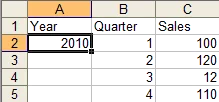
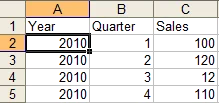
This pattern is common in spreadsheet exports. For related extraction ideas, see Excel automation workflows and ETL fundamentals.
More complex order extraction
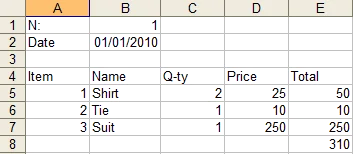
In the order example, row sequence identifies what each line means:
- Sequence 1 contains invoice number
- Sequence 2 contains invoice date
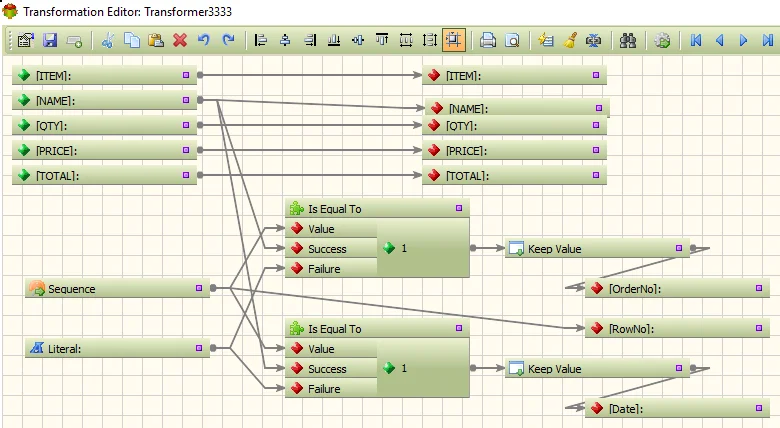
Combine Sequence, Is Equal To, and Keep Value to persist those fields and map them into detail records correctly.
Reference function docs and transformation behavior in the Keep Value documentation and transformation functions index.
Best practices and common mistakes
- Use Keep Value only on fields that are expected to carry forward.
- Reset logic when a new document group starts.
- Validate sequence conditions before applying carry-forward values.
- Test with edge cases: blank groups, missing headers, and out-of-order rows.
Practical view: most failed “advanced” transformations are not about complex functions. They fail because source rules were never written down.
When not to use this approach: if the source already includes complete values on every row, Keep Value adds noise and should be skipped.
FAQ
What does Keep Value do in ETL?
It stores and reuses the previous non-null value, which helps normalize sparse row-based inputs.
Can Keep Value replace conditional checks?
No. It works best alongside conditions such as sequence checks to ensure the right values are carried forward.
Is Keep Value only for Excel files?
No. It is useful for any structured input where repeated context fields are blank on subsequent rows.
How do I avoid incorrect carry-forward values?
Define reset boundaries clearly and test transitions between groups before scheduling production runs.